Network Foundations
Fundamentals
Introduction
What is a Network?
A network is a collection of interconnected devices that can communicate - sending an receiving data, and also sharing resources with each other. These individual endpoint devices, often called nodes, include computers, smartphones, printers, and servers. However, nodes alone do not comprise the entire network.
| Concepts | Description |
|---|---|
| Nodes | Individual devices connected to a network. |
| Links | Communication pathways that connect nodes. |
| Data Sharing | The primary purpose of a network is to enable data exchange. |
Why are Networks Important?
Networks, particularly since the advent of the Internet, have radically transformed society, enabling the multitude of possibilites that are now essential to our lives.
A few benefits:
| Function | Description |
|---|---|
| Resource Sharing | Multiple devices can share hardware and software resources. |
| Communication | Instant messaging, emails, and video calls rely on networks. |
| Data Access | Access files and databases from any connected device. |
| Collaboration | Work together in real-time, even when miles apart. |
Types of Networks
Local Area Network (LAN)
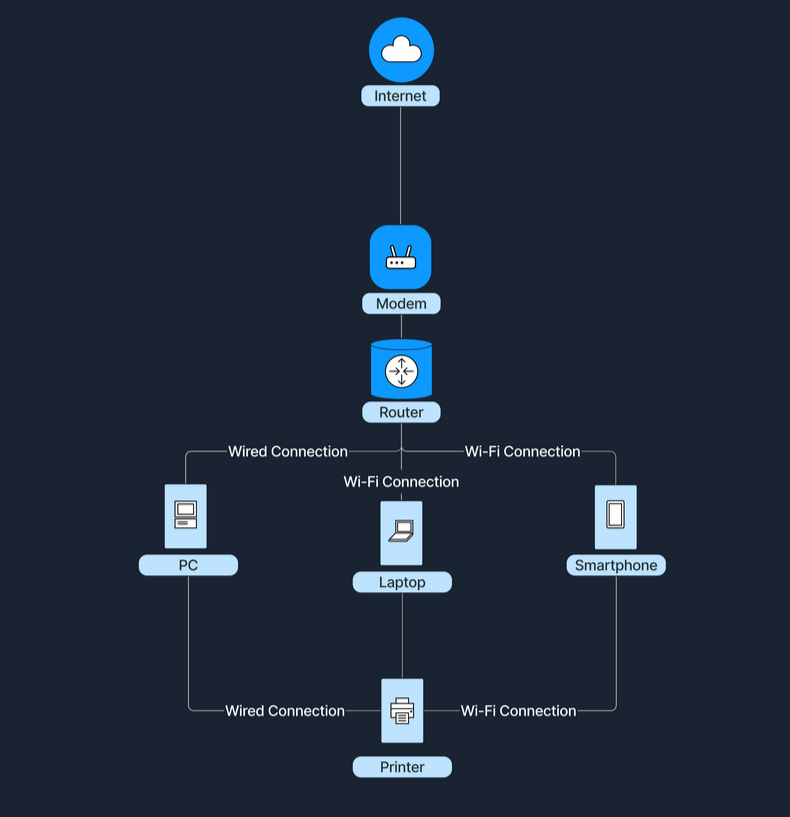
… connects devices over a short distance, such as within a home, school, or small office building.
| Characteristic | Description |
|---|---|
| Geographical Scope | Covers a small area. |
| Ownership | Typically owned and managed by a single person or organization. |
| Speed | High data transfer rates. |
| Media | Uses wired or wireless connections. |
Wide Area Network (WAN)
… spans a large geographical area, connecting multiple LANs.
| Characteristic | Description |
|---|---|
| Geographical Scope | Covers cities, countries, or continents. |
| Ownership | Often a collective or distributed ownership. |
| Speed | Slower data transfer rates compared to LANs due to long-distance data travel. |
| Media | Utilize fiber optics, satellite links, and leased telecommunication lines. |
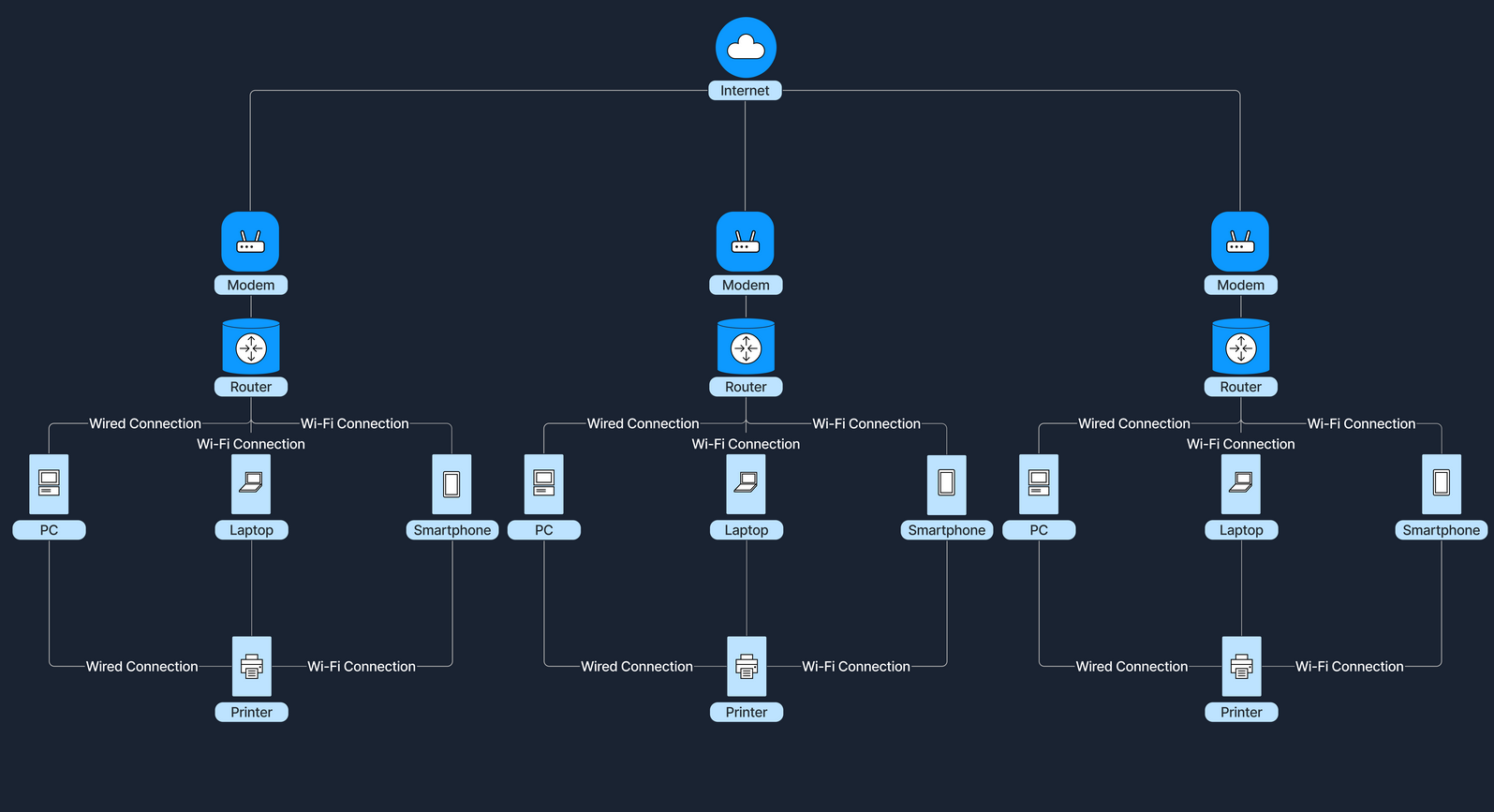
The Internet is the largest example of a WAN, connecting millions of LANs globally.
How do LANs and WANs Work Together?
LANs can connect to WANs to access broader networks beyond their immediate scope. This connectivity allows for expanded communication and resource sharing on a much larger scale.
For instance, when accessing the Internet, a home LAN connects to an ISP’s WAN, which grants Internet access to all devices within the home network. An ISP is a company that provides individuals and organizations with access to the Internet. In this setup, a device called a modem (modulator-demodulator) plays a crucial role. The modem acts as a bridge between your home network and the ISP’s infrastructure, converting digital signals from your router into a format suitable for transmission over various media like telephone lines, cable systems, and fiber optics. This connection transforms a simple local network into a gateway to the resource available online.
Network Concepts
OSI Model
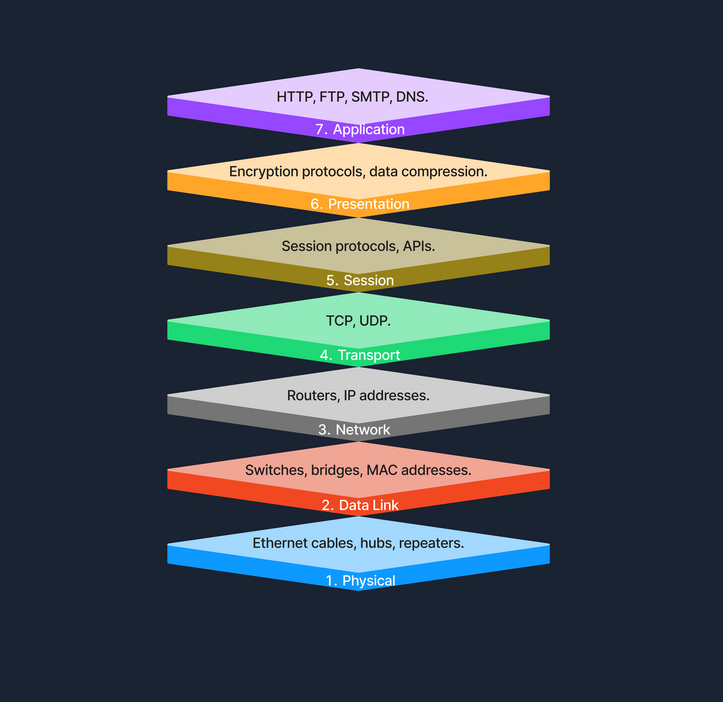
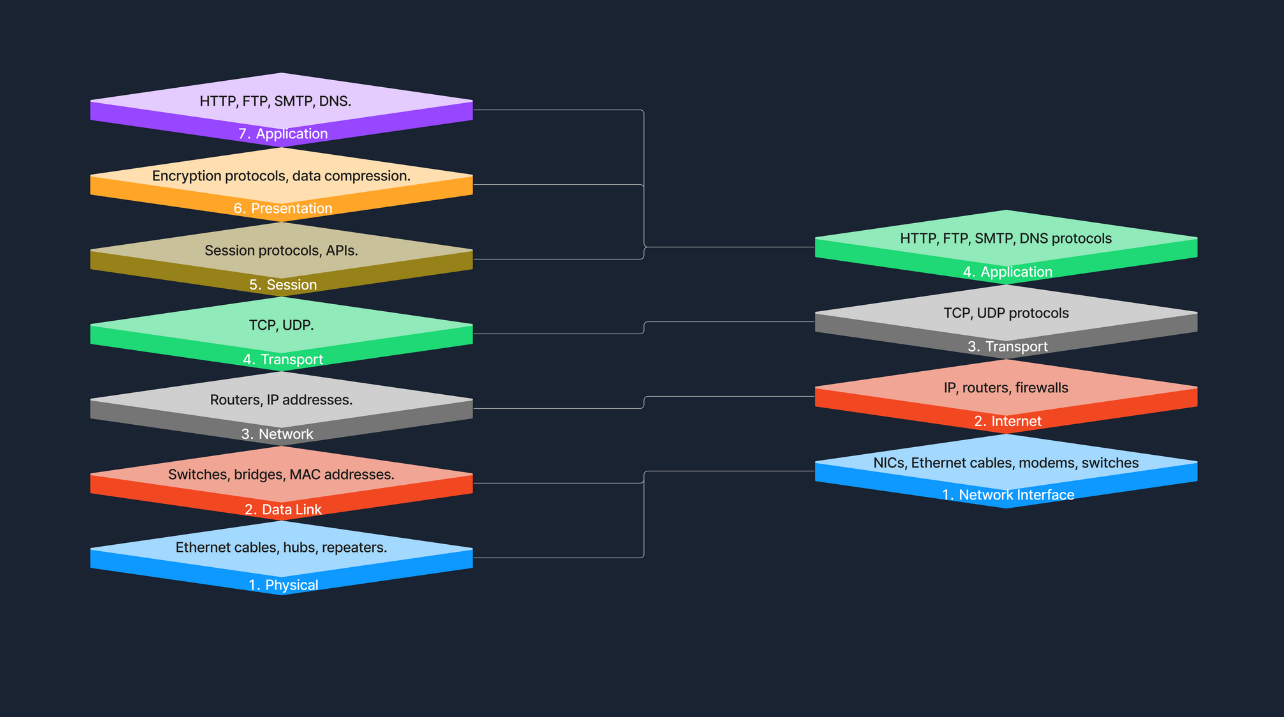
The Open Systems Interconnection (OSI) model is a conceptual framework that standardizes the functions of a telecommunication or computing system into seven abstract layers. This model helps vendors and devs create interoperable network devices and software.
TCP/IP Model
The Transmission Control Protocol / Internet Protocol (TCP/IP) model is a condensed version of the OSI model, tailored for practical implementation on the internet and other networks.
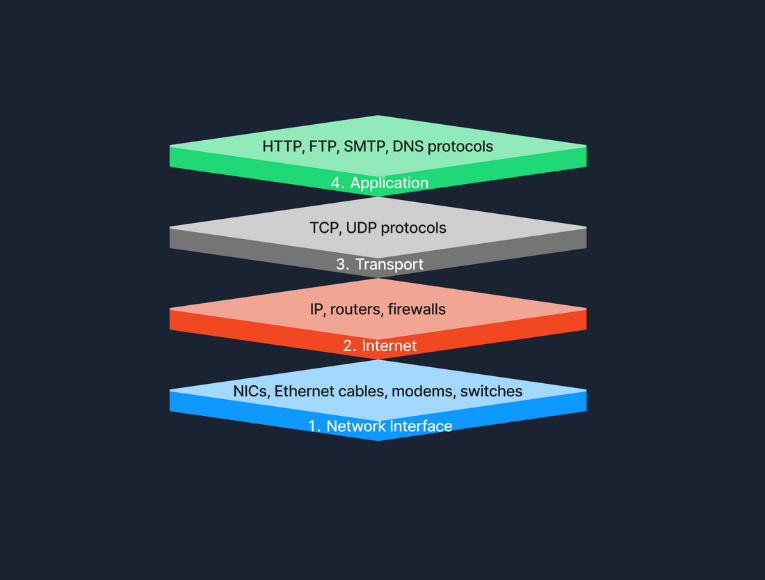
OSI vs. TCP/IP
The TCP/IP model simplifies the complex structure of the OSI model by combining certain layers for practical implementation. Specifically designed around the protocols used on the internet, the TCP/IP model is more application-oriented, focusing on the needs of real-world network communication. This design makes it more effective for internet-based data exchange, meeting modern technological needs.
Protocols
… are standardized rules that determine the formatting and processing of data to fascilitate communication between devices in a network. These protocols operate at different layers within network models, each tailored to handle specific types of data and communication needs.
Common Network Protocols:
- HTTP
- FTP
- SMTP
- TCP
- UDP
- IP
Transmission
… in networking refers to the process of sending data signals over a medium from one device to another.
Transmission Types
Transmission in networking can be categorized into two main types: analog and digital. Analog transmission uses continuous signals to represent information, commonly seen in traditional radio broadcasts. In contrast, digital transmission employs discrete signals to encode data, which is typical in modern communication technologies like computer networks and digital telephony.
Transmission Modes
… define how data is sent between two devices. Simplex mode allows one-way communication only, such as from a keyboard to a computer, where signals travel in a single direction. Half-duplex mode permits two-way communication but not simultaneously; examples include walkie-talkies where users must take turns speaking. Full-duplex mode, used in telephone calls, suppports two-way communication simultaneously, allowing both parties to speak and listen at the same time.
Transmission Media
The physical means by which data is transmitted in a network is known as transmission media, which can be wired or wireless. Wired media includes twisted pair cables, commonly used in Ethernet networks and LAN connections; coaxial cables, used for cable TV and early Ethernet; and fiber optic cables, which transmit data as light pulses and are essential for high-speed internet backbones. Wireless media, on the other hand, encompasses radio waves for Wi-Fi and cellular networks, microwaves for satellite communications, and infrared technology used for short-range communications like remote controls. Each type of media has its specific use cases depending on the requirements of the network environment.
Components of a Network
End Devices
An end device, also known as a host, is any device that ultimately ends up sending or receiving data within a network. Personal computers and smart devices are common and devices; users routinely interact with them directly to perform tasks like browsing the web, sending messages, and creating documents. In most networks, such devices play a crucial role in both data generation and data consumption, like when users stream videos or read web content. End devices serve as the primary user interface to the world wide web, enabling users to access network resources and services seamlessly, through both wired and wireless connections. Another typical example of this would be a student using a notebook to connect to a school’s Wi-Fi network, allowing them to access online learning materials, submit assignments, and communicate with instructors.
Intermediary Devices
An intermediary device has the unique role of facilitating the flow of data between end devices, either within a local area network, or between different networks. These devices include routers, switches, modems, and access points, all of which play crucial roles in ensuring efficient and secure data transmission. Intermediary devices are responsible for packet forwarding, directing data packets to their destinations by reading network address information and determining the most efficient paths. They connect networks and control traffic to enhance performance and reliability. By managing data flow with protocols, they ensure smooth transmission and prevent congestion. Additionally, intermediary devices often incorporate security features like firewalls to protect certain networks from unauthorized access and potential threats. Operating at different layers of the OSI model use routing tables and protocols to make informed decisions about data forwarding. A common example is a home network where intermediary devices like routers and switches connect all household devices to the internet, enabling communication and access to online resources.
Network Interface Cards (NICs)
A NIC is a hardware component installed in a computer, or other device, that enables connection to a network. It provides the physical interface between the device and the network media, handling the sending and receiving of data over the network. Each NIC has a unique MAC address, which is essential for devices to identify each other, and facilitate communication at the data link layer. NICs can be designed for wired connections, such as Ethernet cards that connects via cables, or for wireless connections, like Wi-Fi adapters utilizing radio waves.
Routers
A router is an intermediary device that plays a hugely important role: the forwarding of data packets between networks, and ultimately directing internet traffic. Operating at the network layer of the OSI model, routers read the network address information in data packets to determine their destinations. They use routing tables and routing protocols such as OSPF or BGP to find the most efficient path for data to travel across interconnected networks, including the internet.
They fulfill this role by examining incoming data packets and forwarding them toward their destinations, based on IP addresses. By connecting multiple networks, routers enable devices on different networks to communicate. They also manage network traffic by selecting optimal paths for data transmission, which helps prevent congestion - a process known as traffic management. Additionally, routers enhance security by incorporating features like firewalls and access control lists, protecting the network from unauthorized access and potential threats.
Switches
The switch is another integral component, with its primary job being to connect multiple devices within the same network, typically a LAN. Operating at the data link layer of the OSI model, switches use MAC addresses to forward data only to the intended recipient. By managing data traffic between connected devices, switches reduce network congestion and improve overall performance. They enable devices like computers, printers, and servers to communicate directly with eath other within the network. For instance, in a corporate office, switches connect employees’ computers, allowing for quick file sharing and access to shared resources like printers and servers.
Hubs
A hub is a basic networking device. It connects multiple device in a network segment and broadcasts incoming data to all connected ports, regardless of the destination. Operating at the physical layer of the OSI model, hubs are simpler than switches and do not manage traffic intelligently. This indiscriminate data broadcasting can lead to network inefficiencies and collisions, making hubs less suitable for modern networks.
Network Media and Software Components
… are vital elements that enables seamless communication and operation within a network. Network media, such as cables and wireless signals, provide the physical pathways that connect devices and allow data to be transmitted between them. This includes wired media like Ethernet cables and fiber-optic cables, which offer high-speed connections, as well as wireless media like Wi-Fi and Bluetooth, which provide mobility and flexibility. On the other hand, software components like network protocols and management software define the rules and procedures for data transmission, ensuring that information is correctly formatted, addressed, transmitted, routed, and received. Network protocols such as TCP/IP, HTTP, and FTP enable devices to communicate over the network, while network management software allows administrators to monitor network performance, configure devices, and enhance security through tools like software firewalls.
Cabling and Connectors
… are the physical materials used to link devices within a network, forming the pathways through which data is transmitted. This includes the various types of cables mentioned previously, but also connectors like the RJ-45 plug, which is used to interface cables with network devices such as computers, switches, and routers. The quality and type of cabling and connectors can affect network performance, reliability, and speed.
Network Protocols
… are the set of rules and conventions that control how data is formatted, transmitted, received, and interpreted across a network. They ensure that devices from different manufacturers, and with varying configurations, can adhere to the same standard and communicate effectively.
Network Management Software
… consists of tools and applications used to monitor, control, and maintain network components and operations. These software solutions provide functionalities for:
- performance monitoring
- configuration management
- fault analysis
- security management
They help network administrators ensure that the network operates efficiently, remains secure, and can quickly address any issues that arise.
Software Firewalls
A software firewall is a security application installed on individual computers or devices that monitors and controls incoming and outgoing network traffic based on predetermined security rules. Unlike hardware firewalls that protect entire networks, software firewalls provide protection at the device level, guarding against threats that may bypass the network perimeter defenses. They help prevent unauthorized access, reject incoming packets that contain suspicious or mailicious data, and can be configured to restrict access to certain applications or services.
Servers
A server is a powerful computer designed to provide services to other computers, known as clients, over a network. Servers are the backbone behind websites, emails, files, and applications. In the realm of computer networking, servers play a crucial role by hosting services that clients access, facilitating service provision. They enable resource sharing by allowing multiple users to access resources like files and printers. Servers also handle data management by storing and managing data centrally, which simplifies backup processes and enhances security management. Additionally, they manage authentication by controlling user access and permissions, across multiple components in the network. Servers often run specialized operating systems optimized for handling multiple, simultaneous requests in what is known as the Client-Server-Model, where the server waits for requests from clients and responds accordingly. Whether you knew it or not, this is what was happening under-the-hood the last time you accessed a website from your notebook. Your browser sends a request to the web server hosting the site, and the server subsequently processes the request and sends back the web page data in its response.
Communication and Addressing
Network Communication
MAC Addresses
A MAC address is a unique identifier assigned to the network interface card of a device, allowing it to be recognized on a local network. Operating at the Data Link Layer of the OSI model, the MAC address is crucial for communication within a local network segment, ensuring that data reaches the correct physical device. Each MAC address is 48 bits long and is typically represented in hexadecimal format, appearing as six pairs of hexadecimal digits separated by colons or hyphens. The uniqueness of a MAC address comes from its structure: the first 24 bits represent the Organizationally Unique Identifier (OUI) assigned to the manufacturer, while the remaining 24 bits are specific to the individual device. This design ensures that every MAC address is globally unique, allowing devices worldwide to communicate without address conflicts.
MAC addresses are fundamental for local communication within a local area network, as they are used to deliver data frames to the correct physical device. When a device sends data, it encapsulates the information in a frame containing the destination MAC address; network switches then use this address to forward the frame to the appropriate port. Additionally, the Address Resolution Protocol plays a crucial role by mapping IP addresses to MAC addresses, allowing devices to find the MAC address associated with a known IP address within the same network. This mapping is bridging the gap between logical IP addressing and physical hardware addressing within the LAN.
IP Addresses
An IP address is a numerical label assigned to each device connected to a network that utilizes the Internet Protocol for communication. Functioning at the Network Layer of the OSI model, IP addresses enable devices to locate and communicate with each other across various networks. There are two versions of IP addresses: IPv4 and IPv6. IPv4 addresses consist of a 32-bit address space, typically formatted as four decimal numbers separated by dots, such as 192.168.1.1. In contrast, IPv6 addresses, which were developed to address the depletion of IPv4 addresses, have a 128-bit address space and are formatted in eight groups of four hexadecimal digits, an example being 2001:0db8:85a3:0000:0000:8a2e:0370:7334.
Routers use IP addresses to determine the optimal path for data to reach its intended destination across interconnected networks. Unlike MAC address, which are permanently tied to the device’s network interface card, IP addresses are more flexible; they can change and are assigned based on the network topology and policies. A communication example between two devices on the same network can be similarly illustrated as shown previously in the MAC address subsection.
Ports
A port is a number assigned to specific processors or services on a network to help computers sort and direct network traffic correctly. It functions at the Transport Layer of the OSI model and works with protocols such as TCP and UDP. Ports facilitate the simultaneous operation of multiple network services on a single IP address by differentiating traffic intended for different applications.
When a client application initiates a connection, it specifies the destination port number corresponding to the desired service. Client applications are those who request data or services, while server applications respond to those requests and provide the data or services. The OS then directs the incoming traffic to the correct application based on this port number. Consider a simple example where a user access a website: the user’s browser initiates a connection to the server’s IP address on port 80, which is designated for HTTP. The server, listening on this port, responds to the request. If the user needs to access a secure site, the browser instead connects to port 443, the standard for HTTPS, ensuring secure communication. Port numbers range from 0 to 65535, and it is divided into three main categories, each serving a specific function.
Well-Known Ports (0-1023):
Well-known ports, numbered from 0 to 1023, are reserved for common and universally recognized services and protocols, as standardized and managed by the Internet Assigned Numbers Authority (IANA). For instance, HTTP, which is the foundation of data communication for the WWW, uses port 80, although browsers typically do not display this port number to simplify user experience. Similarly, HTTPS uses port 443 for secure communications over networks, and this port is also generally not displayed by browsers. Another example is FTP, which facilitates file transfers between clients and servers, using port 20 and 21.
Registered Ports (1024-49151):
Registered ports, which range from 1024 to 49151, are not strictly regulated as well-known ports, but are still registered and assigned to specific services by the IANA. These ports are commonly used for external services that users might install on a device. For instance, many database services, such as MSQL, use port 1433. Software companies frequently register a port for their applications to ensure that their software consistently uses the same port on any system. This registration helps in managing network traffic and preventing port conflicts across different applications.
Dynamic/Private Ports (49152-65535):
Dynamic or private ports, also known as ephemeral ports, range from 49152 to 65535 and are typically used by client applications to send and receive data from servers, such as when a web browser connects to a server on the internet. These ports are called dynamic because they are not fixed; rather, they can be randomly selected by the client’s OS as needed for each session. Generally used for temporary communication sessions, these ports are closed once the interaction ends. Additionally, dynamic ports can be assigned to custom server applications, often those handling short-term connections.
DHCP
… is a network management protocol used to automate the process of configuring devices on IP networks. It allows devices to automatically receive an IP address and other networks configuration parameters, such as subnet mask, default gateway, and DNS servers, without manual intervention.
DHCP simplifies network management by automatically assigning IP addresses, significantly reducing the administrative workload. This automation ensures that each device connectedd to the network receives a unique IP address, preventing conflicts and duplication of addresses. Furthermore, DHCP recycles IP addresses that are no longer in use when devices disconnect from the network, optimizing the available address pool.
The DHCP process involves a series of interactions between the client and the DHCP server. This process is often referred to as DORA, an acronym for Discover, Offer, Request, and Acknowledge.
| Role | Description |
|---|---|
| DHCP Server | A network device that manages IP address allocation. It maintains a pool of available IP addresses and configuration parameters. |
| DHCP Client | Any device that connects to the network and requests network configuration parameters from the DHCP server. |
| Step | Description |
|---|---|
| 1. Discover | When a device connects to the network, it broadcasts a DHCP Discover message to find available DHCP servers. |
| 2. Offer | DHCP servers on the network receive the discover message and respond with a DHCP Offer message, proposing an IP address lease to the client. |
| 3. Request | The client receives the offer and replies with a DHCP Request message, indicating that it accepts the offered IP address. |
| 4. Acknowledge | The DHCP server sends a DHCP Acknowledge message, confirming that the client has been assigned the IP address. The client can now use the IP address to communicate on the network. |
NAT
… allows multiple devices on a private network to share a single public IP address. This not only helps conserve the limited pool of public IP addresses but also adds a layer of security to the internal network.
It is a process carried out by a router or a similar device that modifies the source or destination IP address in the headers of IP packets as they pass through. This modification is used to translate the private IP addresses of devices within a local network to a single public IP address that is assigned to the router.
Private vs. Public IP Addresses
Public IP addresses are globally unique identifiers assigned by ISPs. Devices equipped with these IP addresses can be accessed from anywhere on the Internet, allowing them to communicate across the global network. These addresses ensure that devices can uniquely identify and reach each other over the internet.
Private IP addresses are designated for use within local networks such as homes, schools, and offices. These addresses are not routable on the global Internet, meaning packets sent to these addresses are not forwarded by internet backbone routers. Defined by RFC 1918, common IPv4 private address ranges include 10.0.0.0 to 10.255.255.255, 172.16.0.0. to 172.31.255.255, and 192.168.0.0 to 192.168.255.255. This setup ensures that these private networks operate independently of the internet while facilitating internal communication and device connectivity.
Types of NAT
| Type | Description |
|---|---|
| Static NAT | Involves a one-to-one mapping, where each private IP address corresponds directly to a public IP address. |
| Dynamic NAT | Assigns a public IP from a pool of available addresses to a private IP as needed, based on network demand. |
| Port Address Translation | Also known as NAT Overload, is the most common form of NAT in home networks. Multiple private IP addresses share a single public IP address, differentiating connections by using unique port numbers. This method is widely used in home and small office networks, allowing multiple devices to share a single public IP address for internet access. |
DNS
… is like the phonebook of the Internet. It helps finding the right number for a given name. Without DNS, you would need to memorize long, often complex IP addresses for every website you visit. DNS makes lives easier by allowing human-friendly names to access online resources.
Hierarchy
DNS is organized like a tree, starting from the root and branching out into different layers.
| Layer | Description |
|---|---|
| Root Servers | The top of the DNS hierarchy. |
| Top-Level Domains | Such as .com, .org, .net, or country codes like .uk, .de. |
| Second-Level Domains | For example, example in example.com. |
| Subdomains or Hostname | For instance, www in www.example.com, or accounts in accounts.google.com. |
DNS Resolution Process
When you enter a domain name in your browser, the computer needs to find the corresponding IP address. This process is known as DNS resolution or domain translation.
- You type
www.example.cominto your browser. - Your computer checks its local DNS cache to see if it already knows the IP address.
- If not found locally, it queries a recursive DNS server. This is often provided by your ISP or a third-party DNS service like Google DNS.
- The recursive DNS server contacts a root server, which points it to the appropriate TLD name server.
- The TLD name server directs the query to the authoritative name server for
example.com. - The authoritative name server responds with the IP address for
www.example.com. - The recursive server returns this IP address to your computer, which can then connect to the website’s server directly.
Internet Architecture and Wireless Technologies
Internet Architecture
Peer-to-Peer (P2P) Architecture
In a P2P network, each node, whether it’s a computer for any other device, acts as both a client and a server. This setup allows nodes to communicate directly with each other, sharing resources such as files, processing power, or bandwith, without the need for a central server. P2P networks can be fully decentralized, with no central server involved, or partially centralized, where a central server may coordinate some tasks but does not host data.
Client-Server Architecture
The Client-Server model is one of the most widely used architectures on the Internet. In this setup, clients, which are user devices, send requests, such as a web browser asking for a webpage, and servers respond to these requests, like a web server hosting the webpage. This model typically involves centralized servers where data and applications reside, with multiple clients connecting to these servers to access services and resources.
A key component of this architecture is the tier model, which organizes server roles and responsibilities into layers. This enhances scalability and manageability, as well as security and performance.
Single-Tier Architecture
In a single-tier architecture, the client, server, and database all reside on the same machine. This setup is straightforward but is rarely used for large-scale applications due to significant limitations in scalability and security.
Two-Tier Architecture
The two-tier architecture splits the application environment into a client and a server. The client handles the presentation layer, and the server manages the data layer. This model is typically seen in desktop applications where the user interface is on the user’s machine, and the database is on a server. Communication usually occurs directly between the client and the server. Communication usually occurs directly between the client and the server, which can be a database server with query-processing capabilities.
Three-Tier Architecture
A three-tier architecture introduces an additional layer between the client and the database server, known as the application server. In this model, the client manages the presentation layer, the application server handles all the business logic and processing, and the third tier is a database server. This separation provides added flexibility and scalability because each layer can be developed and maintained independently.
N-Tier Architecture
In more complex systems, an N-Tier architecture is used, where N refers to any number of separate tiers beyond three. This setup involves multiple levels of application servers, each responsible for different aspects of business logic, processing, or data management. N-tier architecture are highly scalable and allow for distributed deployment, making them ideal for web applications and services that demand robust, flexible solutions.
While tiered client-server architectures offer many improvements, they also introduce complexity in deployment and maintenance. Each tier needs to be correctly configured and secured, and communication between tiers must be efficient and secure to avoid performance bottlenecks and security vulns.
Hybrid Architecture
A Hybrid model blends elements of both Client-Server and P2P architecture. In this setup, central servers are used to facilitate coordination and authentication tasks, while the actual data transfer occurs directly between peers. This combination leverages the strengths of both architectures to enhance efficiency and performance. The following example gives a high-level explanation of how hybrid architecture works.
Cloud Architecture
… refers to computing infrastructure that is hosted and managed by third-party providers, such as AWS, Azure, and Google Cloud. This architecture operates on a virtualized scale following a client-server model. It provides on-deman access to resources such as servers, storage, and applications, all accessible over the Internet. In this model, users interact with these services without controlling the underlying hardware.
Services like Google Drive or Dropbox are some examples of Cloud Architecture operating under the SaaS model, where you access applications over the Internet without managing the underlying hardware.
Software-Defined Architecture (SDN)
Software-Defined Networking is a modern networking approach that separates the control plane, which makes decisions about where traffic is sent, from the data plane, which actually forwards the traffic. Traditionally, network devices like routers and switches housed both of these planes. However, in SDN, the control plane is centralized within a software-based controller. This config allows network devices to simply execute instructions they receive from the controller. SDN provides a programmable network management environment, enabling administrators to dynamically adjust network policies and routing as required. This separation makes the network more flexible and improves how it’s managed.
Wireless Network
A wireless network is a sophisticated communication system that employs radio waves or other wireless signals to connect various devices such as computers, smartphones, and IoT gadgets, enabling them to communicate and exchange data without the need for physical cables. This technology allows devices to connect to the internet, share files, and access services seamlessly over the air, offering flexibility and convenience in personal and professional environments.
Wireless Router
A router is a device that forwards data packets between computer networks. In a home or small office setting, a wireless router combines the functions of:
- Routing: Directing data to the internet destination.
- Wireless Access Point: Providing Wi-Fi coverage.
Below are the main components of a wireless router:
- WAN: Connects to your internet source.
- LAN: For wired connections to local devices.
- Antennae: Transmit and receive wireless signals.
- Processor & Memory: Handle routing and network management tasks.
Mobile Hotspot
A mobile hotspot allows a smartphone to share its cellular data connection via Wi-Fi. Other devices then connect to this hotspot just like they would to a regular Wi-Fi network. A mobile hotspot uses cellular data, connecting devices to the internet via a cellular network, such as 4G or 5G. The range of a hotspot is typically limited to just a few meters. Running a hotspot can also significantly drain the battery of the device creating the hotspot. For security, access to the hotspot is usually protected by a password, similar to the security measures used for a home Wi-Fi network.
Cell Tower
A cell tower is a structure where antennas and electronic communications equipment are placed to create a cellular network cell. This cell in a cellular network refers to the specific area of coverage provided by a single cell tower, which is designed to seamlessly connect with adjacent cells created by other towers. Each tower covers a certain geographic area, allowing mobile phones to send and receive signals.
Cell towers function through a combination of radio transmitters and receivers, which are equipped with antennas to communicate over specific radio frequencies. These towers are managed by Base Station Controllers (BSC), which oversee the operation of multiple towers. BSCs handle the transfer of calls and data sessions from one tower to another when users move across different cells. Finally, these towers are connected to the core network via backhaul links, which are typically fiber optic or microwave links.
Cell towers are differentiated by their coverage capacities and categorized primarily into macro cells and micro/small cells. Macro cells consist of large towers that provide extensive coverage over several kms, making them ideal for rural areas where wide coverage is necessary. On the other hand, micro and small cells are smaller installations typically located in urban centers. These towers are placed in densely populated areas and fill the coverage gaps left by macro cells.
Frequencies in Wireless Communications
Wireless communications utilize radio waves to enable devices to connect and communicate with each other. These radio waves are emitted at specific frequencies, known as oscillation rates, which are measured in hertz (Hz). Common frequency bands for wireless networks include:
- 2.4 GHz: Used by older Wi-Fi standards (802.11b/g/n). Better at penetrating walls, but can be more prone to interference.
- 5 GHz: Used by newer Wi-Fi standards (802.11a/n/ac/ax). Faster speeds, but shorter range.
- Cellular Bands: For 4G and 5G. These range from lower frequencies (700 MHz) to mid-range (2.6 GHz) and even higher frequencies for some 5G services.
Different frequencies play crucial roles in wireless communication due to their varying characteristics and the trade-offs between range and speed. Lower frequencies tend to travel farther but are limited in the amount of data they can carry, making them suitable for broader coverage with less data demand. In contrast, higher frequencies, while capable of carrying more data, have a much shorter range. Additionally, frequency bands can get congested as many devices operate on the same frequencies, leading to interference that degrade performance. To manage and mitigate these issues, government agencies regulate frequency allocations, ensuring orderly use of the airwaves and preventing interference among users.
Network Security and Data Flow Analysis
Network Security
Firewalls
A firewall is a network security device, either hardware, software, or a comibination of both, that monitors incoming and outgoing network traffic. Firewalls enforce a set of rules to determine whether to allow or block specific traffic.
Firewalls operate by analyzing packets of data according to predefined rules and policies, commonly focusing on factors such as IP addresses, port numbers, and protocols. This process, known as traffic filtering, is defined by system administrators as permitting or denying traffic based on specific conditions, ensuring that only authorized connections are allowed. Additionally, firewalls can log traffic events and generate alerts about any suspicious activity. Different types of firewalls are:
- Packet Filtering Firewall
- Stateful Inspection Firewall
- Application Layer Firewall
- Next-Gen Firewall
Firewalls stand between the internet and the internal network, examining traffic before letting it through. In a home environment, your router/modem has a built-in firewall. In that case, it’s all in one device, and the firewall is inside the router. In larger networks, the firewall is often a separate device placed after the modem/router and before the internal network, ensuring all traffic must pass through it.
IDS/IPS
Intrusion Detection and Prevention Systems are security solutions designed to monitor and respond to suspicious network or system activity. An IDS observes traffic or system events to identify malicious behavior or policy violations, generating alerts but not blocking the suspicious traffic. In contrast, an IPS operates similarily to an IDS but takes an additional step by preventing or rejecting malicious traffic in real time. The key difference lies in their actions: an IDS detects and alerts, while an IPS detects and prevents.
Both IDS and IPS solutions analyze network packets and compare them to known attack signatures or typical traffic patterns. This process involves:
- Signature-based detection: Matches traffic against a database of known exploits.
- Anomaly-based detection: Detecs anything unusual compared to normal activity.
When suspicious or malicious behavior is identified, an IDS will generate an alert for further investigation, while an IPS goes one step further by blocking or rejecting the malicious traffic in real time.
Some of the different types of firewalls IDS/IPS are:
- Network-Based IDS/IPS
- Host-Based IDS/IPS
IDS/IPS can be placed at several strategic locations in a network. One option is to position them behind the firewall, where the firewall filters obvious threats, and the IDS/IPS inspects any remaining traffic. Another common placement is in the DMZ, a separate network segment within the larger network directly exposed to the internet, where they monitor traffic moving in and out of publicly accessible servers. Finally, IDS/IPS solutions can also run directly on endpoint devices, such as servers or workstations, to detect suspicious activity at the host level.
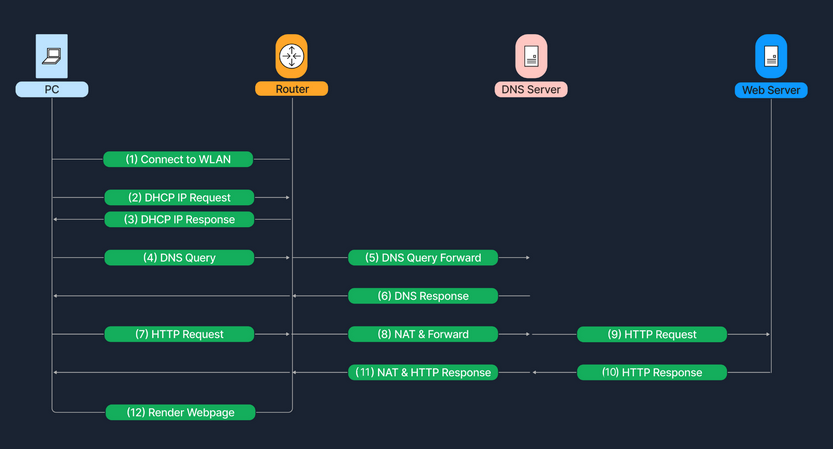
Data Flow Example