Locating Public Exploits
Online Exploit Resources
ExploitDB
The Exploit Database is a project maintained by OffSec. It is a free archive of public exploits that are gathered through submissions, mailing lists, and public resources.
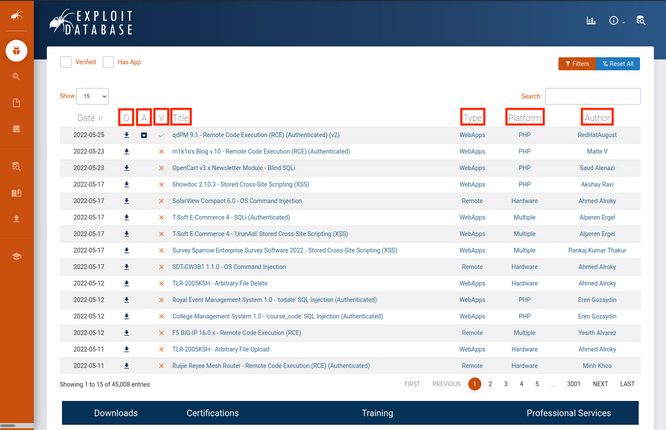
The D field is a quick way you can download the exploit file.
The A field lists the vulnerable application files of respective exploits which you can download for research and testing.
The V fields marks whether the exploit has been verified. Exploits with the verified checkmark have been reviewed, executed, and concluded to be a functioning exploit. These are reviewed by trusted members and add further assurance that the exploit is safe and functional.
The Title field will usually give the vulnerable application name along with its respective vulnerable version and the function of the exploit.
The Type field designates the exploit as one of the following: dos, local, remote, or webapp.
The Platform field designates which kind of system(s) are affected by the exploit. This can be OS, hardware, or even code language services such as PHP.
The last field designates the Author of the exploit.
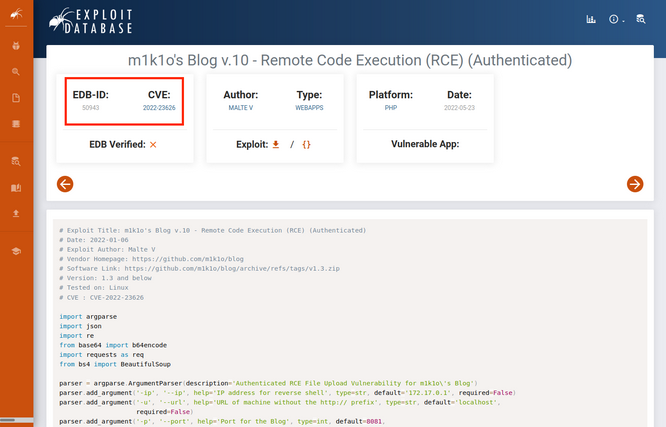
Each exploit has a unique ID, known as the EBD-ID, which is also placed at the end of the URL of the respective exploit’s page. The associated CVE that the exploit impacts is also listed.
Exploit Database updates are announced through Twitter and RSS feeds.
Packet Storm
… is an information security website that provides up-to-date information on security news, exploits, and tools for educational and testing purposes.
Packet Storm also posts updates to Twitter and hosts an RSS feed.
GitHub
… is an online code hosting platform for version control and collaboration. This allows anyone to create and share code, including exploits.
Due to its open nature, using exploits from GitHub presents a large security riks and caution is advised. Unlike the previous two, GitHub repos can be created by anyone and distributed without oversight.
This is not to say all GitHub repos are malicious, but they all must be treated with caution. A benefit from using GitHub as an exploit resource is the speed at which exploits can be made available. Members of the security community can create PoC code and share it almost as quickly as new vulns pop up.
Google Search Operators
You can begin searching for exploits using a specific software’s version followed by the “exploit” keyword and include various search operators to narrow your search. Mastering these advanced operators can help you tailor your results to find exactly what you are searching for.
Offline Exploit Resources
Exploit Frameworks
An exploit framework is a software package that contains reliable exploits for easy execution against a target. These frameworks have a standardized format for configuring an exploit and allow both online and offline access to the exploits.
Metasploit is an excellent framework built to assist in the development and execution of exploits. This framework has a free community edition and a paid pro version.
Core Impact is another exploit framework owned by HelpSystems and there are no free versions for this framework. This framework can automate testing, link to vulnerability scanners, complete phishing campaigns, and re-test exploited systems to verify remediation was completed after a pentest.
The Browser Exploitation Framework (BeEF) is a pentesting tool focused on client-side attacks executed within a web browser.
SearchSploit
The Exploit Database provides a downloadable archived copy of all the hosted exploit code. This archive is included by default in Kali in the exploitdb package. It is recommended updating the package before any assessment to ensure the latest exploits are installed.
kali@kali:~$ sudo apt update && sudo apt install exploitdb
[sudo] password for kali:
...
The following packages will be upgraded:
  exploitdb
...
Setting up exploitdb (20220526-0kali1) ...
...
The above command updates the local copy of the Exploit Database archive under /usr/share/exploitdb/. This directory is split into two major sections, exploits and shellcodes. The /usr/share/exploitdb/ directory contains CSV files for each of the exploits and shellcodes directories. Each CSV file contains the file information of all files with their respective subdirectories. These CSV files contain similar information to the Exploit DB website, such as the EBD-ID, title, author, platform, and other information.
kali@kali:~$ ls -1 /usr/share/exploitdb/
exploits
files_exploits.csv
files_shellcodes.csv
shellcodes
When you redirect to the exploits directory, you’ll find many sub-directories containing all of the exploits. These sub-directories are separated based on OS, architecture, scripting language, etc.
kali@kali:~$ ls -1 /usr/share/exploitdb/exploits
aix
alpha
android
arm
ashx
asp
aspx
atheos
beos
bsd
bsd_x86
cfm
cgi
freebsd
freebsd_x86
...
Manually searching the Exploit Database is by no means ideal, especially given the large quantity of exploits in the archive.
You can run searchsploit from the command line without any parameters to display its usage:
kali@kali:~$ searchsploit
  Usage: searchsploit [options] term1 [term2] ... [termN]
...
As the built-in examples reveal, searchsploit allows you to search through the entire archive and display results based on various search options provided as arguments.
==========
 Examples
==========
  searchsploit afd windows local
  searchsploit -t oracle windows
  searchsploit -p 39446
  searchsploit linux kernel 3.2 --exclude="(PoC)|/dos/"
  searchsploit -s Apache Struts 2.0.0
  searchsploit linux reverse password
  searchsploit -j 55555 | json_pp

  For more examples, see the manual: https://www.exploit-db.com/searchsploit
The options allow you to narrow your search, change the output format, update the exploitdb package, and more.
=========
 Options
=========
## Search Terms <section_code=221f056cc24844cf943822cb2fc89cec> <content_code=b7f8e74c0f4b48652e549d6d3b020081>
   -c, --case     [Term]      Perform a case-sensitive search (Default is inSEnsITiVe)
   -e, --exact    [Term]      Perform an EXACT & order match on exploit title (Default is an AND match on each term) [Implies "-t"]
                                e.g. "WordPress 4.1" would not be detect "WordPress Core 4.1")
   -s, --strict               Perform a strict search, so input values must exist, disabling fuzzy search for version range
                                e.g. "1.1" would not be detected in "1.0 < 1.3")
   -t, --title    [Term]      Search JUST the exploit title (Default is title AND the file's path)
       --exclude="term"       Remove values from results. By using "|" to separate, you can chain multiple values
                                e.g. --exclude="term1|term2|term3"

## Output <section_code=5a8d2644feb228b6b6cdf2fd61370668> <content_code=08d734ebc4e0d5d52b55419f661342c8>
   -j, --json     [Term]      Show result in JSON format
   -o, --overflow [Term]      Exploit titles are allowed to overflow their columns
   -p, --path     [EDB-ID]    Show the full path to an exploit (and also copies the path to the clipboard if possible)
   -v, --verbose              Display more information in output
   -w, --www      [Term]      Show URLs to Exploit-DB.com rather than the local path
       --id                   Display the EDB-ID value rather than local path
       --colour               Disable colour highlighting in search results
...
Finally, the “Notes” section of the help menu reveals some useful search tips.
=======
 Notes
=======
 * You can use any number of search terms
 * By default, search terms are not case-sensitive, ordering is irrelevant, and will search between version ranges
   * Use '-c' if you wish to reduce results by case-sensitive searching
   * And/Or '-e' if you wish to filter results by using an exact match
   * And/Or '-s' if you wish to look for an exact version match
 * Use '-t' to exclude the file's path to filter the search results
   * Remove false positives (especially when searching using numbers - i.e. versions)
 * When using '--nmap', adding '-v' (verbose), it will search for even more combinations
 * When updating or displaying help, search terms will be ignored
For example, you can search for all available remote exploits that target the SMB service on the Windows OS with the following syntax:
kali@kali:~$ searchsploit remote smb microsoft windows
---------------------------------------------------------------------------------------------------------------------------- ---------------------------------
 Exploit Title                                                                                                              |  Path
---------------------------------------------------------------------------------------------------------------------------- ---------------------------------
Microsoft DNS RPC Service - 'extractQuotedChar()' Remote Overflow 'SMB' (MS07-029) (Metasploit)                             | windows/remote/16366.rb
Microsoft Windows - 'EternalRomance'/'EternalSynergy'/'EternalChampion' SMB Remote Code Execution (Metasploit) (MS17-010)   | windows/remote/43970.rb
Microsoft Windows - 'SMBGhost' Remote Code Execution                                                                        | windows/remote/48537.py
Microsoft Windows - 'srv2.sys' SMB Code Execution (Python) (MS09-050)                                                       | windows/remote/40280.py
Microsoft Windows - 'srv2.sys' SMB Negotiate ProcessID Function Table Dereference (MS09-050)                                | windows/remote/14674.txt
Microsoft Windows - 'srv2.sys' SMB Negotiate ProcessID Function Table Dereference (MS09-050) (Metasploit)                   | windows/remote/16363.rb
Microsoft Windows - SMB Relay Code Execution (MS08-068) (Metasploit)                                                        | windows/remote/16360.rb
Microsoft Windows - SMB Remote Code Execution Scanner (MS17-010) (Metasploit)                                               | windows/dos/41891.rb
Microsoft Windows - SmbRelay3 NTLM Replay (MS08-068)                                                                        | windows/remote/7125.txt
Microsoft Windows 2000/XP - SMB Authentication Remote Overflow                                                              | windows/remote/20.txt
Microsoft Windows 2003 SP2 - 'ERRATICGOPHER' SMB Remote Code Execution                                                      | windows/remote/41929.py
Microsoft Windows 2003 SP2 - 'RRAS' SMB Remote Code Execution                                                               | windows/remote/44616.py
Microsoft Windows 7/2008 R2 - 'EternalBlue' SMB Remote Code Execution (MS17-010)                                            | windows/remote/42031.py
Microsoft Windows 7/8.1/2008 R2/2012 R2/2016 R2 - 'EternalBlue' SMB Remote Code Execution (MS17-010)                        | windows/remote/42315.py
Microsoft Windows 8/8.1/2012 R2 (x64) - 'EternalBlue' SMB Remote Code Execution (MS17-010)                                  | windows_x86-64/remote/42030.py
Microsoft Windows 95/Windows for Workgroups - 'smbclient' Directory Traversal                                               | windows/remote/20371.txt
Microsoft Windows NT 4.0 SP5 / Terminal Server 4.0 - 'Pass the Hash' with Modified SMB Client                               | windows/remote/19197.txt
Microsoft Windows Server 2008 R2 (x64) - 'SrvOs2FeaToNt' SMB Remote Code Execution (MS17-010)                               | windows_x86-64/remote/41987.py
Microsoft Windows Vista/7 - SMB2.0 Negotiate Protocol Request Remote Blue Screen of Death (MS07-063)                        | windows/dos/9594.txt
---------------------------------------------------------------------------------------------------------------------------- ---------------------------------
Shellcodes: No Results
Papers: No Results
You can copy an exploit into your current working directory using the -m option if you need to modify it. An advantage of copying the exploit into the current working directory is that it will be easier to organize the exploits used in an engagement and correlate them to systems being tested.
Copy the exploits with the -m option. You can do this with either the path or the EBD-ID of those exploits, which can be found in their path names.
kali@kali:~$ searchsploit -m windows/remote/48537.py

  Exploit: Microsoft Windows - 'SMBGhost' Remote Code Execution
      URL: https://www.exploit-db.com/exploits/48537
     Path: /usr/share/exploitdb/exploits/windows/remote/48537.py
File Type: Python script, ASCII text executable, with very long lines (343)

Copied to: /home/kali/48537.py

kali@kali:~$ searchsploit -m 42031
  Exploit: Microsoft Windows 7/2008 R2 - 'EternalBlue' SMB Remote Code Execution (MS17-010)
      URL: https://www.exploit-db.com/exploits/42031
     Path: /usr/share/exploitdb/exploits/windows/remote/42031.py
File Type: Python script, ASCII text executable

Copied to: /home/kali/42031.py
Nmap NSE Scripts
One very powerful tool of nmap is the Nmap Scripting Engine, which introduces the ability to automate various tasks using scripts.
A complete list of scripts provided by the NSE can be found under /usr/share/nmap/scripts. Using grep to quickly search for the word “exploits” in the NSE scripts returns several results.
kali@kali:~$ grep Exploits /usr/share/nmap/scripts/*.nse
/usr/share/nmap/scripts/clamav-exec.nse:Exploits ClamAV servers vulnerable to unauthenticated clamav comand execution.
/usr/share/nmap/scripts/http-awstatstotals-exec.nse:Exploits a remote code execution vulnerability in Awstats Totals 1.0 up to 1.14
/usr/share/nmap/scripts/http-axis2-dir-traversal.nse:Exploits a directory traversal vulnerability in Apache Axis2 version 1.4.1 by
/usr/share/nmap/scripts/http-fileupload-exploiter.nse:Exploits insecure file upload forms in web applications
/usr/share/nmap/scripts/http-litespeed-sourcecode-download.nse:Exploits a null-byte poisoning vulnerability in Litespeed Web Servers 4.0.x
...
You can display the information of specific NSE scripts by running nmap with the --script-help option followed by the script filename.
kali@kali:~$ nmap --script-help=clamav-exec.nse
Starting Nmap 7.92 ( https://nmap.org ) at 2022-06-02 16:23 EDT

clamav-exec
Categories: exploit vuln
https://nmap.org/nsedoc/scripts/clamav-exec.html
  Exploits ClamAV servers vulnerable to unauthenticated clamav comand execution.

  ClamAV server 0.99.2, and possibly other previous versions, allow the execution
  of dangerous service commands without authentication. Specifically, the command 'SCAN'
  may be used to list system files and the command 'SHUTDOWN' shut downs the
  service. This vulnerability was discovered by Alejandro Hernandez (nitr0us).

  This script without arguments test the availability of the command 'SCAN'.

  Reference:
  * https://twitter.com/nitr0usmx/status/740673507684679680
  * https://bugzilla.clamav.net/show_bug.cgi?id=11585